552 USB-C Hub (9-in-1)
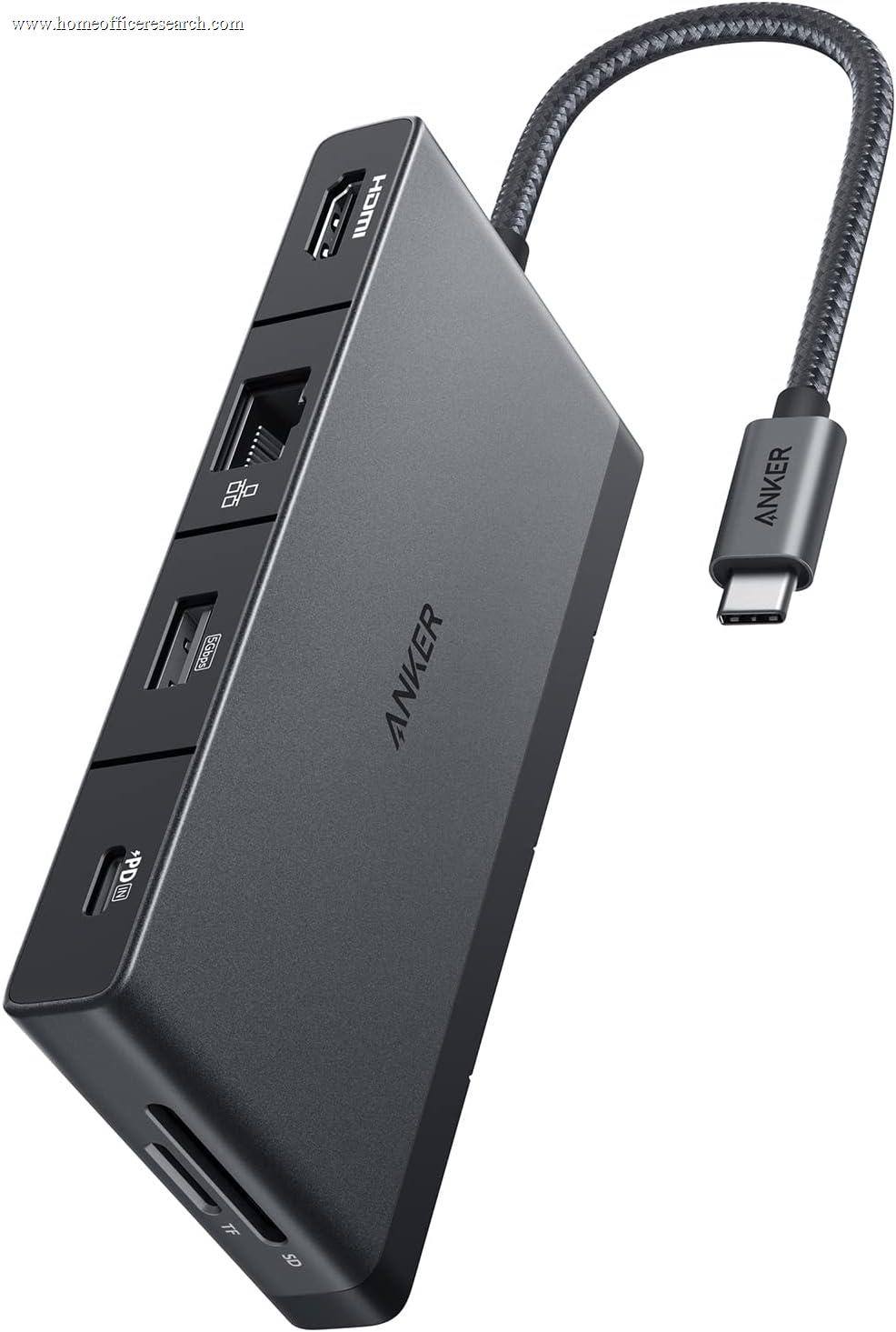
The Anker 552 is a compact, bus-friendly USB-C hub that handles the basics — charging, ethernet, card reading, a handful of peripherals — at a budget price with Anker’s reliable build quality behind it. Its defining limitation is the display output: a single HDMI port capped at 4K@30Hz, which is below the 4K@60Hz standard every other display-equipped hub in our guide achieves. At 30Hz, 4K content is usable for static work but noticeably choppy during scrolling, video, and any motion-heavy task. For buyers who use their laptop display as primary and only occasionally mirror to an external screen, this constraint is manageable. For anyone who plans to use the external monitor as their primary workspace, 4K@30Hz is a meaningful quality-of-life penalty that makes the Anker 565 or CalDigit SOHO Dock worth the additional cost.
How We Scored It
Category Deep-Dives
Connectivity & Bandwidth
5.5 / 10 30% weightingThe Anker 552 connects to the host via USB-C using Alt Mode signaling — the same connection protocol as the CalDigit SOHO Dock and Anker 565 above it in our rankings. Total available bandwidth from the host is limited by the USB-C connection: 10Gbps maximum, shared across all connected devices including the display output. In practice, with a single 4K@30Hz display active, the display signal consumes less bandwidth than a dual 4K@60Hz configuration would, leaving more headroom for USB data transfers and ethernet — a small silver lining of the lower display refresh rate. Running the 552 as a pure docking hub (ethernet, keyboard, mouse, card reader) without display output lets the full 10Gbps serve data peripherals.
The 552 supports only a single display output — there is no second HDMI or DisplayPort. Buyers who need dual-display output will need to step up to the Anker 565 or CalDigit SOHO Dock, both of which offer two 4K outputs at full 60Hz. The single-display limitation is not a bandwidth problem per se; it reflects the 552’s position in Anker’s product line as an entry-level hub targeting users who need basic connectivity expansion rather than a full docking station replacement.
The 552’s connectivity score reflects both the USB-C Alt Mode bandwidth ceiling and the single-display constraint. Among USB-C hubs in our guide, this places it below the SOHO Dock and Anker 565 — which both offer dual 4K@60Hz — and well below the Thunderbolt docks that eliminate bandwidth sharing entirely.
Bottom line on connectivity and bandwidth: USB-C Alt Mode with a 10Gbps ceiling and a single display output. The lower 4K@30Hz display resolution creates more bandwidth headroom for USB peripherals than dual-4K competitors, but this is incidental rather than advantageous. Single-display limitation is the primary structural constraint. The 5.5 score reflects a functional but narrow connectivity package — adequate for basic hub use, limiting for anyone who needs more than one external monitor.
Display Capability
4.0 / 10 25% weightingThe Anker 552’s HDMI output is limited to 4K resolution at 30Hz maximum. This is the most significant weakness in the 552’s scorecard and the primary reason it ranks at #13 in our guide. Every other display-equipped hub in our guide supports 4K@60Hz — double the frame rate of the 552’s maximum. The practical difference between 4K@30Hz and 4K@60Hz is not subtle: at 30Hz, on-screen motion — scrolling a web page, dragging windows, playing video, moving the cursor at speed — produces visible stutter. The display responds to inputs at half the rate of a 60Hz panel, creating a perceptible lag between user action and screen update. For extended work sessions at a 4K external monitor, this stutter becomes fatiguing in a way that does not occur at 60Hz.
The 4K@30Hz ceiling is not a monitor limitation — it is a hub limitation. The same 4K@60Hz-capable monitor will display at 30Hz when connected through the Anker 552 and at 60Hz when connected through the Anker 565, CalDigit SOHO, or any Thunderbolt dock. Users who have experienced 4K@60Hz and then connect through a 30Hz-limited hub reliably report noticing the difference immediately. Users who have never used 4K@60Hz may not have a reference point for comparison, but will still be operating below the panel’s designed performance.
The 552 supports only a single display connection — there is no secondary output. Connecting a second monitor requires either a USB-C to HDMI adapter directly from the host laptop (bypassing the hub for the second display) or purchasing a different hub. This is not an unusual constraint for budget USB-C hubs, but it means the 552 is not a viable solution for any dual-display workflow.
Bottom line on display capability: Single display, capped at 4K@30Hz. The 30Hz limit is the 552’s most consequential shortcoming — it affects daily visual comfort for anyone using an external monitor as a primary workspace. The 4.0 score reflects output that functions but falls measurably short of the 4K@60Hz standard delivered by every other display-equipped hub in our guide. Buyers who plan to use an external monitor as their primary display should budget for the Anker 565 or CalDigit SOHO Dock instead.
Power Delivery
8.0 / 10 20% weightingThe Anker 552’s 85W USB Power Delivery is the hub’s strongest specification and matches the CalDigit SOHO Dock’s leading PD rating in the USB-C Alt Mode category. For a hub at this price point, 85W is genuinely generous — competing hubs frequently offer 60–65W, which can result in the laptop battery slowly depleting during demanding workloads even while connected to the hub. At 85W, the 552 covers the MacBook Pro 14″’s charging requirements and meets the rated charging wattage for most Windows ultrabooks and thin-and-light laptops without throttling.
The strong PD rating is particularly relevant given the 552’s bus-powered design. Unlike the CalDigit SOHO Dock, which uses an external AC adapter to power its peripheral ports independently of the PD delivery, the 552 derives its power from the USB-C host connection. In practice, this means the hub draws power from the host laptop’s USB-C port — the same port delivering 85W for charging. Anker manages this through power budgeting that prioritizes laptop charging at rated wattage while allocating remaining bus power to peripheral ports. For light peripheral loads (keyboard, mouse, card reader), this approach works without issue. Users connecting power-hungry USB peripherals should be aware that bus-powered peripheral operation has a ceiling that externally powered docks do not share.
The 8.0 score for power delivery reflects the 85W PD rating as a genuine category strength — particularly for a bus-powered hub, which must deliver this charging wattage from the host connection rather than from a dedicated power adapter.
Bottom line on power delivery: 85W is at the top of the USB-C Alt Mode category in our guide and correctly charges the MacBook Pro 14″ and most professional Windows laptops at full speed. The bus-powered design means peripheral power is shared from the same connection, which works well for standard peripherals and has known limits for power-hungry USB devices. The 8.0 score is the 552’s best category result and its most compelling specification relative to price.
Port Mix
5.5 / 10 15% weightingThe Anker 552 provides nine ports total: two USB-A 3.0 ports (5Gbps), one USB-C data port (5Gbps), one HDMI output (4K@30Hz), one SD card reader, one microSD card reader, one Gigabit Ethernet port, the host USB-C connection, and the PD passthrough. The port count of nine is labeled in the product name, and the composition covers the core needs of a basic travel or desk setup — ethernet, card reading, and enough USB ports for a keyboard and mouse.
The two USB-A ports is the lowest count of any hub in our guide. A standard home office USB-A peripheral set typically includes a keyboard, a mouse, and at least one additional device (USB headset, webcam, phone charger, USB storage). The 552’s two USB-A ports cover two of these; a third requires either using the USB-C data port with an adapter or leaving a peripheral disconnected. For a minimalist setup — wireless peripherals that share a single USB receiver, plus one USB device — two ports is manageable. For a typical multi-peripheral desk, it is a friction point that a three- or four-port hub would not present.
The dual card reader (SD + microSD, separate slots) is a genuine positive — the same useful feature present on the CalDigit SOHO Dock, enabling simultaneous access to both card formats without swapping. Gigabit Ethernet rounds out the core connectivity with reliable wired network access. The 552 does not include an audio jack, which means users with wired headsets or desktop speakers must rely on the laptop’s built-in jack or a separate adapter. For many users this is not a daily issue, but it is an omission that the SOHO Dock and Anker 565 do not share.
Bottom line on port mix: Nine ports cover the essentials — ethernet, dual card readers, charging — with only two USB-A ports and no audio jack. The two-port USB-A count is the narrowest in the guide and creates friction for users with three or more USB-A peripherals. The dual card reader is a welcome feature at this price tier. The 5.5 score reflects a port mix that is functional for minimalist setups and constrained for more demanding configurations.
Value
7.5 / 10 7% weightingThe Anker 552 is typically priced among the most affordable hubs in our guide. At this price, the combination of 85W power delivery, Gigabit Ethernet, dual card readers, and Anker’s warranty coverage represents solid value for the dollar. Competing hubs at similar prices frequently omit ethernet, deliver lower PD wattage (60W or less), or lack card readers entirely. The 552 includes all three as standard, which makes it competitively specified for its price tier.
The value score accounts for the display limitation honestly: buyers who purchase the 552 primarily for ethernet, charging, and card reading — and who either use their laptop display or only occasionally mirror content to an external screen — will find the 552’s value proposition strong. The 85W PD and ethernet alone, at this price, justify the purchase for laptop users who need a travel-friendly wired network connection and full-speed charging from a single USB-C cable. Buyers who want to use an external 4K monitor as their primary daily display should pay the modest difference to step up to the Anker 565 — the 4K@60Hz improvement is worth the cost if the external display is a daily driver.
Bottom line on value: Strong value for buyers who need ethernet, 85W charging, and dual card readers at a budget price. The display limitation does not reduce value for buyers who don’t need an external display or who use it only occasionally. For primary-display users, the additional cost of the Anker 565 represents a better long-term value. The 7.5 score reflects genuine price competitiveness against the right use case.
Build Quality
7.5 / 10 3% weightingThe Anker 552 is built with a plastic housing in a compact rectangular form factor — consistent with Anker’s product design across its hub lineup. The plastic build is lighter and less premium than the CalDigit SOHO’s aluminum, but Anker’s manufacturing quality control is consistently above average for the category, and owner reports of physical defects or port degradation are uncommon. The hub runs warm under sustained load (particularly with 85W PD active and ethernet in use simultaneously) but does not accumulate heat to a problematic degree in a desktop environment. The plastic housing is less effective at passive heat dissipation than aluminum, but the 552’s thermal load is lower than higher-port-count competitors, which partially compensates.
Anker’s 18-month warranty on the 552 is standard for the brand and the category. The company’s support infrastructure and replacement process are well-reviewed — Anker has built a strong reputation for responding to warranty claims without excessive friction. The build quality score of 7.5 reflects a product that is solidly constructed for its price, not premium in materials but reliable in performance over time. It is meaningfully better built than generic no-name hubs at the same price, and slightly below the build quality level of CalDigit products at a higher price point.
Bottom line on build quality: Solid plastic construction with Anker’s characteristically above-average quality control and customer support. Not premium, but reliable. The 7.5 score positions the 552 correctly: better built than generic alternatives at the price, a notch below the aluminum-housing docks that cost more. For a hub in daily use at a fixed desk, the build is durable enough for multi-year service.
About the Manufacturer
ER
Anker is a consumer electronics brand based in Shenzhen, China, with significant US operations, that has become one of the most widely recognized names in USB-C charging and connectivity accessories. Founded in 2011, the company built its reputation on USB charging products and expanded into hubs, cables, power banks, and audio. In the docking station and hub category, Anker competes across multiple price tiers — the 552 at the budget end, the 565 in the mid-range, and the 778 Thunderbolt 4 dock at the premium tier.
Anker’s value proposition is consistent across its lineup: reliable hardware at competitive prices, backed by customer support that responds to warranty claims without excessive friction. The brand does not compete on premium materials or cutting-edge connectivity — it competes on price-to-reliability, which it delivers at the 552’s price point. Users who need a hub that works consistently without paying for features they won’t use will find the 552 representative of Anker’s core strength. Users who need the full feature set of a premium dock should look at Anker’s 778 Thunderbolt 4 or CalDigit’s lineup instead.