565 USB-C Hub (11-in-1)
The Anker 565 makes a clear, honest case: dual 4K displays, a broad port mix, and 85W laptop charging from a compact USB-C hub without a Thunderbolt tax. For home office users whose laptops support USB-C Alt Mode and who don’t need Ethernet or Thunderbolt-specific bandwidth, it delivers the practical essentials of a docking station at a fraction of the cost — with Anker’s established build quality and after-sales track record behind it.
How We Scored It
Category Deep-Dives
Connectivity & Bandwidth
6.0 / 10 30% weightingThe Anker 565’s connectivity score reflects a structural constraint that no amount of design optimization can resolve: USB-C Alt Mode operates on a single USB-C connection with a shared total bandwidth pool, unlike the 40Gbps dedicated tunnels of Thunderbolt 4. When the 565 is running two 4K displays simultaneously via its HDMI outputs, that video bandwidth is drawn from the same USB-C link that also carries data signals to your USB peripherals. In practice, users running two 4K displays at 60Hz will see data throughput to USB devices reduced during heavy display activity — though for typical home office peripheral sets (keyboard, mouse, webcam, audio interface), the practical impact is often not noticeable.
What this means concretely: you cannot connect a Thunderbolt NAS, a Thunderbolt RAID array, or any device that requires the full Thunderbolt protocol to the Anker 565 — these are physically incompatible. Additionally, USB-C Alt Mode does not support daisy-chaining additional Thunderbolt devices. The 565 is a hub endpoint, not a hub root. Users whose workflow includes Thunderbolt peripherals should look at the Anker 778 (#6) or the CalDigit TS4 (#2) for Thunderbolt-capable docking.
Within the USB-C Alt Mode tier, the 565’s data port allocation is competitive. The USB-C 10Gbps data port and mix of USB-A ports cover standard peripheral connectivity without notable bottlenecks for non-video workloads. There is no Ethernet port — a meaningful gap for users on wired networks, which is worth naming explicitly. If Ethernet is a requirement, the 565 is not the right choice regardless of other strengths.
Bottom line on connectivity: USB-C Alt Mode is a real bandwidth constraint versus Thunderbolt 4, scored accordingly. No Ethernet. Fully functional for users with standard peripheral sets whose laptops don’t require Thunderbolt-specific features.
Display Capability
7.0 / 10 25% weightingThe 565 supports two simultaneous 4K displays at 60Hz via its dual HDMI 2.0 outputs — a practical display configuration that covers the majority of home office dual-monitor setups. For users running two 1440p or 1080p displays, the hub has meaningful headroom above the actual resolution requirements. The 4K@60Hz ceiling on each port is sufficient for any current home office display including the monitors ranked in our guide.
The display constraint relative to Thunderbolt 4 docks is not resolution or refresh rate at these specs — it is flexibility. A Thunderbolt dock using DisplayPort 1.4 can drive displays in more configurations: higher refresh rates, DisplayPort daisy chains, or specific monitor combinations that HDMI 2.0 does not support (such as ultrawide resolutions above HDMI 2.0’s bandwidth ceiling or certain variable refresh rate configurations that require DisplayPort). The 565’s two fixed HDMI outputs are well-suited to its target user — someone running two standard flat-panel monitors — but cannot match the flexibility of DisplayPort outputs for unconventional setups.
It is worth noting explicitly that certain laptop combinations impose display limitations regardless of the hub’s rated output. Apple Silicon Macs with M1 or M2 chips natively support only a single external display when connected via USB-C Alt Mode; adding a second display requires software like DisplayLink or a specific Apple Silicon configuration. The Anker 565 does not circumvent this hardware limitation. MacBook users who need dual monitors should verify their specific chip generation supports dual display via USB-C Alt Mode before purchasing.
Bottom line on display capability: Dual 4K@60Hz via HDMI 2.0 covers the mainstream dual-monitor home office setup. No DisplayPort outputs limits flexibility for unconventional configurations. M1/M2 Mac users should verify compatibility before purchase.
Power Delivery
7.5 / 10 20% weightingThe 565 provides 85W of USB-C Power Delivery to the connected laptop — sufficient to charge most ultrabooks and thin-and-light laptops at or near their rated charge rate. MacBook Air (both Intel and Apple Silicon variants), 13-inch MacBook Pro, and the majority of Windows ultrabooks draw 65W or below at full charge, making 85W a comfortable margin. Dell XPS 13 and similar thin Windows laptops are well covered.
The practical edge case is high-performance laptops under sustained CPU and GPU load: a 16-inch MacBook Pro at peak load draws up to 140W, and a gaming-class Windows laptop may draw 100W or more. At 85W, the hub will charge these laptops while idle or during light tasks but will not sustain full charge under sustained heavy computational work — the battery will drain slowly rather than charge. For users with performance laptops who frequently run demanding workloads, the 85W ceiling is a real limitation. For users with standard ultrabooks, it is not.
The 7.5 score reflects genuinely useful power delivery that covers the mainstream laptop population without reaching the 98W sustained output of the CalDigit TS4 or the 96W+ levels of premium Thunderbolt docks. At the 565’s price tier, 85W is a competitive specification — alternative USB-C hubs at similar price points frequently offer 65W or less.
Bottom line on power delivery: 85W covers ultrabooks and standard laptops comfortably. High-performance laptops (16-inch MacBook Pro, gaming laptops) will charge at reduced rate under heavy load. Competitive specification for a hub at this tier.
Port Mix & Usability
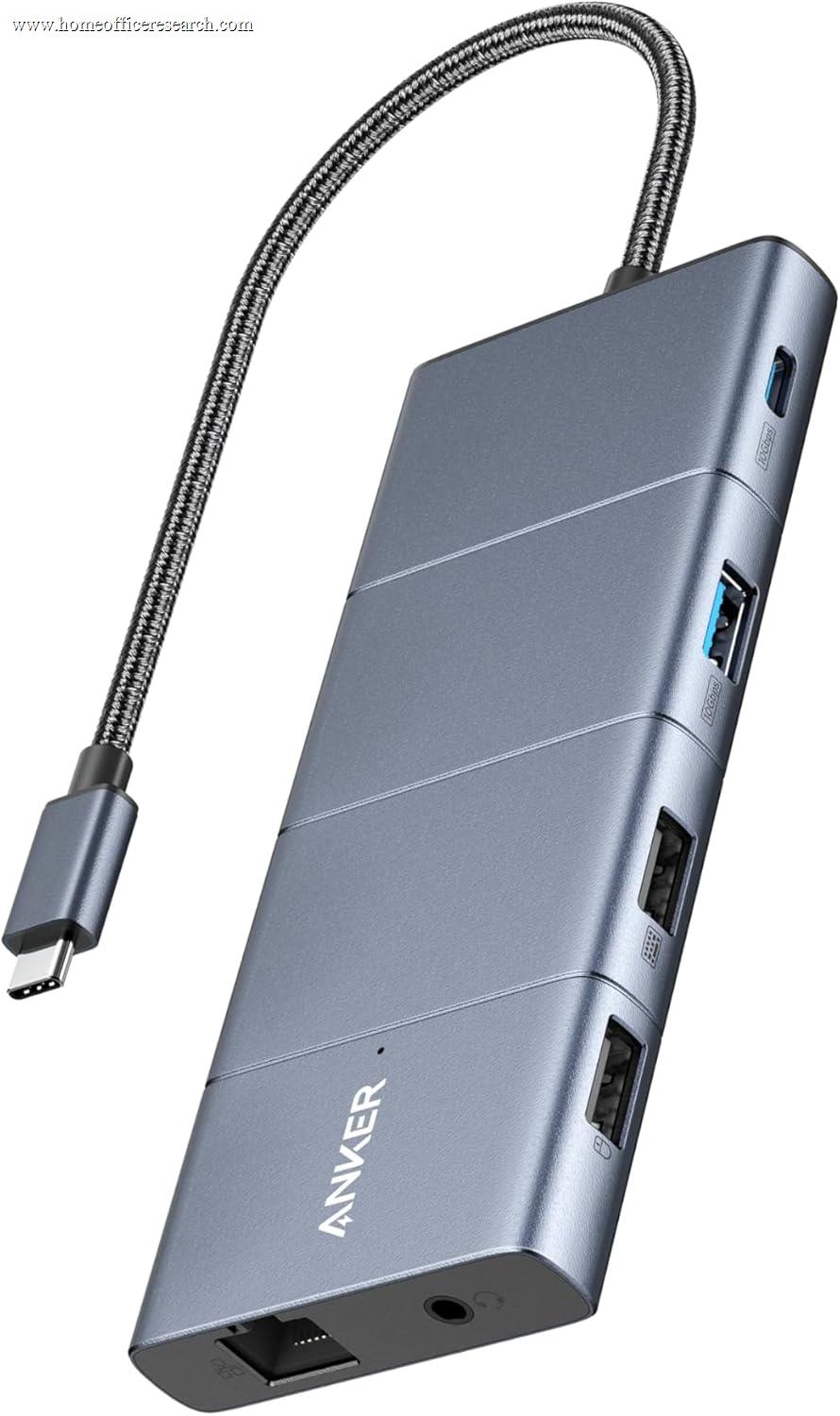
8.0 / 10 15% weightingPort mix is where the 565 earns its strongest category score. The 11-port layout covers the practical peripheral needs of a standard home office without requiring additional adapters: two HDMI display outputs, a USB-C data port, multiple USB-A ports for keyboard, mouse, and accessories, SD and microSD card slots for photographers and content creators, and a 3.5mm audio jack for headsets. The SD and microSD slots both support UHS-I — adequate for modern cards in home office use, though not the UHS-II speeds found in premium docks designed for professional photo or video workflows.
The combination of SD reader and audio jack in a compact hub is genuinely useful — these are the two ports most commonly absent from budget hubs that hit a similar price point with fewer total connections. Having both in a single cable-managed unit simplifies desk setups where a laptop’s native ports are limited or physically awkward to access (a common scenario with sealed MacBook designs or thin Windows laptops positioned in stands or arms).
The compact desktop form factor is suited to both fixed desktop setups and mobile use. The hub is light and small enough to travel with a laptop, providing a consistent peripheral environment across home office and other working locations without the footprint penalty of a full-size Thunderbolt dock. For users who regularly work from multiple locations, this portability is a practical differentiator.
Bottom line on port mix: 11 ports covering dual display, full USB hub, dual card readers, and audio in a compact form is the 565’s clearest competitive advantage. SD and audio inclusion at this price tier is above par for USB-C hubs.
Value
9.0 / 10 7% weightingValue is the Anker 565’s highest-scoring category, and it reflects a genuine market position: no other docking station in our guide delivers dual 4K display support with 85W charging and a broad port mix at this price point. The step from the 565 to the next tier — Thunderbolt 4 docks starting with the CalDigit Element Hub (#6) and Anker 778 (#5) — represents both a meaningful capability upgrade and a significant price increase. For users whose requirements are met by USB-C Alt Mode and who have no Thunderbolt-specific needs, paying for a Thunderbolt dock is paying for specifications they will not use.
The 9.0 value score reflects the quality-to-price ratio within the 565’s target use case. Anker’s build quality at this price tier consistently exceeds what lesser-known brands deliver — the hub does not feel cheap, the ports are tight and correctly rated, and Anker’s warranty and customer support infrastructure provides meaningful after-sales confidence. Users who have had negative experiences with no-name USB-C hubs that throttle bandwidth, misrepresent port speeds, or fail early will find the Anker 565 a substantial step up in reliability.
Bottom line on value: Best value in our guide for users whose workflows don’t require Thunderbolt. The 565 represents the practical ceiling of USB-C Alt Mode capability at the lowest price point in our docking station category.
Build & Design
7.5 / 10 3% weightingThe Anker 565 uses a compact rectangular housing with a matte finish that is clearly above the commodity USB-C hub baseline in material quality. Port tolerances are tight — connections seat correctly without wobble — and the housing shows no flex under normal handling. The integrated cable eliminates a common failure point in hubs that use a detachable host cable, though it also means the cable cannot be replaced if it sustains damage.
The layout places display outputs and the host connection on one face, with USB-A ports and card readers distributed across the remaining sides. This arrangement works well for desktop setups but can require cable management attention when multiple devices are connected simultaneously. The lack of a cable management channel or attachment loop is the most notable ergonomic omission relative to full-size docking stations with dedicated cable routing.
The 7.5 score reflects build quality that is competitive at this price tier and appropriate for the hub’s compact positioning, without the premium finish materials (aluminum housing, status LED array, ventilation design) found in Thunderbolt docks that cost two to three times as much. Anker’s reputation in this space is well-founded — the 565 is a consistent, well-manufactured product at its price point.
Bottom line on build: Solid construction above the commodity USB-C hub baseline. Integrated cable is a durability trade-off. Compact form factor suits both desk and travel use.
About the Manufacturer
ER
Anker Innovations was founded in 2011 by Steven Yang, a former Google engineer, and has grown into one of the most recognized consumer electronics brands in the charging and connectivity category. The company’s core competency is delivering reliable power and connectivity products at price points significantly below premium alternatives — a positioning that has earned Anker a large and loyal user base and consistent high ratings in the categories it competes in.
Anker’s approach to the USB-C hub market follows the same pattern as its charger and cable lines: aggressive pricing, above-average build quality for the tier, and warranty and customer support infrastructure that distinguishes it from lesser-known competitors. The 565 is part of Anker’s mid-range hub lineup, positioned above the company’s entry-level single-display hubs and below its PowerExpand and premium Thunderbolt offerings.
The 18-month warranty on the 565 is standard for Anker’s hub lineup and is backed by Anker’s US-based customer support operation. Anker has a documented history of responsive warranty handling, and its replacement and refund processes are meaningfully more reliable than the customer service infrastructure of off-brand USB-C hub manufacturers. For a product in a category where quality variance between brands is high, Anker’s after-sales track record is a practical purchase consideration.