TS3 Plus Thunderbolt 3 Dock
The CalDigit TS3 Plus was the definitive Thunderbolt 3 dock recommendation when it launched in 2018, and it remains a capable performer for users whose laptops have Thunderbolt 3 but not TB4. Eighty-seven watts of host charging, dedicated DisplayPort 1.2 and HDMI 2.0 outputs enabling true dual 4K, and CalDigit’s characteristically solid build quality make it the standout option in the legacy TB3 category. In 2025, however, it competes at a price point where newer Thunderbolt 4 docks deliver meaningfully better USB speeds, 2.5GbE, and forward compatibility — which limits its overall score to 6.8 out of 10.
How We Scored It
Category Deep-Dives
Connectivity & Bandwidth
6.0 / 10 30% weightingThe TS3 Plus connects via a single Thunderbolt 3 cable, providing 40Gbps of total bandwidth shared across all connected devices, display outputs, and the downstream TB3 port. This bandwidth budget is the central architectural constraint of the TB3 era: unlike newer Thunderbolt 4 controllers that benefit from improved allocation efficiency, the TB3 implementation must divide its 40Gbps among active displays, storage devices, and USB peripherals simultaneously. Under light loads — a single 4K display, a few USB accessories, and Ethernet — the bandwidth ceiling is effectively invisible. Under heavier configurations involving two 4K displays, active storage, and multiple USB-A devices, some users report mild throughput contention on USB-connected drives.
The five USB-A ports all operate at USB 3.1 Gen 1 (5Gbps), which was the prevailing USB standard at the TS3 Plus’s 2018 launch but now trails the 10Gbps (Gen 2) USB-A ports found on current Thunderbolt 4 docks including CalDigit’s own TS4. For everyday mouse, keyboard, and webcam use this distinction is meaningless. For users copying large files from a USB-A external drive — a UHS-I card reader or older portable SSD — the 5Gbps ceiling is a real limitation. The single USB-C data port runs at USB 3.1 Gen 2 (10Gbps), providing one higher-speed connection for modern devices.
The Gigabit Ethernet port delivers standard wired networking for users whose laptops lack a built-in port. By current dock standards, 1GbE has been superseded by 2.5GbE on the TS4 and several competitors — meaningful for users with multi-gigabit internet connections or fast NAS transfers, but negligible for users on standard 100Mbps–1Gbps plans. The downstream Thunderbolt 3 port allows daisy-chaining a TB3 device or monitor, though in practice the bandwidth available to it is shared with the host connection and other active devices.
Bottom line on connectivity: The TB3 host connection and 5Gbps USB-A ports are functional but legacy by 2025 standards. Users who need 10Gbps USB-A, 2.5GbE, or USB4/TB4 compatibility should consider a current-generation dock. For users with TB3 laptops who need a reliable full-featured connection hub, the TS3 Plus still delivers — just within the constraints of its era.
Display Capability
7.0 / 10 25% weightingThe TS3 Plus ships with dedicated DisplayPort 1.2 and HDMI 2.0 display outputs, enabling true dual-display support without adapter intermediaries or DisplayLink software. The DisplayPort 1.2 output supports single-display resolutions up to 5K@60Hz (5120×2880) or 4K@60Hz; the HDMI 2.0 output supports up to 4K@60Hz on its own. Running both outputs simultaneously, the TS3 Plus drives dual 4K@60Hz displays — the front-right-of-screen and secondary monitor configuration typical of most home office setups — with no driver overhead and no screen recording permission requirements imposed by the macOS kernel extension framework.
The architectural advantage of having hardware display outputs rather than a software adapter is real and worth emphasizing. Many USB-C Alt Mode hubs at similar price points rely on DisplayLink for multi-display output, which introduces CPU overhead (typically 10–15% on sustained video playback), requires a kernel extension installation with screen recording permissions on macOS, and can produce subtle compression artifacts on fast-moving content. The TS3 Plus avoids all of these compromises entirely: its DP1.2 and HDMI outputs drive displays natively through the Thunderbolt controller.
The display limitation worth noting is that DP1.2 caps at 4K@60Hz at 8-bit color without compression. Users who have upgraded to a 4K@144Hz gaming or productivity monitor, or who connect a 5K display at its native resolution alongside a second 4K monitor, will find the TS3 Plus’s display architecture insufficient. DP2.1 (available on newer docks) can drive 4K@240Hz or 8K@60Hz. For users with standard 4K@60Hz monitors in a dual-display configuration — by far the most common home office scenario — the TS3 Plus’s display capability remains practical and capable.
Bottom line on display capability: Dedicated DP1.2 + HDMI 2.0 outputs enable clean, driverless dual 4K@60Hz — a genuine architectural advantage over software-based alternatives. The ceiling of DP1.2 limits refresh rate and color depth headroom vs. current standards, keeping the score at 7.0 rather than higher.
Power Delivery
8.0 / 10 20% weightingThe TS3 Plus delivers 87W to the host laptop via its Thunderbolt 3 cable — a figure that was class-leading at launch and remains respectable today. The 87W host allocation covers the full charging profile for MacBook Pro 13-inch and 14-inch models and is sufficient to maintain charge on the 16-inch MacBook Pro under moderate workloads. Under sustained CPU and GPU load on a 16-inch model (which can peak at 96W+ draw), the 87W ceiling means the battery will discharge slowly rather than maintaining full charge, though users rarely sustain maximum load for extended periods. For the overwhelming majority of home office workflows — documents, browser tabs, video calls, light creative work — 87W charges all current MacBook Pro models comfortably.
The power delivery implementation is stable by design. CalDigit’s power supply architecture for the TS3 Plus prioritizes the host charging allocation before distributing power to downstream ports, meaning that connecting additional USB accessories does not silently reduce the laptop’s charging wattage in the way that some underpowered docks can. The downstream TB3 port provides 15W for device charging — useful for a phone or small peripheral — and the USB-C data port provides standard bus power. The TS3 Plus does not attempt simultaneous high-power delivery to multiple devices that would create instability.
For context, the TS4 delivers 98W sustained to the host, providing meaningful headroom for the 16-inch MacBook Pro under heavier loads. The 11W gap between TS3 Plus and TS4 is noticeable specifically on high-performance 16-inch models during encoding, rendering, or gaming — for all other use cases the difference is academic. The TS3 Plus’s 87W remains a strong result that reflects CalDigit’s commitment to practical charging performance rather than paper specifications.
Bottom line on power delivery: 87W host charging was excellent in 2018 and remains practical for all MacBook Pro sizes under typical home office loads. The 8.0 score reflects strong execution, held below 9.0 by the small but real gap versus the TS4’s 98W for demanding 16-inch users.
Port Mix & Usability
7.5 / 10 15% weightingThe TS3 Plus offers a genuinely comprehensive port selection for a dock of its era: five USB-A ports, one downstream TB3, one USB-C data port, Gigabit Ethernet, a UHS-II SD card reader, and separate 3.5mm headphone and microphone jacks. The mix was designed to serve the broadest range of home office peripherals — multiple USB-A devices (keyboard, mouse, webcam, external drive, USB receiver) can connect simultaneously without requiring a secondary hub. The SD card reader’s UHS-II support is a genuine differentiator; many docks include SD slots that only reach UHS-I speed, leaving faster UHS-II cards performing below their rated capacity. CalDigit’s UHS-II implementation serves photographers and videographers who use high-end SD cards in their cameras.
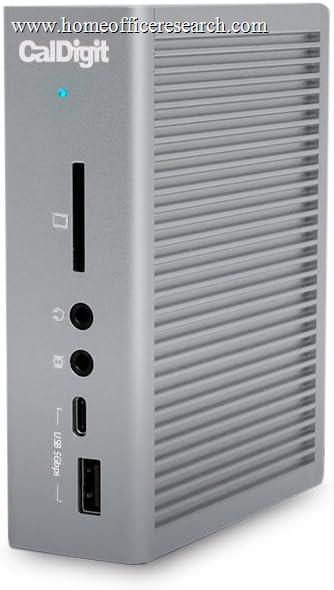
Front-panel accessibility is a practical quality-of-life feature. The TS3 Plus places a USB-A port and the downstream TB3 port on the front face, making it simple to connect USB drives, phones, and temporary peripherals without reaching behind the dock. The rear-facing arrangement of display outputs, Ethernet, and the bulk of the USB ports keeps permanent connections tidy and out of sight. The dock can be positioned vertically or horizontally, adapting to different desk configurations and cabinet placements with equal stability.
The port mix score is held below 8.0 for two reasons. First, the five USB-A ports all run at 5Gbps (Gen 1), meaning that the TS3 Plus provides more USB-A ports than many current docks but at lower individual speeds — quantity over throughput. Second, the absence of a microSD card slot means users with microSD-equipped cameras or drones will need an additional adapter. Neither issue is a dealbreaker, but both reflect the engineering decisions of the TB3 era rather than current best practices.
Bottom line on port mix: A comprehensive and well-organized port selection that covers most home office needs without additional adapters. Five USB-A ports, dedicated SD, audio jacks, and Ethernet make the TS3 Plus genuinely all-in-one for its category. USB-A Gen 1 speeds and absent microSD keep the score at 7.5 rather than higher.
Value
4.0 / 10 7% weightingValue is where the TS3 Plus faces its most significant challenge in 2025. At launch in 2018, it commanded a price premium that was justified by its class-leading feature set: no other TB3 dock offered the same combination of 87W charging, dual 4K@60Hz via dedicated outputs, comprehensive port coverage, and CalDigit’s build quality at a comparable price. That context no longer holds. The TB4 dock market has matured to the point where Thunderbolt 4 docks with 2.5GbE, 10Gbps USB-A ports, 98W host charging, and forward compatibility with USB4 hosts are available at prices that often undercut the TS3 Plus’s current retail — or come close enough to make the TS3 Plus a poor value proposition for any buyer who isn’t locked into a TB3 laptop.
The honest buyer profile for the TS3 Plus in 2025 is a user with a Thunderbolt 3 Mac or Windows laptop — typically a 2017–2019 MacBook Pro — who needs a reliable full-featured dock and is not planning to upgrade their laptop soon. For that buyer, the TS3 Plus is functional and well-built, and the CalDigit brand provides confidence in firmware support and compatibility documentation. For anyone with a TB4 or USB4 laptop, purchasing the TS3 Plus at current prices would be an active mistake — several TB4 docks in the comparison table above provide better specifications at equal or lesser cost.
CalDigit has not discontinued the TS3 Plus, but the upgrade path from TS3 Plus to TS4 is straightforward: the TS4 provides 98W host charging, 2.5GbE, 10Gbps USB-A ports, additional USB-C ports, and TB4/USB4 host compatibility at a modest price premium. For users who are considering a TS3 Plus purchase and whose laptop supports TB4 or USB4, the extra cost of the TS4 represents substantially better long-term value than a TS3 Plus at its current price.
Bottom line on value: The TS3 Plus was excellent value in 2018. In 2025, it competes against meaningfully superior TB4 alternatives at similar price points. The 4.0 score reflects the gap between current price and current competition — not a reflection of the product’s quality, but of the market that has grown up around it.
Build & Design
8.0 / 10 3% weightingThe TS3 Plus’s aluminum enclosure is solid, quiet, and compact — CalDigit’s signature combination. The dock is passively cooled with no fan, meaning no audible noise regardless of load or ambient temperature. Port cutouts are clean and precisely machined, connection to ports has the tactile quality of a well-built device, and the aluminum surface shows no flex under hand pressure. An LED status indicator on the front provides at-a-glance confirmation that the host connection is active. The dock can be positioned vertically using the included stand or laid flat without any orientation penalty — both configurations are stable and professional in appearance.
CalDigit has provided firmware updates for the TS3 Plus following launch, addressing USB hub stability refinements and macOS compatibility adjustments as Apple released new operating system versions. This ongoing support is not universal in the dock market — several competitors have shipped TB3 docks that quietly developed compatibility issues with macOS updates and were never patched. The CalDigit compatibility documentation for the TS3 Plus remains publicly available and specifically notes per-laptop behavior differences, which reflects the company’s transparency about the real-world complexity of Thunderbolt compatibility.
The design’s one widely-noted limitation is the power brick size relative to the dock itself. The TS3 Plus is compact on desk, but its external power adapter is a substantial brick that requires management behind the desk or in cable routing. This is an inherent consequence of delivering 87W passively — the power conversion components must go somewhere — and the same criticism applies to all high-wattage docks in this category. For fixed desk installations it is invisible; for users who want to travel with the dock, the power adapter is a meaningful inconvenience.
Bottom line on build and design: Solid aluminum construction, zero fan noise, and CalDigit’s track record of post-launch firmware support make the TS3 Plus a quality physical product that has aged well mechanically even as its technology generation has not. The 8.0 score reflects genuine build quality, held from a higher mark by the proportionally large power adapter.
About the Manufacturer
Digit
CalDigit was founded in 2003 in Milpitas, California, originally developing high-speed storage solutions for the media production industry. The company expanded into Thunderbolt connectivity with its Thunderbolt Station series — the TS1, TS2, and TS3 — which became reference standards for professional Mac users who needed reliable peripheral expansion. CalDigit products have been stocked in Apple retail stores as recommended accessories and are widely used in broadcast, film post-production, and creative professional environments where connection stability and thermal management under sustained load are non-negotiable requirements.
The TS3 Plus was the company’s flagship Thunderbolt 3 dock and represented the culmination of CalDigit’s TB3 product line before the Thunderbolt 4 era. Its successor, the TS4 — our #2-ranked docking station overall, offers Thunderbolt 4/USB4 host compatibility, 98W host charging, 2.5GbE, and 10Gbps USB-A ports. For users currently on the TS3 Plus considering an upgrade, the TS4 is the natural next step in the CalDigit lineup and is the product CalDigit positions as the current standard for professional Mac connectivity. CalDigit maintains firmware update support for the TS3 Plus consistent with its policy of supporting products for several years post-launch.
CalDigit products are sold through Apple retail, B&H Photo, Amazon, and CalDigit’s own website, and carry a 2-year limited warranty. The TS3 Plus requires a Thunderbolt 3 or Thunderbolt 4 port on the host laptop; USB-C Alt Mode hosts without Thunderbolt certification are not compatible.