Element Hub
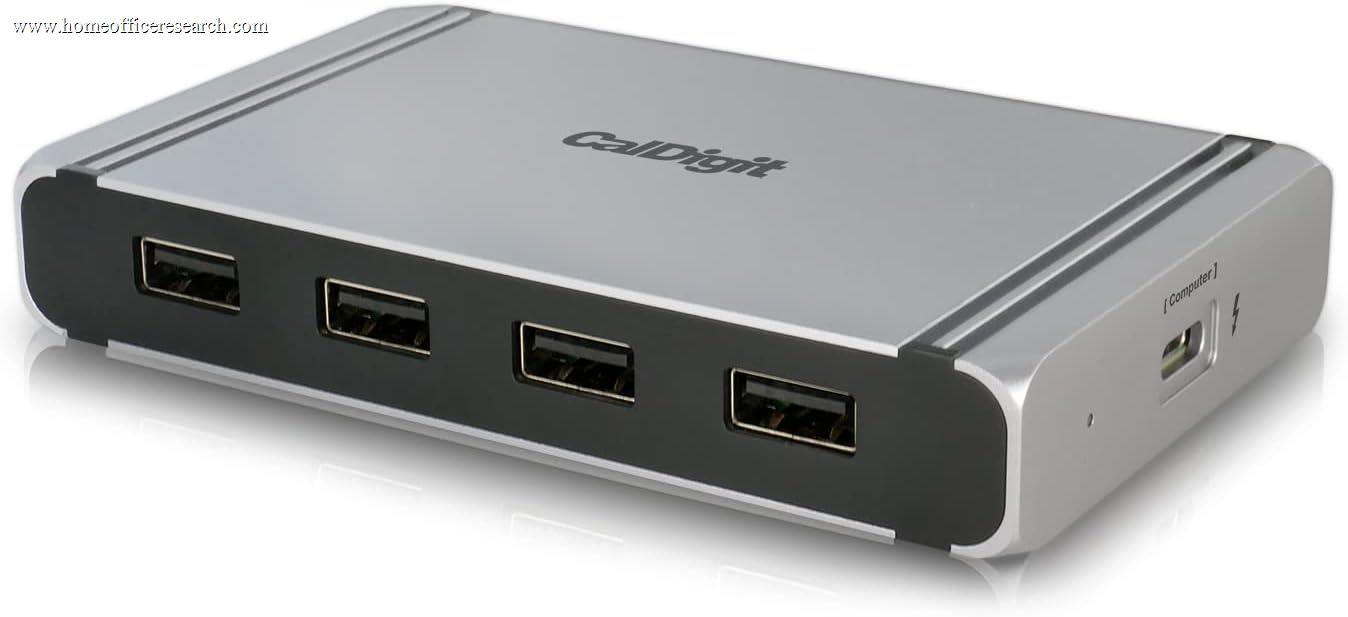
The CalDigit Element Hub is a Thunderbolt 4 hub — not a docking station — and that distinction is the whole product. Where the TS4 maximizes port variety, the Element Hub maximizes Thunderbolt downstream expansion in the smallest possible footprint: three 40Gbps TB4 ports and four 10Gbps USB-A ports, all packed into an aluminum slab the size of a deck of cards. For MacBook Pro users who need to chain Thunderbolt peripherals without desk clutter, it earns a solid 7.4 out of 10.
How We Scored It
Category Deep-Dives
Connectivity & Bandwidth
7.5 / 10 30% weightingThe Element Hub’s central value proposition is its three downstream Thunderbolt 4 ports, each operating at the full 40Gbps ceiling of the standard. This matches the TS4’s downstream TB4 count exactly — a striking fact given the Element Hub’s much smaller size and lower price. If your peripheral ecosystem is dominated by TB4 devices — Thunderbolt NVMe enclosures, TB4-enabled monitors, external GPU enclosures, or other hubs in a daisy-chain — the Element Hub gives you the same bandwidth architecture as CalDigit’s flagship dock in a dramatically smaller package.
Each downstream TB4 port is also USB4-compatible, meaning the full 40Gbps is available to USB4 devices without any negotiation penalty. The four USB-A ports operate at USB 3.2 Gen 2 (10Gbps) — not the slower 5Gbps Gen 1 found on budget hubs — making them genuinely useful for fast external storage and modern USB accessories. All connections are driverless, running natively over the Thunderbolt controller without software adaptation layers. This matters in practice: no DisplayLink driver installation, no CPU overhead for video compression, and no macOS screen recording permission requirements that plague software-based video adapters.
The trade-off is what the Element Hub does not include: no Ethernet, no SD card reader, no audio connectivity. Users who need any of these will require additional adapters or USB hubs hanging off one of the four USB-A ports. For users whose Thunderbolt peripherals already provide the connectivity they need — for example, a TB4 monitor with built-in USB hub and Ethernet — the Element Hub’s eight-port configuration is more than sufficient. For users who expect the same all-in-one connectivity of a full dock, this is a meaningful gap that limits the score in this category despite the strength of its Thunderbolt implementation.
Bottom line on connectivity: Three 40Gbps TB4 downstream ports in a pocket-sized hub is genuinely impressive — it matches the TS4’s flagship TB4 architecture at a fraction of the size and cost. The absence of Ethernet, SD, and audio prevents a higher score, but those aren’t the product’s intended purpose.
Display Capability
7.0 / 10 25% weightingThe Element Hub supports up to 6K@60Hz on a single display via its downstream Thunderbolt 4 ports — covering Apple Pro Display XDR and other high-resolution professional monitors at full quality. On M1 Pro, M1 Max, M2 Pro, M2 Max, and subsequent Pro/Max chips, the hub supports dual 4K@60Hz displays simultaneously by using two of the three downstream TB4 ports for display connections. Intel-based Macs with full Thunderbolt 3 or 4 support can also drive dual 4K output. This is delivered entirely through Thunderbolt’s native protocol — no DSC compression, no adapter intermediaries.
The display limitation the Element Hub shares with all Thunderbolt hubs is the Apple silicon base chip restriction. MacBook Air models with M1, M2, or M3 (non-Pro/Max chips) are hardware-limited to a single external display regardless of which hub or dock they connect to. No TB4 hub or dock resolves this — it is a constraint in Apple’s chip architecture, not a hub deficiency. Users on base-chip MacBook Airs who need dual monitors must use a DisplayLink-based solution instead.
The absence of a dedicated DisplayPort output on the Element Hub means all display connectivity flows through the TB4 ports, which allocates those ports between display and data duties. A user running dual 4K displays has one downstream TB4 port remaining for data devices — sufficient for many workflows but worth planning around. By contrast, the TS4’s dedicated DisplayPort 1.4 output keeps display and data bandwidth on separate paths. This architectural difference — inherent to the hub form factor — is why the Element Hub scores lower in this category despite delivering capable display output for its intended use case.
Bottom line on display capability: Solid dual-4K support on Pro/Max hardware, native TB4 protocol with no DSC or adapter overhead, and 6K single-display capability cover most home office monitor setups. The absence of a dedicated display output creates some port contention in multi-display configurations, and base Apple silicon chips remain limited to one external display regardless.
Power Delivery
8.0 / 10 20% weightingThe Element Hub delivers a consistent 60W of power to the host laptop regardless of which downstream devices are connected. This is a meaningful design commitment: the hub’s power circuitry is engineered to guarantee the host’s 60W allocation before distributing power to downstream ports, which means adding peripherals does not silently reduce charging throughput. Each of the three downstream TB4 ports provides up to 18W for device charging, and each USB-A port provides 7.5W — enough to charge phones, power USB-C accessories, and keep small peripherals running without drawing from the host’s allocation.
The 60W host delivery ceiling deserves honest context. For a 14-inch MacBook Pro under light to moderate load — documents, browser, video calls, coding — 60W is sufficient to maintain charge and recover from depletion. For the 16-inch MacBook Pro, which can draw 80–96W under sustained CPU and GPU load, 60W will not keep pace with consumption at peak — the battery will discharge while working, though slowly. Users who regularly run GPU-intensive workloads on a 16-inch model should plan to supplement with the MagSafe adapter during heavy sessions. For the vast majority of knowledge work and creative workflows on either MacBook Pro size, 60W is a practical day-to-day ceiling that works without issue.
Compared to the Element Hub’s siblings in the CalDigit lineup, the TS4 delivers 98W sustained to the host — 38W more — backed by a larger 135W power supply. That gap reflects the fundamental difference between a compact hub and a full docking station: physics constrain how much power a small hub can deliver and dissipate passively. The Element Hub’s 60W is best-in-class for its product category, and the consistent delivery without throttling under peripheral load is a genuine quality indicator rather than a marketing claim.
Bottom line on power delivery: 60W consistent host charging is appropriate for most MacBook Pro use cases and represents a quality implementation for a compact hub. Users with 16-inch models running sustained heavy workloads will want to supplement with MagSafe. The score of 8.0 reflects strong execution for the form factor, held below 9.0 by the real-world 60W ceiling versus full docks.
Port Mix & Usability
7.0 / 10 15% weightingThe Element Hub’s eight-port count is intentionally minimal — a deliberate design choice, not an oversight. CalDigit’s product positioning treats the Element Hub as a Thunderbolt bandwidth expansion device rather than a peripheral aggregator. The three downstream TB4 ports and four USB-A ports address the two most common connectivity needs cleanly: high-bandwidth Thunderbolt chains and standard USB peripherals. Everything else — Ethernet, SD cards, audio — is left to the user’s existing peripherals or additional adapters. Whether this port philosophy works depends entirely on what you need.
Where the Element Hub does excel on usability is its reversible design. The hub can be placed to the left or right of a laptop without the ports becoming inverted or awkwardly oriented — an ambidextrous quality that sounds trivial until you’ve fought a non-reversible hub on the wrong side of your desk. The flat, slim profile (just 0.7 inches thick) allows it to sit cleanly alongside a laptop without adding visual bulk, and the absence of a stand or vertical orientation option is appropriate for a device this compact. The included Thunderbolt 4 cable is CalDigit’s typical quality — thick, well-shielded, and 0.8m long, which provides enough slack for most desk configurations without excess.
The one usability note worth flagging is the power adapter size relative to the hub. The Element Hub’s charging brick is substantially larger than the hub itself — a comical mismatch that reviewers consistently flag. For desk use this is irrelevant, but it limits the hub’s portability for travel use cases where the power adapter becomes a meaningful packing inconvenience. Users who want to use the Element Hub as a travel hub — a common impulse given its compact size — should factor this into expectations.
Bottom line on port mix: Eight ports covering three TB4 and four USB-A outputs the hub’s targeted use case well. The reversible design and slim profile are practical quality-of-life wins. The absence of Ethernet, SD, and audio means the Element Hub works best as a complement to an existing peripheral setup rather than as a standalone all-in-one solution.
Value
7.5 / 10 7% weightingThe Element Hub is significantly less expensive than the TS4 — roughly half the price — which immediately positions it as CalDigit’s accessible entry point into the Thunderbolt 4 ecosystem. For users whose primary need is TB4 downstream expansion without the comprehensive port suite of a full dock, the value equation is straightforward: you get three 40Gbps downstream Thunderbolt ports and four 10Gbps USB-A ports at a price that reflects the focused feature set. No overpriced ports you will never use.
The value calculus becomes more complicated if you factor in what the Element Hub omits. Users who discover they also need Ethernet will likely add a USB-C to Ethernet adapter. Those who need an SD card reader add another accessory on top of that. By the time these gaps are patched, the total spend can approach the cost of a full dock that includes these features natively — and a full dock typically delivers more host charging wattage in addition. The Element Hub is excellent value for users who genuinely need only what it offers. It represents middling value for users who purchase it as a budget alternative to a full dock and then rebuild its missing functionality through adapters.
Bottom line on value: Strong value for users who understand the product — a TB4 hub, not a dock. Weaker value for users who treat it as a budget dock and then patch its gaps with add-on adapters. The 7.5 score reflects genuine worth for the right buyer, tempered by the risk of misaligned expectations.
Build & Design
8.0 / 10 3% weightingThe Element Hub’s enclosure is solid aluminum machined to a 4.48 × 2.75 × 0.7-inch footprint — genuinely pocket-sized for a Thunderbolt 4 hub. CalDigit’s manufacturing quality is visible in the details: port cutouts are clean and precise, the aluminum has no flex or give under hand pressure, and the anodized finish is consistent across the surface. There is a row of indicator LEDs along one edge that illuminate when devices are connected — a useful at-a-glance confirmation that power and data connections are live without requiring a software menu or checking cable seating.
The reversible design is the Element Hub’s most distinctive physical feature. Unlike conventional hubs where ports face a fixed direction, the Element Hub is engineered so that its port orientation reads correctly from either side — USB-A ports and TB4 ports are on both long edges, and the labeling and LED indicators read naturally from the laptop’s perspective regardless of which side the hub sits on. In practice this means no positioning frustration: place it left or right, it works. This design detail reflects serious attention to real-world desk use patterns rather than engineering convenience.
The primary design shortcoming — flagged by virtually every independent reviewer — is the power adapter disproportion. The hub’s external power brick is considerably larger than the hub itself, and the cord is rigid enough to require some cable management effort. For a desk-permanent setup this is invisible, but it undermines the portability story that the hub’s physical size would otherwise tell. CalDigit includes a quality Thunderbolt 4 cable in the box, which offsets some of the accessory criticism — the cable quality matches what CalDigit includes with the TS4 at a higher price point.
Bottom line on build and design: Premium aluminum construction, a genuinely innovative reversible port layout, and strong build quality earn a solid 8.0. The oversized power adapter is the one notable blemish in an otherwise well-executed physical product.
About the Manufacturer
Digit
CalDigit was founded in 2003 in Milpitas, California, originally developing high-speed storage solutions for the media production industry. The company expanded into Thunderbolt connectivity with its Thunderbolt Station series, which became a reference standard for professional Mac users requiring reliable peripheral expansion. CalDigit products have been stocked in Apple retail stores as recommended accessories and are widely used in broadcast, film post-production, and creative professional environments where connection stability and thermal management under sustained load are essential.
The Element Hub sits at the compact end of CalDigit’s Thunderbolt product range, with the TS4 — our #2-ranked docking station and long the lineup’s Thunderbolt 4 flagship. Where the TS4 addresses users who need maximum port density and comprehensive connectivity, the Element Hub serves users who prioritize portability, desk minimalism, and Thunderbolt expansion specifically. CalDigit maintains active firmware update support for the Element Hub, consistent with its approach across the TS line, addressing compatibility refinements and USB hub stability improvements post-launch. The company’s compatibility documentation — which lists specific laptop models and their behavior with CalDigit hardware — reflects a transparency about real-world interoperability that distinguishes CalDigit from brands that leave compatibility questions to user forums.
CalDigit products are sold through Apple retail, B&H Photo, Amazon, and CalDigit’s own website, and carry a 2-year limited warranty. The Element Hub is compatible with any Thunderbolt 4- or USB4-equipped computer and, at reduced bandwidth, with Thunderbolt 3 hosts as well.