UD-MSTH2 USB-C Triple Display MST Hub
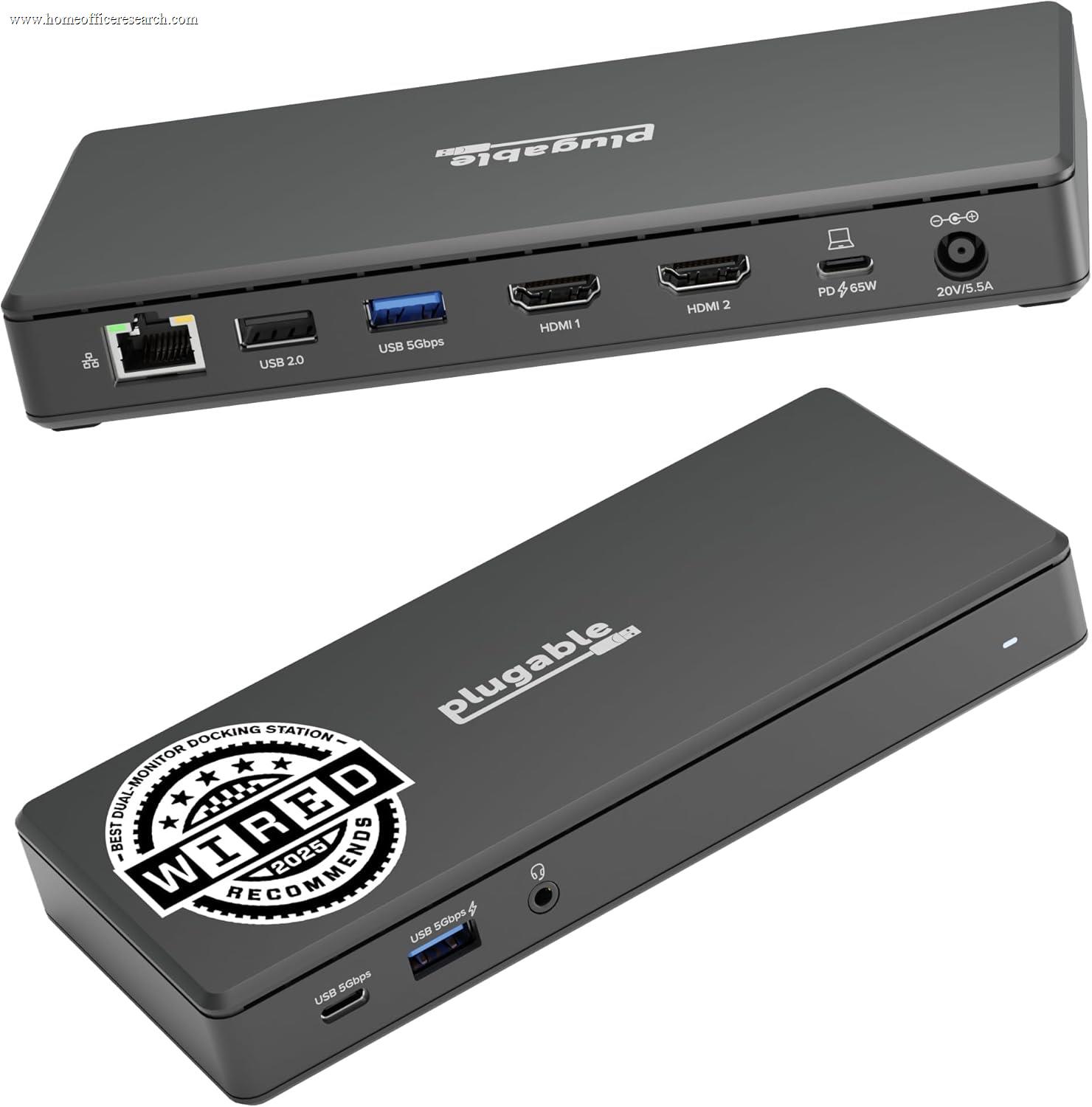
The Plugable UD-MSTH2 solves a specific problem efficiently: getting two external HDMI monitors from a single USB-C Alt Mode port, without DisplayLink drivers and without a power brick. Using DisplayPort Multi-Stream Transport (MST), it enables a genuine triple-display setup — your laptop’s built-in screen plus two external monitors — from a port that would otherwise support only one. The tradeoffs are real: MST is a Windows-native technology, and Apple Silicon Macs do not support it via USB-C Alt Mode. The hub also provides virtually no peripheral connectivity beyond its HDMI outputs and 100W power passthrough, making it a display extender rather than a full docking station. For Windows users whose primary need is dual external display output from a non-Thunderbolt USB-C port, the UD-MSTH2 delivers on its core promise. For anyone who also needs ethernet, USB data ports, or audio, it is the wrong product.
How We Scored It
Category Deep-Dives
Connectivity & Bandwidth
5.5 / 10 30% weightingThe Plugable UD-MSTH2 connects to the host computer via a single USB-C Alt Mode connection — the same underlying technology as every other non-Thunderbolt dock in our guide. The total available bandwidth from the host is governed by the USB-C specification: a maximum of 10Gbps shared across all functions. In the UD-MSTH2’s case, nearly all of that bandwidth is consumed by the display pipeline. MST (Multi-Stream Transport) multiplexes two display streams across the single USB-C connection, which means both HDMI outputs are competing for the same bandwidth pool that would otherwise serve a single monitor at full specification.
The bandwidth constraint has a direct consequence for resolution. When running a single external display, the UD-MSTH2 can deliver up to 4K at 60Hz — the full Alt Mode capability. When both HDMI ports are active simultaneously via MST, the available bandwidth is split between them: users can expect two displays at up to 4K@30Hz each, or two displays at 2560×1440@60Hz each, depending on the host GPU and cable quality. The step from single-display 4K@60Hz to dual-display 4K@30Hz is meaningful — 30Hz is perceptibly less smooth for scrolling and motion-heavy work — though many productivity-focused users running spreadsheets, documents, and browser applications at 1440p@60Hz report a comfortable working experience.
The UD-MSTH2 provides no meaningful USB data bandwidth beyond the host connection and display pipeline. There are no USB-A data ports, no ethernet, no audio passthrough to consume bandwidth. In one sense this is a limitation; in another, it means the hub does not further fragment an already bandwidth-constrained connection. The UD-MSTH2 is purpose-built to do one thing — extend display output — and does not attempt to be a general-purpose data hub.
Bottom line on connectivity and bandwidth: USB-C Alt Mode with a 10Gbps ceiling, fully committed to the dual-display MST pipeline. Single-display mode achieves 4K@60Hz; dual-display mode requires resolution or refresh rate compromise. No data connectivity beyond the display function. The 5.5 score reflects a hub that executes its narrow connectivity mandate competently but lacks the bandwidth headroom of Thunderbolt and offers nothing for USB peripheral users.
Display Capability
6.0 / 10 25% weightingThe UD-MSTH2’s central capability — and the reason to choose it over competing hubs — is its use of DisplayPort Multi-Stream Transport (MST) to drive two external HDMI displays from a single USB-C Alt Mode connection. MST is a DisplayPort specification that allows multiple independent display streams to be multiplexed over a single physical connection, then demultiplexed at a hub or monitor. Unlike DisplayLink, MST operates at the hardware level and requires no software drivers under Windows — the two external monitors appear as independent displays to the operating system and GPU, enabling true extended desktop use without driver installation or a background software process.
The display output delivers two independent HDMI connections. At single-display operation, the full USB-C Alt Mode bandwidth is available to one port: up to 4K@60Hz. With both outputs active in dual-display MST mode, each display receives a portion of the shared bandwidth. Practical maximum configurations in dual mode include two 4K displays at 30Hz each, or two 2560×1440 displays at 60Hz each. For users running two 1080p monitors, MST bandwidth is ample and both screens run at full 60Hz without compromise. The right resolution choice depends on the user’s panel specifications and refresh rate preferences.
The critical compatibility constraint is macOS and Apple Silicon. MST via DisplayPort Alt Mode is not supported on Apple M-series chips for dual external display output — the Apple Silicon display architecture routes external display signals through a different pathway that requires either Thunderbolt or DisplayLink for multiple external monitors. On Apple Silicon Macs (M1, M2, M3, and their variants), the UD-MSTH2 will function as a single-display adapter only; the second HDMI port will not produce output simultaneously. Intel-based Macs may support MST depending on the specific model and GPU, but this is not guaranteed. The UD-MSTH2 is effectively a Windows-primary product, and buyers should verify MST compatibility with their specific laptop before purchasing.
On compatible Windows machines, MST performs reliably. The GPU’s native DisplayPort MST capability handles the signal multiplexing, and the UD-MSTH2 passes it through to two HDMI displays with no additional processing overhead. There is no compression, no added latency from a video encoding step, and no driver to maintain — advantages MST holds over DisplayLink for users who qualify for it.
Bottom line on display capability: MST-based dual display from USB-C Alt Mode is a genuine capability gap filler for Windows users without Thunderbolt. The resolution compromise in dual-display mode (4K@30Hz max per display, or 1440p@60Hz) is a real limitation compared to Thunderbolt docks. macOS compatibility is severely limited on Apple Silicon. The 6.0 score credits the UD-MSTH2 for delivering driver-free dual display where competitors cannot, while reflecting the resolution ceiling and platform restrictions that prevent a higher rating.
Power Delivery
9.0 / 10 20% weightingThe UD-MSTH2 includes a 100W USB Power Delivery passthrough via a dedicated USB-C PD port, which is the highest PD rating available in any USB-C Alt Mode hub in our guide. 100W covers the full charging specification for the MacBook Pro 14″ (96W), the MacBook Pro 16″ (140W rated, but 100W sustained charging), and the vast majority of Windows ultrabooks and professional laptops that specify 65W–100W chargers. Unlike hubs that reduce PD output under load — delivering 85W rated but dropping lower when displays are active — the UD-MSTH2 routes its PD circuit through a dedicated passthrough path, decoupled from the display pipeline.
The bus-powered design means the hub draws no power from a wall outlet on its own. A wall charger connected to the PD passthrough port supplies power both to the laptop and to the hub’s internal circuits. This eliminates the need for a separate AC adapter and power cable for the hub itself — a meaningful convenience advantage for desk setups with limited outlet capacity and for travel. The tradeoff is that there are no powered USB-A ports for peripherals, since the hub has no independent power budget for data devices. For a hub that focuses exclusively on display output and laptop charging, this design decision is coherent.
The 9.0 score for power delivery reflects the 100W PD passthrough as the UD-MSTH2’s strongest specification. It matches or exceeds the PD rating of full Thunderbolt docks at a fraction of the price, and it makes the hub a complete single-cable charging solution for laptop users who need only display output and power rather than peripheral connectivity.
Bottom line on power delivery: 100W PD passthrough is the UD-MSTH2’s best specification — it charges even demanding laptops at full speed and eliminates the need for a separate hub power supply. The bus-powered design is a feature rather than a limitation given the hub’s display-focused role. The 9.0 score places the UD-MSTH2 at the top of the USB-C Alt Mode tier for power delivery.
Port Mix
5.0 / 10 15% weightingThe Plugable UD-MSTH2 provides three functional connections: two HDMI outputs and one USB-C PD passthrough port. That is the complete port inventory. There are no USB-A data ports, no Gigabit Ethernet, no audio jack, no SD card reader, and no additional USB-C data connections. Positioned as a “docking station” in category comparisons, the UD-MSTH2 falls well short of what most home office workers mean by that term — a hub that centralizes peripheral connections and eliminates cable clutter from the laptop.
For buyers who want to connect a keyboard, mouse, headset, wired ethernet, and external storage through a single hub, the UD-MSTH2 cannot serve that role. Those peripherals would need to connect directly to the laptop or through a separate USB hub added to the setup. This is not a failure of the product’s design — it is an accurate reflection of its purpose: the UD-MSTH2 is a display extender with power passthrough, not a general-purpose docking station.
The practical implication for buyers is a pairing decision. Users who already have a USB hub or wireless peripherals (keyboard and mouse sharing a single USB receiver, for example) and whose primary unmet need is dual external display output will find the UD-MSTH2’s port mix adequate for their actual workflow. Users who are replacing a full docking station or who expect a single cable to handle all peripheral needs will need a different product. The Belkin Connect Pro or CalDigit SOHO Dock, both reviewed in this guide, offer the data connectivity the UD-MSTH2 lacks, though at the cost of Thunderbolt dependency or a single-display limitation respectively.
Bottom line on port mix: Two HDMI outputs and 100W PD passthrough — nothing else. This is a display hub, not a docking station in the conventional sense. The 5.0 score reflects a port inventory that is appropriate for the product’s specific purpose but far below the connectivity standard expected of a full dock. Buyers must be clear-eyed about what peripheral needs the UD-MSTH2 does and does not address.
Value
7.5 / 10 7% weightingThe UD-MSTH2 is typically available at a budget price, which positions it as an entry point for dual external display capability. The closest functional alternatives — docks that can drive two external monitors without DisplayLink drivers — generally require a Thunderbolt 4 port and a pricier Thunderbolt dock. For the specific use case the UD-MSTH2 addresses (Windows laptop with USB-C Alt Mode, needing dual display output), it represents a meaningful cost advantage over the Thunderbolt tier. The value proposition is strongest for users whose laptops lack Thunderbolt and who want a driver-free solution that is not feasible at any price through other means.
The value calculation shifts for users who also need peripheral connectivity. Adding a separate USB hub and ethernet adapter to supplement the UD-MSTH2’s missing ports brings the total cost of ownership closer to competing hubs that include those features. The Anker 565, for example, includes USB-A ports, ethernet, and dual 4K display capability for Windows users, though it achieves dual display through a different mechanism. Buyers should audit their full connectivity needs before assuming the UD-MSTH2’s lower headline cost represents the better total value.
Bottom line on value: Strong value within a narrow use case: Windows users who need dual external display from USB-C Alt Mode, have their peripheral connectivity handled separately, and are not willing to pay for Thunderbolt. Outside that profile, the missing peripheral connectivity reduces practical value. The 7.5 score reflects competitive pricing for a capability that has few alternatives, tempered by the peripheral gap that may add cost downstream.
Build Quality
7.0 / 10 3% weightingThe Plugable UD-MSTH2 is a compact, bus-powered hub in a plastic housing. Its form factor is smaller than a full docking station — closer to a travel hub — reflecting the absence of power circuitry, large USB controllers, and the thermal management components that add size and weight to comprehensive docks. With no AC adapter and minimal internal electronics beyond the MST chip and HDMI output stages, the hub runs cool in normal use and generates no meaningful thermal output under sustained dual-display operation.
Plugable’s manufacturing quality is consistently above the generic hub tier. The USB-C host cable is attached and of adequate length for typical desk configurations. HDMI ports have solid retention. Plugable backs the UD-MSTH2 with a two-year warranty — above the 18-month norm for Anker products and matching CalDigit’s coverage — and the company maintains an active technical support operation that is notably transparent about compatibility limitations, often publishing compatibility tables and macOS guidance that competing brands omit entirely. Firmware update availability for the UD-MSTH2 is more limited than for Plugable’s full docks (the MST hub has less firmware-configurable behavior), but the underlying MST specification is mature and stable.
The build quality score of 7.0 reflects solid construction for the category and price, a two-year warranty, and Plugable’s characteristic transparency. It does not reach the 8.0–9.0 range reserved for aluminum-enclosure docks with active thermal management, as the plastic form factor and minimal internal complexity keep it in the mid-tier build category.
Bottom line on build quality: Compact plastic construction, cool-running operation, two-year warranty, and Plugable’s above-average documentation and support. Reliable for daily use at a fixed desk or in a travel bag. The 7.0 score reflects quality that exceeds generic alternatives at this price point without reaching the premium tier of aluminum-cased docks.
About the Manufacturer
GABL
Plugable is a Redmond, Washington-based USB connectivity company founded in 2009 with a focus on docking stations, hubs, and USB accessories for Windows and Mac. The company has built a reputation for documentation transparency that is unusual in the consumer electronics space — Plugable publishes detailed compatibility matrices, macOS-specific guidance, and clear driver requirement disclosures that competing brands frequently omit. In a category where marketing copy routinely overstates compatibility, Plugable’s willingness to explicitly state “this does not work on Apple Silicon for dual display” is a meaningful differentiator.
Plugable’s product line spans DisplayLink docks, Thunderbolt 4 docks (the TBT4-UD5 ranked #4 in our guide), USB-A legacy docks, and MST hubs. The UD-MSTH2 sits in the MST hub category — a narrower product type aimed at Windows users who need dual display output without Thunderbolt. Plugable maintains active firmware update pipelines for its full docking stations and provides responsive technical support, both of which contribute to long-term product reliability in ways that are difficult to quantify but consistently noted in owner feedback. The two-year warranty on the UD-MSTH2 is consistent with Plugable’s standard coverage across its product line.