Magic Mouse (USB-C)
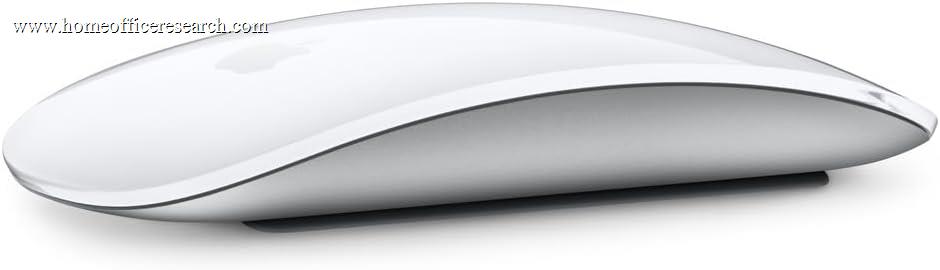
The Apple Magic Mouse is the lowest-friction option for someone fully inside the Apple ecosystem who values its Multi-Touch gesture surface — and the 2024 refresh finally moves charging from Lightning to USB-C. On a Mac, the gestures are genuinely good: you swipe across the smooth top surface to move between pages and spaces, with no physical scroll wheel needed. But it ranks last in our guide for reasons that are hard to ignore in a home office: a flat, low-profile shape many find uncomfortable over long sessions, Bluetooth-only pairing to a single device, clicks that are not silenced, and a charging port still located on the underside — so it cannot be used while charging. It is a stylish companion for a Mac desk, not an ergonomic or productivity standout.
How We Scored It
Category Deep-Dives
Ergonomics & Comfort
5.0 / 10 30% weightingErgonomics is the Magic Mouse’s weakest dimension and the single biggest reason it ranks last. The body is flat and very low-profile, with a gently curved top that sits only about an inch high. Rather than filling the palm, it leaves the hand in a flattened, fingertip-led posture that many users find cramped over a full working day. There is no contour to support the palm, no thumb rest, and no meaningful arch — the design prioritizes a clean, minimalist aesthetic over hand support.
This is well-documented and widely felt: the Magic Mouse is frequently cited as comfortable in short bursts and tiring over long sessions, particularly for larger hands. It is not adjustable, not available in alternative shapes, and right-or-left use is symmetric but equally flat either way. For a device meant to be held for hours of home office work, the shape is a genuine limitation rather than a matter of taste — which is why this category scores 5.0, the lowest ergonomic mark among the conventional mice in our guide.
Bottom line on ergonomics: A flat, minimalist shape that looks elegant but provides little palm support and is widely found tiring over long sessions. The 5.0 reflects a design that prioritizes aesthetics over all-day comfort — the main reason it sits at the bottom of our ranking.
Tracking & Sensor
7.5 / 10 20% weightingTracking is genuinely a strength. On a Mac, the Magic Mouse glides accurately and smoothly, and its defining feature is the Multi-Touch surface: the entire top of the mouse is touch-sensitive, so you scroll in any direction with one finger and swipe between pages, full-screen apps, and Mission Control with intuitive gestures — no physical scroll wheel required. For a Mac user, these gestures are fluid, well-integrated with macOS, and arguably the best touch-gesture experience of any mouse.
The caveats are the usual ones: there is no exposed DPI setting or any-surface Darkfield tracking, and the gesture experience is tied to macOS — on Windows the mouse works as a basic pointer but loses most of what makes it special. It also wants a normal surface like any optical mouse. Within its native Mac environment, though, the combination of accurate tracking and a rich gesture surface is the Magic Mouse’s clear high point, and the reason this category is its best score.
Bottom line on tracking: Smooth, accurate tracking plus the best Multi-Touch gesture surface of any mouse — a real strength on a Mac. The 7.5 reflects excellent gesture-driven navigation, with the gestures largely tied to macOS and no any-surface tracking.
Connectivity & Multi-Device
5.0 / 10 20% weightingThe Magic Mouse connects via Bluetooth only, with no USB receiver option, and — critically for this category — it pairs with a single device at a time. There is no Easy-Switch-style multi-device cycling: moving it between machines means manually re-pairing, which is far more friction than the three-device switching the Logitech mice offer. For a multi-machine home office desk, this single-device limitation is a real, daily drawback.
The 2024 USB-C refresh is a genuine improvement over the old Lightning model — it means one fewer cable type to manage — but Apple left the charging port on the underside of the mouse, so it still cannot be used while charging. You flip it over, plug in, and wait; a quick top-up gives hours of use, but the mouse is unusable during it. Battery life is roughly a month per charge. The single-device Bluetooth and unusable-while-charging design together hold connectivity to 5.0.
Bottom line on connectivity: Bluetooth-only, single-device pairing with no multi-device switching, plus an underside charging port that means it can’t be used while charging. The 5.0 reflects these real constraints; the USB-C move is a welcome but small improvement.
Buttons & Scrolling
5.5 / 10 15% weightingThe Magic Mouse takes an unusual approach: instead of physical buttons and a wheel, the whole top is a click-and-touch surface. Left/right click are gesture-defined, scrolling is done by sliding a finger in any direction, and macOS gestures (two-finger swipe between pages, etc.) replace dedicated buttons. For gesture-led navigation this is elegant and, on a Mac, often faster than a wheel for moving between spaces and pages.
But measured against a productivity mouse it is sparse and has real drawbacks. There are no side buttons to map to back/forward or shortcuts, no tilt or free-spin wheel, and limited customization of the touch actions. The clicks are not silenced, so it is audibly clicky on calls. And the touch surface, while clever, does not replace the workflow value of several programmable physical buttons for power users. The gesture experience earns it a passing score; the lack of buttons, customization, and quiet clicks keeps it at 5.5.
Bottom line on buttons & scrolling: An elegant gesture surface that works well on a Mac, but no side buttons, no quiet clicks, and limited customization. The 5.5 reflects clever touch navigation undercut by a sparse, non-silent control set.
Value
5.5 / 10 10% weightingThe Magic Mouse is priced like a premium productivity mouse but delivers a narrower, more specialized package: great Mac gestures, but limited ergonomics, single-device Bluetooth, no side buttons, and no quiet clicks. For that money, the Logitech MX Anywhere 3S or MX Master 3S offer more capability and comfort for general use — though neither replicates the Magic Mouse’s native macOS gesture integration, which is the one thing some Mac users genuinely prefer.
So the value verdict is conditional. If you specifically want the Apple gesture experience and aesthetic on a Mac desk — and especially if you already use a Magic Keyboard and Trackpad — the Magic Mouse fits the ecosystem and that has real worth to you. If you are weighing it purely as a productivity tool, it is an expensive way to get a comfortable, capable everyday mouse, and the alternatives are stronger. The 5.5 reflects fair value for the dedicated Mac-gesture buyer and weak value for everyone else.
Bottom line on value: Fair value only for the Mac user who specifically wants Apple’s gesture surface and ecosystem fit; otherwise a premium-priced mouse that is out-featured and out-comforted by similarly priced rivals. The 5.5 reflects that conditional value.
Software & Customizability
6.0 / 10 5% weightingThe Magic Mouse is configured through macOS System Settings rather than a dedicated app. There you can adjust tracking speed, scroll direction, and toggle the available Multi-Touch gestures — a clean, no-extra-software experience that fits Apple’s approach. For a Mac user this is simple and works well out of the box.
The ceiling, though, is low compared with Logitech’s Options+ or Razer’s Synapse. There is no per-application profile system, no button remapping beyond the basic gesture toggles, and no macros — the customization is limited to what macOS exposes. Third-party utilities can extend it somewhat, but out of the box it is the least configurable mouse in our guide in terms of workflow programmability. The 6.0 reflects a clean, simple native experience that is also a shallow one.
Bottom line on software: Clean, no-install configuration through macOS settings, but shallow — no per-app profiles, button remapping, or macros. The 6.0 reflects simplicity at the cost of customization depth.
About the Manufacturer
Apple needs little introduction; within peripherals, its Magic accessories — the Magic Mouse, Magic Keyboard, and Magic Trackpad — are designed first and foremost to pair with the Mac, emphasizing minimalist design and tight macOS integration over configurability or third-party features.
The Magic Mouse (USB-C), introduced in the October 2024 refresh, is functionally the same mouse as the prior Lightning model — same Multi-Touch surface, same shape, same single-device Bluetooth — with the charging port changed from Lightning to USB-C and offered in white or black surfaces. The underside charging-port design, long criticized, was carried over unchanged.
For buyers committed to the Apple ecosystem who value the gesture surface and matching aesthetic, the Magic Mouse is the native choice. For those prioritizing ergonomics, multi-device flexibility, quiet operation, or deep customization, the Logitech options in our guide are more capable home office tools — and most of them work fully on a Mac as well.