MX Master 4
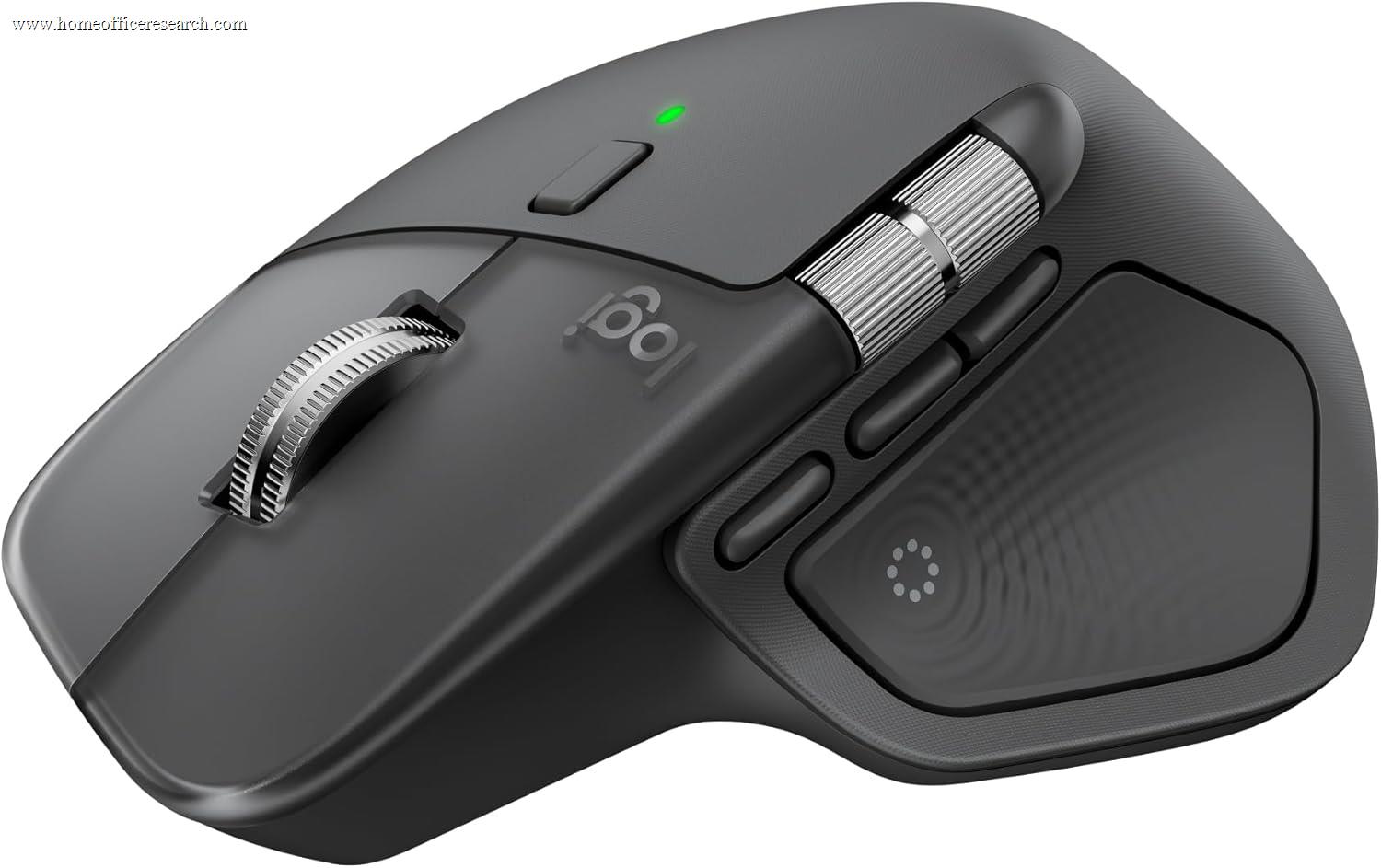
The Logitech MX Master 4 is the strongest all-round home office mouse in our evaluation. It keeps everything that made the MX line the default productivity mouse — a sculpted palm-grip shape, the Darkfield any-surface sensor, the MagSpeed electromagnetic wheel, and a dedicated thumbwheel — and adds two genuinely new capabilities: a customizable haptic feedback panel in the thumb rest and the Actions Ring radial overlay. It also clicks more quietly and connects more reliably than the 3S it succeeds. It is the most expensive mouse in our top tier, and that price is the only thing keeping its Value score in check — the hardware itself sets the ceiling for the category.
How We Scored It
Category Deep-Dives
Ergonomics & Comfort
9.5 / 10 30% weightingThe MX Master 4 carries forward the sculpted right-handed shape that has defined the MX Master line for years, and it remains the most broadly comfortable full-size mouse for palm-grip users with medium-to-large hands. The body rises to a high, contoured arch — approximately 51mm at its peak — that fills the palm and supports the hand in a neutral, slightly rotated position rather than forcing it flat. A pronounced thumb scoop on the left side gives the thumb a defined resting shelf instead of leaving it to drag on the desk, which is one of the under-appreciated reasons the shape works for long sessions: the thumb is supported, not active, except when it reaches the thumbwheel or the new haptic panel.
At 150g, the MX Master 4 is a deliberately substantial mouse — about 9g heavier than the 3S. This is the one ergonomic tradeoff worth naming honestly. For palm-grip productivity use, where the hand rests on the mouse and moves it in small increments, that weight reads as stability and planted-ness rather than fatigue. For users who prefer to lift and reposition frequently, or who use a claw or fingertip grip, the mass is noticeable and a lighter mouse like the MX Anywhere 3S (99g) or Keychron M6 8K (78g) will feel more agile. This is a shape-and-weight profile optimized specifically for stationary, all-day desk work — which is exactly the home office use case.
The surface materials are a meaningful part of the comfort story. The main body uses a soft-touch coating that resists fingerprints, and the thumb area combines textured grip zones with the new haptic panel. The hand position the shape enforces keeps the wrist in mild extension rather than the flat, pronated posture a low-profile mouse imposes — not as aggressive a correction as a true vertical mouse, but a measurable improvement over a flat ambidextrous design for users without existing strain.
Bottom line on ergonomics: The benchmark palm-grip shape for full-size productivity mice, refined rather than reinvented. The 9.5 reflects best-in-class all-day comfort for medium-to-large hands; the only reason it isn’t a perfect 10 is that the 150g weight and right-handed-only shape are not universal — small hands, fingertip-grip users, and left-handers are better served elsewhere.
Tracking & Sensor
9.0 / 10 20% weightingThe MX Master 4 uses Logitech’s Darkfield high-precision sensor with a 200–8,000 DPI range adjustable in 50-DPI increments. The headline DPI number is, frankly, more than any office task requires — most users will settle between 1,000 and 1,600 DPI — but the sensor’s real value for a home office is not its ceiling, it’s Darkfield’s defining capability: it tracks on glass and high-gloss surfaces (down to roughly 4mm glass thickness) where conventional optical sensors fail entirely. If you work on a glass desk, a glossy laminate, or simply without a mousepad, this is the difference between a usable mouse and a frustrating one.
Tracking consistency is excellent across the full DPI range, with no perceptible jitter, acceleration artifacts, or smoothing at the resolutions relevant to office work. The sensor handles the precise, small movements of document editing and the broad sweeps of multi-monitor cursor travel equally well. For users driving a wide 5K2K or dual-4K layout, the higher DPI settings let the cursor cross the full pixel expanse without repeated lift-and-reposition, while the Darkfield reliability means it tracks accurately regardless of the desk surface underneath.
The 9.0 rather than a higher score reflects category context, not a flaw: the MX Master 4 is not a low-latency gaming sensor, and its 125Hz / 8ms report rate is standard for a productivity mouse rather than the 1,000–8,000Hz polling of performance mice like the Keychron M6 8K. For document work, design, and general productivity, that report rate is completely imperceptible. It only matters if you also intend to use this mouse for competitive gaming — which is not its purpose.
Bottom line on tracking: The Darkfield any-surface sensor is the most practically useful tracking feature for a home office, and the MX Master 4 has the best implementation of it. The 9.0 reflects excellent, surface-agnostic precision for all office work; it stops short of a perfect score only because its report rate is tuned for productivity rather than gaming responsiveness.
Connectivity & Multi-Device
9.5 / 10 20% weightingThe MX Master 4 connects via both the new Logi Bolt USB-C receiver and Bluetooth Low Energy, and pairs with up to three devices simultaneously — switching between them with a button on the underside or, with Logitech Flow, automatically as the cursor crosses from one machine to another. For the multi-machine home office desk — a work laptop and a personal desktop, or a Mac and a PC — this three-device switching is the single most valuable connectivity feature, and the MX line’s implementation remains the most polished in the market.
The headline connectivity change over the 3S is a new high-performance wireless chip and revised antenna placement that Logitech rates at roughly twice the connection strength of the previous generation. In practice this translates to more reliable performance in RF-congested environments — homes saturated with Wi-Fi, smart devices, and other Bluetooth peripherals — and steadier behavior at range. The shift to a USB-C Bolt receiver (from the older USB-A dongle) also matters: it plugs directly into the USB-C ports that dominate modern laptops and docks without an adapter, and the receiver is encrypted to Logi Bolt’s enterprise security standard.
Battery is rechargeable via USB-C, rated up to 70 days on a full charge, with a one-minute quick charge delivering about three hours of use — enough that the mouse effectively never strands you. Cross-platform support spans Windows, macOS, Linux, and ChromeOS, with full feature support (including the Actions Ring and haptics) through Logi Options+ on Windows and macOS.
Bottom line on connectivity: Three-device Bolt-plus-Bluetooth switching, a more robust wireless chip, a modern USB-C receiver, and 70-day battery make this the most complete wireless package in our mouse evaluation. The 9.5 is the top connectivity score on the page.
Buttons & Scrolling
9.5 / 10 15% weightingThis is where the MX Master 4 separates itself from every other mouse in the table. The MagSpeed electromagnetic scroll wheel remains the best scroll mechanism on the market: it shifts automatically between a precise, click-to-click ratcheted mode for line-by-line control and a free-spinning mode that can fly through roughly 1,000 lines in a single flick. Because it is driven electromagnetically rather than by a mechanical ratchet, it is also nearly silent. Alongside it, the dedicated thumbwheel handles horizontal scrolling — genuinely useful for wide spreadsheets, video-editing timelines, and large design canvases, and a capability the compact and budget mice in this guide simply do not have.
The Quiet Click main buttons are new to this model in the MX Master line and reduce click noise by roughly 90% versus a standard mouse while preserving a crisp, defined tactile response. For a home office, this is not a cosmetic feature: standard mouse clicks are audible through most webcam and headset microphones, and on a call-heavy desk the difference between an audible tap on every click and effectively nothing is meaningful to everyone else on the call.
The genuinely new controls are the haptic feedback panel and the Actions Ring. The haptic panel sits in the thumb rest and provides subtle physical confirmation tied to software events — for example, a tactile pulse when the cursor crosses between displays, or feedback within supported apps like Photoshop, Lightroom, and Zoom. The Actions Ring is a radial on-screen menu, summoned by a button, that surfaces a customizable set of tools or shortcuts around the cursor; Logitech cites up to a 63% reduction in repetitive mouse movements for workflows that lean on it. Both features are genuinely useful rather than gimmicks, though both depend on Logi Options+ and per-app configuration to realize their value.
Bottom line on buttons & scrolling: The MagSpeed wheel plus dedicated thumbwheel was already the best scrolling package available; adding Quiet Clicks, a haptic panel, and the Actions Ring extends the lead. The 9.5 reflects a control set no other mouse in our evaluation matches.
Value
7.5 / 10 10% weightingThe MX Master 4 is the most expensive mouse in our top tier, and the 7.5 value score is an honest reflection of that. The hardware justifies a premium — nothing else combines this shape, the Darkfield sensor, the MagSpeed and thumbwheel scrolling, and the new haptics and Actions Ring — but the value calculus is complicated by the existence of the MX Master 3S, which sits one rank below at a lower price and delivers the same core sensor, the same MagSpeed wheel, the same thumbwheel, and the same three-device switching.
The honest framing for a buyer: the haptic panel, Actions Ring, Quiet Clicks, and improved wireless chip are real upgrades, but they are refinements on an already-excellent platform, not transformations. If you want the best mouse available and will use the new features, the MX Master 4 earns its price. If your priority is value, the 3S captures roughly 90% of the experience for less money — which is precisely why it ranks #2 rather than being eclipsed. The MX Master 4 loses value points not because it is overpriced for what it is, but because its closest sibling is a remarkable value.
Bottom line on value: Priced correctly for a flagship, but in a lineup where the previous flagship is still sold at a meaningful discount. The 7.5 reflects that real internal competition — buy the 4 for the best experience, the 3S for the best value.
Software & Customizability
9.5 / 10 5% weightingLogi Options+ is the most polished consumer peripheral software in this evaluation, and the MX Master 4 is the mouse that most fully exploits it. Every button is remappable, including per-application profiles that change what each control does depending on the active app — a different button layout in Photoshop than in a browser than in Excel, applied automatically. The Actions Ring, the haptic feedback behaviors, the MagSpeed thresholds, the DPI steps, and the thumbwheel function are all configured here, as is Logitech Flow for multi-computer cursor and clipboard sharing.
The depth is unusual for a mainstream product: Smart Actions allows multi-step macros and automations to be bound to a single control, which power users can use to collapse repetitive workflows into one click. The tradeoff, common to all software-dependent mice, is that the MX Master 4’s most distinctive features — haptics and the Actions Ring in particular — are only as good as the time invested in configuring them, and they require Options+ to be installed and running. On a fresh machine without the software, the mouse still works as an excellent standard pointer, but its headline capabilities are dormant until configured.
Bottom line on software: The deepest, best-executed configuration software in the category, and the MX Master 4 uses all of it. The 9.5 reflects per-app profiles, Smart Actions, Flow, and full control over the new haptics and Actions Ring — provided you invest the setup time.
About the Manufacturer
tech
Logitech is a Swiss-American company founded in 1981 and one of the longest-established names in computer peripherals. Its MX (Master Series) line is the company’s premium productivity tier, positioned for professionals and creators rather than gamers, and it has effectively defined the category of the high-end productivity mouse over the last decade — to the point that competing products are routinely benchmarked against whichever MX Master is current.
The MX Master 4, launched in late 2025, is the fourth major generation of that flagship. Logitech’s stated design priorities for it were ergonomic continuity (keeping the proven shape), more reliable wireless, and the addition of haptic feedback and the Actions Ring as new productivity tools. The company supports the mouse through Logi Options+ on Windows and macOS, with regular software updates that have, historically, added features to existing hardware over its lifespan.
Logitech’s scale is also a practical advantage for buyers: broad retail availability, strong warranty support, and an ecosystem of compatible peripherals (keyboards, webcams, the Logi Bolt receiver standard) that interoperate cleanly — relevant if you are assembling a complete desk setup rather than buying a single device.