ADS-4700W
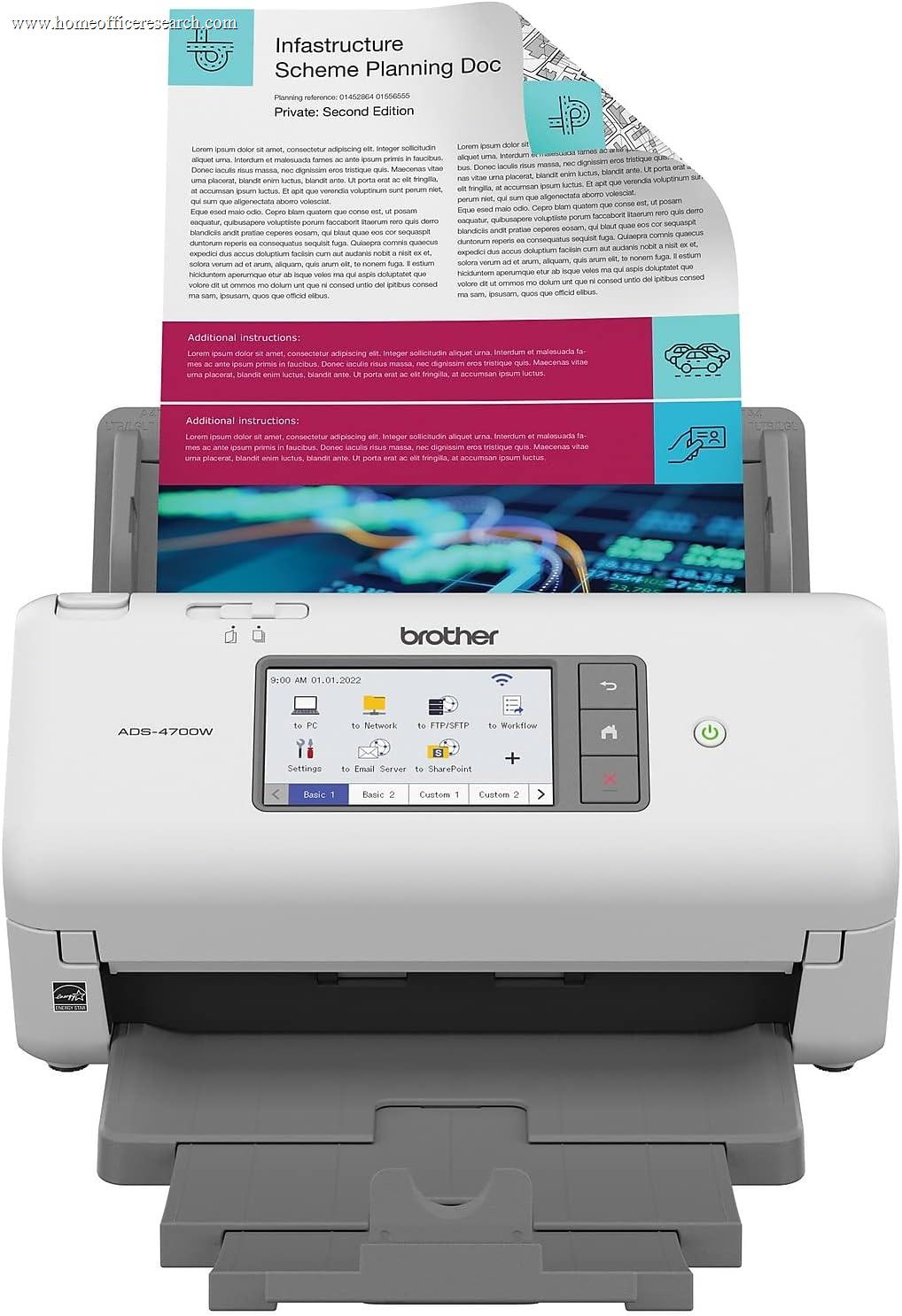
The Brother ADS-4700W is the choice when a scanner needs to be a shared network resource, not just a USB peripheral. It’s the only model in this guide with wired Gigabit Ethernet alongside Wi-Fi and USB, and it backs that with on-device security controls and 56 customizable one-touch shortcuts on a 4.3-inch touchscreen. The hardware is fast — 40 ppm, single-pass duplex, an 80-sheet feeder — and aimed at busy small offices. Our one reservation is feeding: some users report multi-page jams even on modest batches, which is why it sits behind the top desktop scanners despite leading on connectivity.
How We Scored It
Category Deep-Dives
Scan Quality & Accuracy
8.0 / 10 25% weightingThe ADS-4700W uses a dual contact-image-sensor system to capture both sides at 600 dpi optical, with the expected automatic deskew, crop, blank-page removal, and color detection. Scans are clean and OCR is accurate enough for reliable searchable PDFs of everyday office documents.
In our assessment its image processing is very good but a touch behind the best Canon and Epson units in fine detail and color nuance — a small gap that won’t matter for text-heavy paperwork, which is what this scanner is built to digest.
Bottom line on scan quality: Clean, accurate output with dependable OCR — very good, if a half-step behind the Canon and Epson units on fine image processing.
Speed & Throughput
8.5 / 10 20% weightingThe ADS-4700W is rated at 40 pages per minute and 80 images per minute with single-pass duplex, matching the fastest desktop scanners here. Its 80-sheet feeder is among the largest, second only to the Epson ES-580W’s 100.
That makes it well suited to a small office that scans steadily through the day — the combination of high ppm and a big tray means fewer interruptions to reload. On raw throughput specs, it’s a true workhorse.
Bottom line on speed: 40 ppm / 80 ipm single-pass duplex with an 80-sheet feeder — genuine workhorse throughput for busy days.
Software & OCR
7.5 / 10 20% weightingBrother pairs the scanner with iPrint&Scan and bundles Kofax Power PDF for editing and managing PDFs. The software is straightforward and functional rather than flashy, and produces searchable output without a subscription.
Where it shines is the touchscreen: you can save up to 56 customizable one-touch shortcuts — \”Invoices to the shared folder,\” \”Contracts to email as searchable PDF\” — so any user can walk up and scan to the right place with one tap. For a device several people share, that on-device workflow is more valuable than app polish.
Bottom line on software: Straightforward Brother software plus Kofax Power PDF, with the standout being 56 on-screen one-touch shortcuts for a shared device.
Paper Handling & Versatility
8.5 / 10 15% weightingOn paper, handling is a strength: an 80-sheet ADF, single-pass duplex, double-feed detection, and support for mixed media including cards and receipts. Capacity and duplex put it among the better-equipped desktop units.
We temper that with a documented caveat. Some user reviews report the feeder jamming on multi-page batches, occasionally even small ones — a real-world reliability concern we reflect rather than gloss over. Many owners run it without trouble, but if flawless feeding of large stacks is your top priority, it’s worth weighing against the smoother-feeding Canon and ScanSnap units.
Bottom line on paper handling: An 80-sheet feeder and single-pass duplex give it strong capacity — but reported multi-page feed jams keep our confidence just short of the leaders.
Connectivity
8.5 / 10 10% weightingConnectivity is the ADS-4700W’s headline. It’s the only model in this guide with wired Gigabit Ethernet, alongside Wi-Fi and USB 3.0 — and a wired network link is the most stable connection of all for a device multiple people rely on. Mobile scanning works through AirPrint and Brother Mobile Connect.
It also adds what a shared environment needs: Triple Layer Security to control device and network access, and the 56 on-screen shortcuts noted above. If your scanner is a communal resource on a home or small-office network rather than a personal USB peripheral, nothing else here is as well suited.
Bottom line on connectivity: The only scanner here with wired Ethernet, plus Wi-Fi, USB 3.0, a touchscreen, and security controls — the best choice for a networked, shared setup.
Reliability & Value
7.5 / 10 10% weightingThe ADS-4700W is built as workgroup hardware, with a one-year limited warranty and security features aimed at shared use. For its networked feature set, the price is fair against comparable business scanners.
The reason it doesn’t score higher on this measure is the feed-jam reports discussed above — for a scanner you depend on, dependable feeding is part of value. If networking, security, and shared-device workflows are what you need, it earns its place; if you’re a solo user who just wants the smoothest possible feeding, a Canon or ScanSnap may serve you better for less.
Bottom line on reliability & value: Solid workgroup build and security at a fair price for its class — with the feed-reliability caveat the main thing holding the score back.
About the Manufacturer
Brother Industries is a Japanese company founded in 1908, known worldwide for printers, label makers, sewing machines, and scanners. Its ADS line covers desktop document scanners for home and small-office use, while the compact DSmobile series handles portable scanning.
The ADS-4700W is the networked workhorse of the range, distinguished by wired Ethernet, on-device security, and a touchscreen with dozens of customizable shortcuts. Brother leans on the hardware and touchscreen workflow more than on bundled software polish.
For home office buyers, Brother’s strength is connectivity and shared-use features — the ADS-4700W is the pick when more than one person needs to scan to a networked device, with the broadest connection options in this guide.