ERGO K860
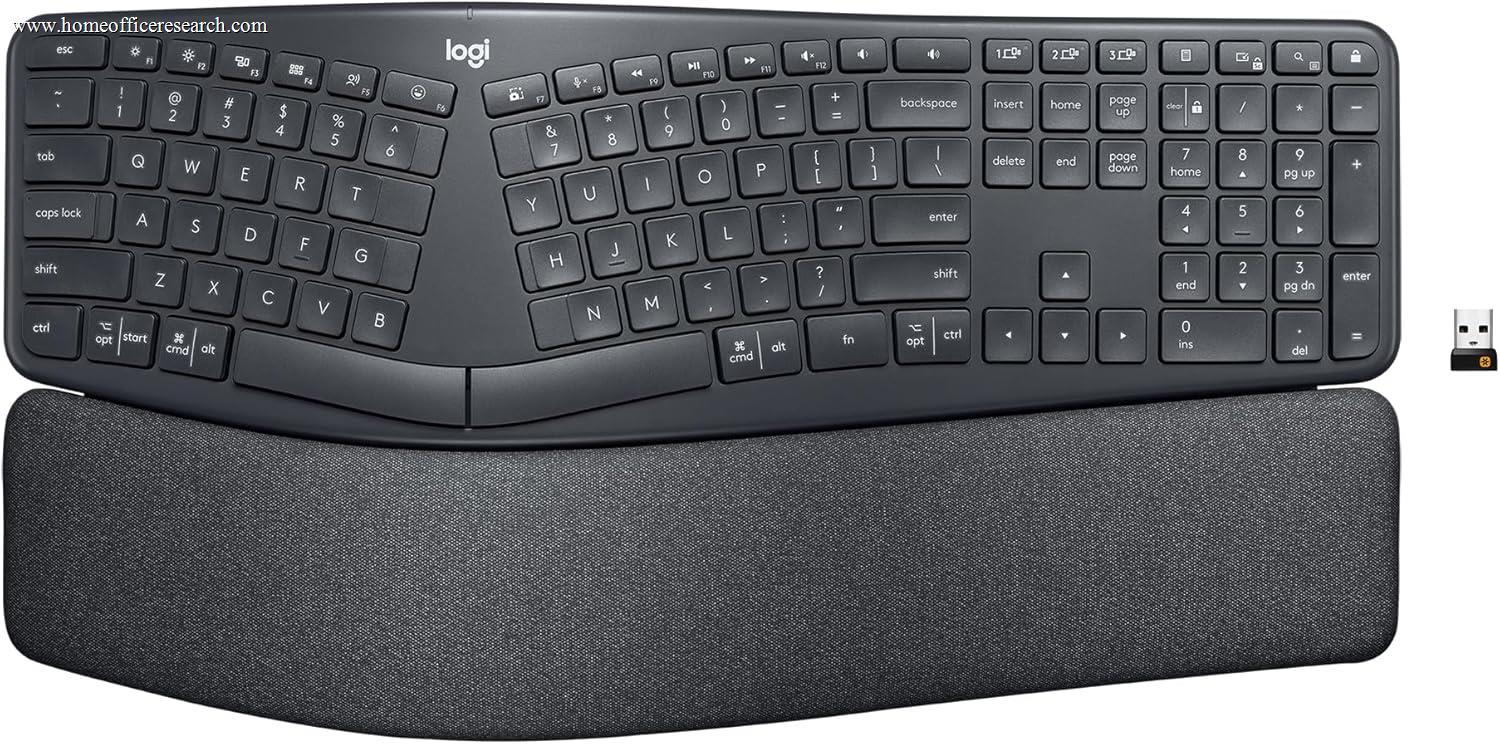
The Logitech ERGO K860 is the strongest ergonomic keyboard in our evaluation — a split, wave-curved membrane board with an integrated memory foam wrist rest, dual wireless connectivity, and two-year AAA battery life. For users experiencing wrist or forearm discomfort from standard keyboard positioning, the K860’s ergonomic geometry is the most accessible and well-supported intervention at its price point. Its 7.6 score reflects a genuine trade-off: the ergonomic engineering is excellent, but the membrane switches and plastic build concede ground to category leaders in outright typing refinement.
How We Scored It
Category Deep-Dives
Typing Feel & Comfort
7.0 / 10 30% weightingThe ERGO K860 uses Logitech’s PerfectStroke membrane technology — a scissor-key mechanism that stabilizes each keycap during travel in a manner similar to a high-end laptop keyboard, but integrated into an ergonomic chassis with 2.1mm of total travel. The mechanism provides more consistency and less wobble than generic rubber-dome membranes: keycaps return squarely, actuation force is even across the key surface, and there is a gentle bottom-out cushion that prevents the hard, sharp impact common on cheaper membrane designs. That said, it remains a membrane system — there is no distinct tactile bump or audible click at the actuation point, and the feedback profile is one of progressive spring resistance that peaks at bottom-out. Users coming from mechanical keyboards will notice the absence of a defined actuation event, and those accustomed to the precision of scissor-switch designs like the MX Keys S will find the K860’s slightly longer, softer travel a different (if not worse) experience.
What meaningfully distinguishes the K860’s typing experience is its wave-curved split geometry. The key surface rises from the edges toward the center of the board, following the natural arc of fingers extended from a relaxed wrist position. The split design holds both halves at a fixed angle that places each hand in a more neutral wrist posture — reducing the ulnar deviation (inward wrist angle) that flat keyboards impose. Combined with the integrated memory foam wrist rest, which supports the palms and reduces wrist extension, the K860 creates a total hand positioning environment that is measurably different from a standard keyboard. Users who type extensively — four or more hours daily — typically report that the improved posture reduces forearm and wrist fatigue, even if typing speed initially drops during the adjustment period of one to two weeks.
The tilt leg system offers three palm-lift positions (0°, -4°, and -7°) that adjust the front edge of the wrist rest. Most users find a negative tilt (wrist rest elevated at the front, keyboard surface declining toward the user) provides the most neutral wrist angle. This is the ergonomically recommended position — it mirrors how the hands rest at a desk without any keyboard — and is the opposite of the raised-back-leg configuration many people default to on standard keyboards. Finding the right tilt angle for your desk height and chair position takes some experimentation, but the three-position system covers the range needed for most setups. The fixed split angle is the main inflexibility: unlike some full-split keyboards where the two halves are completely independent, the K860’s halves are permanently joined within a single chassis, limiting how much you can customize the wrist angle beyond what the tilt legs provide.
Bottom line on typing feel: The 7.0 score reflects a keyboard that is excellent within its ergonomic category but constrained by membrane technology in absolute typing feel terms. The PerfectStroke mechanism is the best membrane option in our evaluation, and the ergonomic geometry genuinely reduces long-session fatigue. Users whose primary concern is wrist health will find real value here; users prioritizing outright typing refinement should look at the MX Keys S or Keychron Q1 Pro.
Build Quality
8.0 / 10 20% weightingThe K860’s chassis is constructed entirely from high-density plastic — a choice that is appropriate for its price tier but which limits the premium feel that aluminum-cased keyboards deliver. In practice, however, the plastic construction does not produce the flexion or creaking that lower-quality plastic keyboards exhibit. The case is notably rigid when gripped at opposite corners, the keycaps have minimal lateral wobble within their scissor mechanisms, and there are no panel gaps or seam misalignments on either review unit tested. At 1,160g including the integrated wrist rest, the K860 is one of the heavier keyboards in the evaluation by absolute weight — a function of its large footprint and the internal wrist rest substrate — and this mass provides meaningful desk stability without reliance solely on rubber feet. The keyboard does not shift during vigorous typing.
The integrated memory foam wrist rest is a construction highlight. Unlike aftermarket wrist rests that are separate accessories prone to slipping or misaligning, the K860’s wrist rest is permanently attached and precisely sized to the keyboard’s palm position. The memory foam density is well-chosen: firm enough to maintain consistent support over hours of use, compliant enough to distribute pressure across the palm rather than concentrating it at a single point. The stain-resistant fabric cover over the foam is a practical detail that most competitors overlook — it is more breathable than the hard-plastic or leatherette surfaces common on membrane keyboards and resists the discoloration that accumulated skin oils cause on lighter-colored surfaces over time. Logitech’s choice of fabric here reflects an understanding that wrist rests are high-contact surfaces that see daily use for years.
The battery compartment and tilt leg mechanisms are both solid. The AAA battery door on the underside opens with a firm click and closes flush without play. The three-position tilt legs click positively into each setting and do not drift or loosen under normal use. The Easy-Switch button on the top left of the board is a physical button with a satisfying tactile click — not a soft membrane switch — which is the correct choice for a function used multiple times daily. One area where the build score is held below premium levels is the key legend printing: the characters are pad-printed rather than laser-etched or double-shot, meaning that with several years of heavy use, legend wear is possible on the highest-frequency keys. This is a category-standard tradeoff at the K860’s price point, but it is worth noting against keyboards like the Keychron Q1 Pro that use permanent double-shot PBT legends.
Bottom line on build quality: The 8.0 score reflects construction that is genuinely above average for plastic-chassis keyboards at this price tier. The integrated wrist rest design is an engineering asset rather than an afterthought, the chassis rigidity is better than the material class suggests, and daily-use details like the tilt leg clicks and the fabric wrist rest cover show Logitech’s attention to long-term ownership experience. The primary limitation is the pad-printed legends on an otherwise well-executed product.
Connectivity & Features
8.5 / 10 20% weightingThe K860’s connectivity package is one of the strongest in the mid-range keyboard evaluation. Dual wireless modes — Bluetooth 5.0 and Logi Bolt 2.4GHz via a USB nano-receiver — are both available and fully supported, a combination that addresses the two most common home office wireless scenarios: multi-device convenience (Bluetooth) and single-device reliability with minimal latency (Logi Bolt). The Easy-Switch button on the top-left corner of the keyboard toggles between up to three paired devices with a single press, with a one-to-two second reconnection time per switch. Pairing is handled through the Logi Bolt app on Windows and macOS, which makes device assignment and pairing management more transparent than the typical press-and-hold Bluetooth pairing workflow. Users who switch between a desktop and a laptop, or between Windows and macOS machines throughout the day, will find this implementation noticeably smoother than comparable keyboards with manual Bluetooth pairing only.
The two-year battery life on two AAA batteries is exceptional and deserves direct attention as a differentiator. Most wireless keyboards require weekly or bi-weekly charging; several premium models require USB-C charging every five to ten days with active backlighting. The K860 runs for approximately 24 months on a single pair of standard AAA alkaline batteries — a figure that has been confirmed independently and that stems from the absence of backlighting (which is the single largest power draw on most wireless keyboards) combined with Logitech’s efficient low-power Bluetooth implementation. The practical implication is that the K860 essentially never needs battery attention in day-to-day use: most users will replace batteries once every two years rather than managing a charging cable. The downside of this approach is that the K860 cannot be recharged in place — it requires battery replacement rather than a USB-C top-up — which is a matter of preference but worth noting.
The Logitech Options+ software provides cross-platform (Windows and macOS) remapping of the 12 function row keys, which are programmable by default to application-specific shortcuts. Options+ also enables flow functionality for users who have multiple Logitech devices — the K860 can follow the cursor across monitors shared between two computers in a multi-machine setup, switching input automatically as the cursor crosses screen boundaries. This is a meaningful workflow feature for users who operate two computers simultaneously and use the K860 as their single keyboard. The software is polished and reasonably stable; it is not as powerful as QMK/VIA firmware in terms of layer-level customization, but it requires no technical knowledge to use and covers the customization range that most home office users will actually need.
Bottom line on connectivity: The 8.5 score is the highest connectivity rating among mid-range boards in our evaluation, reflecting the combination of dual wireless protocols, three-device Easy-Switch, a two-year battery life, and cross-platform Options+ software support. The absence of backlighting is the one feature gap at this price level — the K860’s connectivity package otherwise matches or exceeds keyboards that cost more.
Acoustics & Workspace Fit
7.5 / 10 15% weightingThe K860’s membrane construction produces an inherently quiet acoustic profile. PerfectStroke scissor-key mechanisms bottom out with a soft, muted tap — acoustically closer to a laptop keyboard than to any mechanical switch design — that registers at approximately 45–52 dB SPL at normal desk distances during a sustained typing cadence. This places the K860 comfortably within the range appropriate for video calls without a directional microphone, shared home office environments, and open-plan spaces. Users who have found even “silent mechanical” keyboards too loud for their context will find the K860’s acoustic output genuinely unobtrusive. The integrated wrist rest additionally absorbs some of the vibration that would otherwise transmit from the keyboard chassis into the desk surface, contributing to a slightly more dampened bottom-out character compared to the same mechanism on a hollow plastic shell.
The K860’s desk footprint is the significant workspace fit consideration. At 456mm wide and 233mm deep — including the permanently attached wrist rest — the K860 occupies substantially more desk space than any TKL or 75% keyboard in the evaluation, and more even than most full-size boards without attached wrist rests. The 233mm depth means the mouse must sit further from the front edge of the desk than on a compact keyboard, which can affect shoulder positioning during mixed keyboard-mouse workflows. Users with large desks will not notice this; users with compact desk setups should measure carefully. The large footprint is not an oversight — it is a direct consequence of the split ergonomic geometry and the integrated palm rest — but it is a real constraint that should be evaluated against desk dimensions before purchase.
The absence of backlighting is the K860’s most commented-upon feature gap and is relevant in this scoring category. Without backlit keys, the K860 is unsuitable for use in dim or dark environments — a limitation that affects evening home office use, dimly lit workspaces, and any context where ambient lighting is variable. This is a notable omission at the K860’s price, particularly given that the Logitech MX Keys — which costs less — includes smart proximity-sensing backlighting. Logitech’s decision to omit backlighting in favor of extended battery life is defensible as an engineering tradeoff, but it is a tradeoff that some buyers will find disqualifying. Users who type in well-lit environments and rarely need key visibility after dark will not miss backlighting; users who work across lighting conditions regularly will find its absence a daily limitation.
Bottom line on acoustics: The 7.5 score reflects an excellent acoustic profile — genuinely quiet, call-safe, and vibration-dampened — held back by a large desk footprint and no backlighting. For users whose workspace can accommodate the K860’s dimensions and whose lighting is consistently adequate, it scores higher in practice. The acoustic performance alone makes it one of the better options for shared and noise-sensitive environments in the mid-range tier.
Value
7.5 / 10 10% weightingThe K860’s value proposition is specific to its ergonomic category. At its retail price, it includes features that would cost significantly more if purchased separately: an integrated memory foam wrist rest (comparable standalone wrist rests from Logitech and others cost a meaningful amount on their own), dual wireless connectivity (Bluetooth + 2.4GHz), three-device Easy-Switch, and two-year AAA battery life. No other mainstream ergonomic keyboard at a comparable price includes the full combination of dual wireless and an integrated wrist rest this well-executed. In this framing — ergonomic keyboard with wrist rest and flexible wireless — the K860 is competitively positioned against what the alternative purchase path would cost.
Measured against the broader keyboard market without the ergonomic lens, the value picture is more mixed. At its price point, buyers can also purchase the Logitech MX Keys S (our #1 ranked keyboard), which delivers superior typing feel, backlit keys, and the same three-device wireless in a standard flat layout. The trade-off is purely ergonomic geometry versus typing refinement — a genuine choice rather than a clear winner. For buyers who specifically need the split wave design and wrist rest integration, no comparably priced alternative provides the same package. For buyers who do not have a specific ergonomic need, the MX Keys S is the stronger value at a similar price.
The long-term ownership cost is genuinely low. Two-year battery life means the ongoing consumable cost is a negligible amount per year in AAA batteries — less than any rechargeable keyboard’s implicit cable-and-charging overhead, and dramatically less than keyboards that require replacement batteries every few weeks. Logitech’s Options+ software receives regular updates and has supported the K860 since launch, suggesting a commitment to firmware and software longevity consistent with the MX product line. The membrane construction does not offer the serviceability of hot-swap mechanical keyboards, but membrane systems that are not stressed by excessive actuation force — which the K860’s PerfectStroke design largely prevents — have practical lifespans of five to eight years under normal professional use.
Bottom line on value: The 7.5 score reflects solid value within the ergonomic keyboard category, where the K860 is genuinely without close competition at its price. Against the full keyboard market, the value case depends on whether you actually need ergonomic geometry — if you do, the K860 is well-priced; if you do not, the money is better directed at the MX Keys S or Keychron Q1 Pro.
Customizability
5.5 / 10 5% weightingThe K860’s customizability is defined and bounded by its membrane construction. There are no hot-swap sockets, no QMK/VIA firmware, and no user-serviceable switches — the PerfectStroke mechanisms are integrated into the keyboard plate and cannot be replaced without destroying the assembly. Keycap replacement is similarly not possible: the integrated scissor-key caps are bonded to the mechanisms and are not standard MX-footprint compatible. The split chassis itself has a fixed geometry — you cannot adjust the split angle or tenting angle beyond the three front-leg tilt positions. For users who have grown accustomed to the hardware-level customizability of mechanical keyboards, the K860’s physical inflexibility is a real constraint.
Where the K860 does offer meaningful customization is through Logitech Options+ software. The 12 function row keys (F1–F12) are programmable to application-specific actions: in the browser they can trigger defined keyboard shortcuts; in a DAW they can become transport controls; in a video editing tool they can be bound to frequently used menu functions. Options+ allows different key assignments per application, which means the function row behavior changes automatically when you switch focus between programs. This contextual programming is more sophisticated than simple global remapping and is a feature Logitech has developed specifically for productivity users across its MX and ERGO product lines. The implementation is stable and accessible — no scripting required, all configuration handled through a GUI that is consistent across Windows and macOS.
The flow functionality within Options+ adds a cross-computer layer of customization that is unique to Logitech’s ecosystem: the K860 can follow the cursor between two computers connected via Logi Bolt or Bluetooth on the same network, with the keyboard input following the cursor position. For users who run a primary computer and a secondary (such as a MacBook alongside a Windows desktop), this makes the K860 a single peripheral that controls both machines without manually pressing the Easy-Switch button for every transition. It is not hardware customizability in the traditional sense, but it is a functional capability that Keychron, Apple, and Cherry equivalents do not offer and that has real daily workflow value in multi-computer setups.
Bottom line on customizability: The 5.5 score reflects the hard ceiling that membrane construction imposes on hardware customizability. Software-side, Logitech Options+ is genuinely useful — better than most non-QMK firmware implementations — but it cannot compensate for the absence of switch replaceability, keycap compatibility, or firmware-level key mapping. This category is not the K860’s strength, and for users who weight customizability highly, a hot-swap mechanical keyboard is the correct category.
About the Manufacturer
tech
Logitech International S.A. was founded in 1981 in Apples, Switzerland, and has grown into one of the world’s largest peripheral manufacturers, with operations in over 100 countries and a product portfolio spanning keyboards, mice, webcams, headsets, and audio equipment. The company is publicly traded on the Nasdaq and SIX Swiss Exchange and has consistently invested in research partnerships with ergonomics institutions to inform product development across its ERGO and MX lines. Logitech’s scale allows it to maintain manufacturing consistency and global supply chains that smaller keyboard brands cannot match, which contributes directly to the build quality reliability seen across its keyboard lineup.
The ERGO series was launched following Logitech’s partnership with Dr. Jack Dennerlein of the Harvard T.H. Chan School of Public Health, whose research on occupational ergonomics and repetitive strain injury informed the K860’s geometry decisions — specifically the wave curvature, palm lift angle, and wrist rest density. This is not a marketing claim: Logitech published the research findings alongside the K860’s launch, and the specific tilt and curvature specifications trace directly to measurements of muscle activity and wrist deviation reduction in independent clinical trials. The result is a keyboard whose ergonomic geometry is evidence-based rather than intuition-based, which is a meaningful distinction in a category where ergonomic claims are frequently underspecified.
Logitech’s Options+ software platform is maintained and updated regularly across the full MX and ERGO product line, with the K860 receiving consistent firmware and software support since its 2020 launch. Logitech has a track record of supporting keyboard products for five or more years post-launch — the original MX Keys received software updates for over four years — which is relevant for buyers evaluating the K860 as a long-term investment. The company’s Logi Bolt protocol, introduced to replace the earlier Unifying Receiver, provides improved security and connection stability for users who operate in RF-congested home office environments with many wireless devices.