B1 Pro
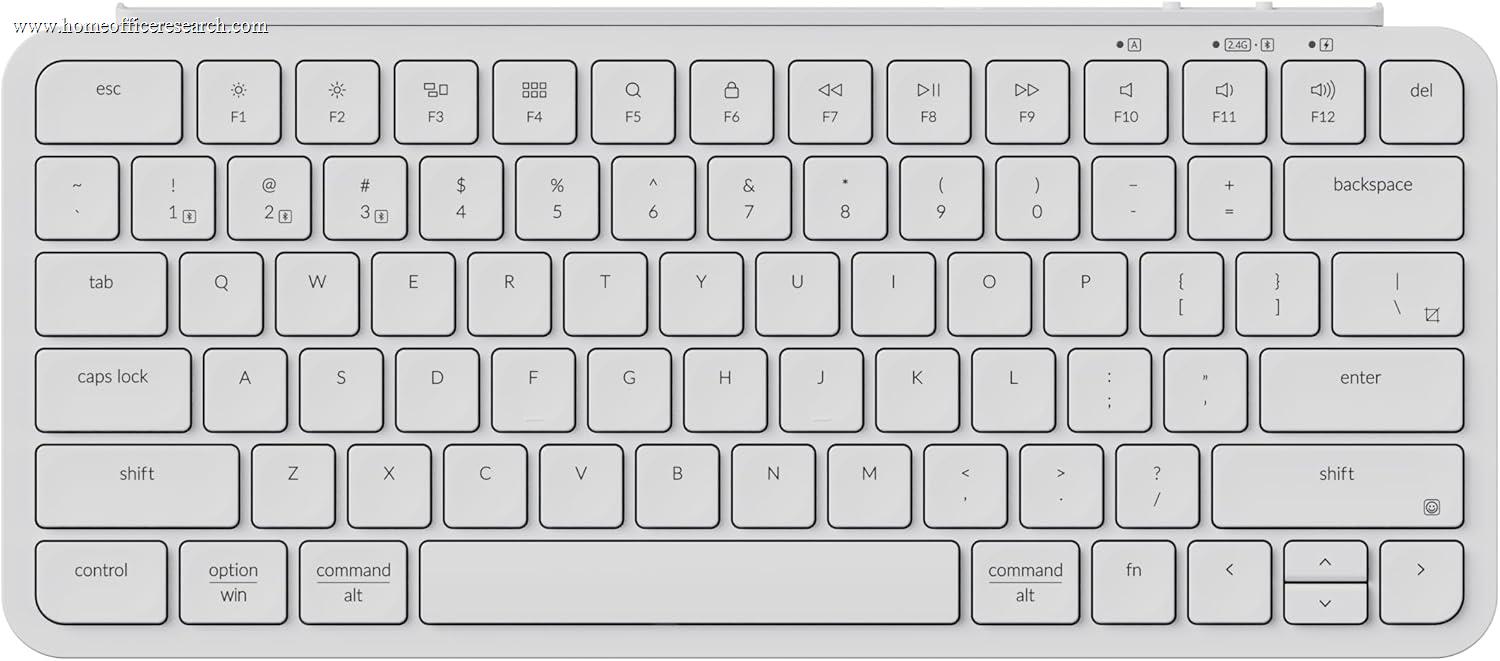
The Keychron B1 Pro is an ultra-slim scissor-switch keyboard with triple-mode wireless — Bluetooth 5.2 (three simultaneous devices), 2.4GHz (1000Hz polling), and USB-C wired — at a budget price. It is the most connectivity-capable keyboard in this price tier, with ZMK browser-based firmware programming and a claimed 1,200-hour battery that makes it effectively charge-irrelevant for most users. The fundamental trade-off is clear: this is not a mechanical keyboard, and in a guide built around mechanical typing feel and customizability, the B1 Pro occupies a specific niche — buyers who want a slim, quiet, multi-device wireless keyboard at a price point that the Logitech MX Keys and Apple Magic Keyboard don’t come close to matching.
How We Scored It
Category Deep-Dives
Typing Feel & Comfort
4.5 / 10 30% weightingThe B1 Pro’s typing feel is defined entirely by its scissor-switch mechanism — the same basic technology used in laptop keyboards for the past two decades. Scissor-switches use a crossed plastic frame beneath each keycap to guide the cap straight down and back up with minimal wobble, resulting in a consistent keystroke feel that is quiet, linear, and short-travel. At 1.7mm of key travel, the B1 Pro offers slightly more depth than the thinnest laptop keyboards (Apple Magic Keyboard: ~1.0mm) but significantly less than any mechanical option in this guide (4.0mm typical). For buyers who have typed on laptop keyboards for years and find mechanical keyboards needlessly loud, heavy, or deep, the B1 Pro’s typing feel will be familiar and entirely comfortable. For buyers who specifically want the tactile feedback, switch selection, and bottom-out depth of a mechanical keyboard, the B1 Pro does not deliver and is not designed to.
The absence of backlighting is the B1 Pro’s most commercially unusual omission. At its budget price — and at any price in the wireless keyboard category — no backlighting means the keyboard is not usable in dark environments without memorizing key positions. For touch typists who do not look at their hands, this is a non-issue. For anyone who types in a dim room, works in low-light conditions, or uses the keyboard as a travel companion in varied lighting environments, the lack of backlighting is a genuine functional limitation. Competing keyboards at similar price points — including basic membrane keyboards — routinely include at least single-color LED backlighting. Keychron’s apparent trade: LED circuitry was omitted in favor of longer battery life, which contributes to the 1,200-hour claimed figure.
The keycap profile uses slightly concave, spherical-dish sculpting similar to the Logitech MX Keys, which allows fingertips to land accurately in the key center without the dead-flat surface of Apple’s Magic Keyboard. The ABS keycap material is standard for this keyboard category and will develop surface shine over time, though the integrated nature of scissor-switch keycaps means replacement with aftermarket caps is not practical. The compact layout requires some adjustment for users accustomed to wider boards — particularly the compressed up/down arrow keys, which are half-height to accommodate the overall footprint.
Bottom line on typing feel: A competent scissor-switch keyboard that replicates the typing experience of a good laptop keyboard — no more, no less. The 4.5 score reflects an honest category comparison against mechanical keyboards: the B1 Pro is appropriate for its intended audience (laptop keyboard users who want a wireless desk board without a mechanical learning curve) but cannot compete with the tactile depth or switch choice available from any mechanical option in this guide.
Build Quality
5.0 / 10 20% weightingThe B1 Pro is constructed entirely from ABS plastic with a slim-profile chassis that measures 5.2mm at the front edge — a dimension that places it in the category of ultra-slim keyboards occupying the same physical class as the Logitech MX Keys Mini and Apple Magic Keyboard. The plastic finish is relatively refined for the price: the top surface is a smooth matte white or black (depending on colorway selected), and the chassis produces no noticeable flex under normal typing pressure. At 425g, the B1 Pro is the lightest keyboard in this evaluation by a significant margin — a genuine asset for travel use, where weight and bulk matter, but a contributor to the less substantial desk feel compared to metal-chassis keyboards.
The scissor-switch key mechanism is integrated into the PCB with no hot-swap capability — the concept doesn’t apply, as scissor-switches are not user-serviceable in the same way mechanical switches are. Individual scissor-switch units can be replaced in principle, but the process requires disassembly and is not a practical field-serviceability feature. This is standard for all slim keyboard designs in this category: the Logitech MX Keys Mini and Apple Magic Keyboard are equally non-serviceable at the switch level. The implication for longevity is that the B1 Pro, unlike the mechanical keyboards in this guide, has a finite serviceable life determined by the durability of its integrated switch mechanisms. Keychron rates the scissor-switches at 50 million keystrokes per key, which is adequate for multi-year home office use but lower than the 100 million keystroke ratings common for mechanical switches.
A thoughtful inclusion is the USB-C dongle storage in the battery compartment — a practical anti-loss design that keeps the 2.4GHz wireless receiver physically attached to the keyboard during transport. The battery compartment also houses the battery and is accessible from the bottom of the keyboard without tools. The included accessories — braided USB-C cable, USB-A adapter, and a silicone dust cover — represent a better-than-average inclusion set for a budget keyboard.
Bottom line on build quality: A well-executed slim plastic design that matches the construction philosophy of keyboards costing 2-3x as much, with the same integrated non-serviceable switch limitation. The 5.0 score reflects the absence of metal construction, the limited switch serviceability, and the lower absolute weight compared to mechanical alternatives, without penalizing the B1 Pro for design choices that are appropriate and expected in its category.
Connectivity & Features
8.0 / 10 20% weightingThe B1 Pro’s connectivity specification is the strongest in this guide at its price point and competitive with keyboards at 3-4x the cost. Triple-mode wireless — Bluetooth 5.2 with three simultaneous paired devices, a dedicated 2.4GHz receiver (1000Hz polling), and USB-C wired — covers every connectivity scenario a home office user is likely to encounter. The three-device Bluetooth pairing allows the B1 Pro to remain connected to a desktop, laptop, and phone or tablet simultaneously, switching between them via dedicated key combinations. The dedicated 2.4GHz receiver at 1000Hz polling provides the lowest wireless latency available (sub-1ms, equivalent to wired) for users who prioritize input responsiveness.
The 1,200-hour battery life without backlighting is the B1 Pro’s most practical single specification for home office use. A keyboard that doesn’t need charging for the functional equivalent of 50 consecutive eight-hour workdays is, in practice, a keyboard that the user will never think about in battery terms. Compared to mechanical wireless keyboards that require charging every 60-150 hours with backlighting on, the B1 Pro’s charge schedule is essentially irrelevant. The USB-C charging port supports charging while in use, so the transition to tethered operation when the battery does eventually deplete is transparent.
The physical mode switch on the back of the keyboard — selecting between 2.4GHz receiver, Bluetooth, and wired operation — is a more reliable switching mechanism than keyboard-shortcut-only approaches used on some competing keyboards. The Mac/Windows compatibility switch on the back of the keyboard swaps modifier key behaviors (Command/Option vs. Windows/Alt) without software. Together these hardware switches mean the B1 Pro’s connectivity mode is always visually verifiable rather than requiring the user to infer the active state from LED indicators or keyboard shortcut history.
Bottom line on connectivity: The strongest connectivity specification in this guide for the price — triple-mode wireless with three-device Bluetooth pairing, 1000Hz 2.4GHz polling, and 1,200-hour battery. The 8.0 score reflects genuine excellence in this category, held back slightly from the top scores by the absence of USB passthrough or additional connectivity features found on some higher-ranked keyboards.
Acoustics & Workspace Fit
6.5 / 10 15% weightingThe B1 Pro is the quietest keyboard in this evaluation by a clear margin. Scissor-switch mechanisms are inherently quieter than mechanical switches because they lack the distinct actuation event and spring-return click that defines mechanical keyboard sound. Typing on the B1 Pro is acoustically similar to typing on a laptop keyboard: a soft, consistent thud with no clacking, clicking, or metallic resonance. Measured at approximately 38–45 dB SPL under normal typing conditions, the B1 Pro is quiet enough to type during a video call without impacting audio quality, even on a directional microphone placed at close range. For users who share office space, participate in frequent calls, or work in environments where keyboard noise would be inconsiderate, the B1 Pro eliminates this concern entirely in a way that no mechanical keyboard in this guide can fully replicate.
The compact 65% footprint is well-suited to desk space economy. The B1 Pro’s dimensions (296mm × 130mm) place it among the smaller keyboard options in the guide, freeing desk space equivalent to the numpad and extended navigation cluster found on larger form factors. The 5.2mm front height and approximately 14.5mm maximum height create a very low-profile desk presence that suits setups where aesthetic minimalism is valued — glass desks, shared spaces, and travel configurations where visual footprint matters as much as physical footprint. No adjustable feet or angle adjustment are included, which is consistent with the slim form factor but means the fixed typing angle (approximately 5-6°) is not adjustable for users who prefer a higher wrist angle.
The compact layout does require some adaptation in navigation-intensive workflows. Without dedicated Home, End, Page Up, Page Down, Insert, or Delete keys, these functions require the Fn layer. For users who rely heavily on these keys in text editing or spreadsheet work, the adaptation period and reliance on layer switching may be a persistent friction point. The function row is full-height (a differentiator from the Apple Magic Keyboard’s half-height function keys), which makes F-key access more finger-friendly for users who use function keys regularly.
Bottom line on acoustics: The quietest keyboard in this guide — genuinely suited to video-call typing, shared office environments, and any use case where mechanical noise would be a problem. The 6.5 score reflects this genuine advantage alongside the compact layout’s navigation limitations and the lack of angle adjustability. If acoustic quietness is the primary requirement, no keyboard in this evaluation improves on the B1 Pro.
Value
7.5 / 10 10% weightingAt its budget price, the Keychron B1 Pro delivers triple-mode wireless connectivity, Bluetooth 5.2 with three-device pairing, 1000Hz 2.4GHz polling, ZMK firmware programming, and a 1,200-hour battery — a feature set that the Logitech MX Keys Mini provides at a higher price without the 2.4GHz high-polling wireless and with less firmware flexibility, at two and a half times the price. The pricier Apple Magic Keyboard has a fingerprint reader but no browser-based programmability, no 2.4GHz mode, and fewer simultaneous paired devices. From a connectivity-feature-per-dollar standpoint, the B1 Pro is difficult to argue against.
The value proposition is more nuanced when considering the B1 Pro in context with mechanical keyboards at similar prices. The Keychron C3 Pro at a slightly lower budget price delivers QMK/VIA firmware, 5-pin hot-swap, and gasket mount — a meaningfully deeper feature set for users who prioritize typing feel and long-term customizability. The C3 Pro’s slight price advantage over the B1 Pro buys a fundamentally different keyboard experience. Buyers who are choosing between the C3 Pro and B1 Pro are making a product-category choice — mechanical typing platform vs. slim wireless convenience — not a value comparison within a single category. Both represent genuinely good value within their respective segments.
The long-term cost picture for the B1 Pro is less favorable than for mechanical keyboards with hot-swap PCBs. Scissor-switch keyboards have a finite serviceable life that is not user-extendable through switch replacement. When the mechanism wears beyond functional tolerance — typically after several years of heavy use — the keyboard is replaced rather than repaired. At its budget price, this is a lower-stakes outcome than it would be for a premium keyboard, but it is a genuine difference from the multi-year ownership proposition of hot-swap mechanical keyboards.
Bottom line on value: Exceptional value within the slim wireless keyboard category — significantly better connectivity than keyboards at 2-3x the price. The 7.5 score (slightly below the C3 Pro’s 7.5, matching it here) reflects strong price-feature positioning in its segment, tempered by the finite serviceability ceiling that mechanical alternatives don’t share.
Customizability
5.0 / 10 5% weightingThe B1 Pro uses ZMK firmware, programmable through Keychron’s web-based Launcher tool at launcher.keychron.com — a browser-based interface that requires no software installation and works on any operating system including Linux, which has historically been underserved by keyboard software. The Launcher provides four programmable layers (primary and function layers for Mac and Windows, accessible via the Mac/Windows hardware switch), key remapping across all layers, and macro support for any key position. For users who want to move the Fn key, remap media controls, or create shortcut macros, this capability is meaningfully better than the no-programmability offered by the Logitech MX Keys and Apple Magic Keyboard.
The ZMK implementation is, however, significantly less capable than the full QMK/VIA firmware available on the mechanical keyboards in this guide. QMK supports unlimited layers (vs. four on ZMK here), tap-dance functions, combos, leader key sequences, per-key RGB animation control, and advanced macro programming. VIA’s real-time remapping updates via USB without cable reconnection. The B1 Pro’s ZMK programming, while genuinely useful and better than proprietary alternatives in this price tier, represents a partial implementation of what QMK offers — enough for most users’ basic remapping needs, but not a platform that serious keyboard customizers will find satisfying.
The absence of switch ecosystem access is the most fundamental customizability limitation. Because the B1 Pro uses integrated scissor-switches, there is no mechanism to change the keyboard’s physical feel through switch replacement. The typing feel of the B1 Pro is fixed at purchase and cannot be meaningfully altered through modification. This is standard for the slim keyboard category, but it means the B1 Pro’s customizability ceiling is set by design rather than by budget — an enthusiast who wants to modify their keyboard cannot do so regardless of how much they’re willing to spend on it.
Bottom line on customizability: ZMK browser-based programming is a genuine differentiator vs. Logitech and Apple in the slim keyboard category, providing real remapping and macro capability without software installation. The 5.0 score is honest about the gap relative to QMK keyboards: four programmable layers and no switch ecosystem access place the B1 Pro substantially below the mechanical options in this guide for customizability depth.
About the Manufacturer
chron
Keychron was founded in 2017 and built its reputation on bringing enthusiast mechanical keyboard features — hot-swap PCBs, QMK firmware, aluminum construction — to mainstream price points. The company’s expansion into the slim scissor-switch category with the B-series represents a deliberate move to compete directly with Logitech and Apple in the office keyboard segment traditionally dominated by non-mechanical designs.
The B1 Pro, launched in 2024, is Keychron’s compact entry in the ultra-slim wireless category. The B-series keyboard line pairs scissor-switch construction with the connectivity and programming features Keychron developed for its mechanical lineup — including ZMK browser-based firmware programming and multi-mode wireless that competitors at several times the price do not match. The B1 Pro’s comparison point is explicitly the Logitech MX Keys Mini and Apple Magic Keyboard: Keychron designed a keyboard that mirrors those products’ form factor while undercutting their price by 60-70% and adding 2.4GHz wireless and programmability.
Keychron publishes the B1 Pro’s ZMK firmware source on GitHub, consistent with the company’s broader open-source approach across its product line. For Linux users and developers who require a programmable keyboard without Windows or macOS software dependencies, this is a practical advantage. The B1 Pro’s browser-based programming works identically across operating systems — a design choice that reflects Keychron’s understanding of its technically-oriented customer base.