MX Mechanical Mini
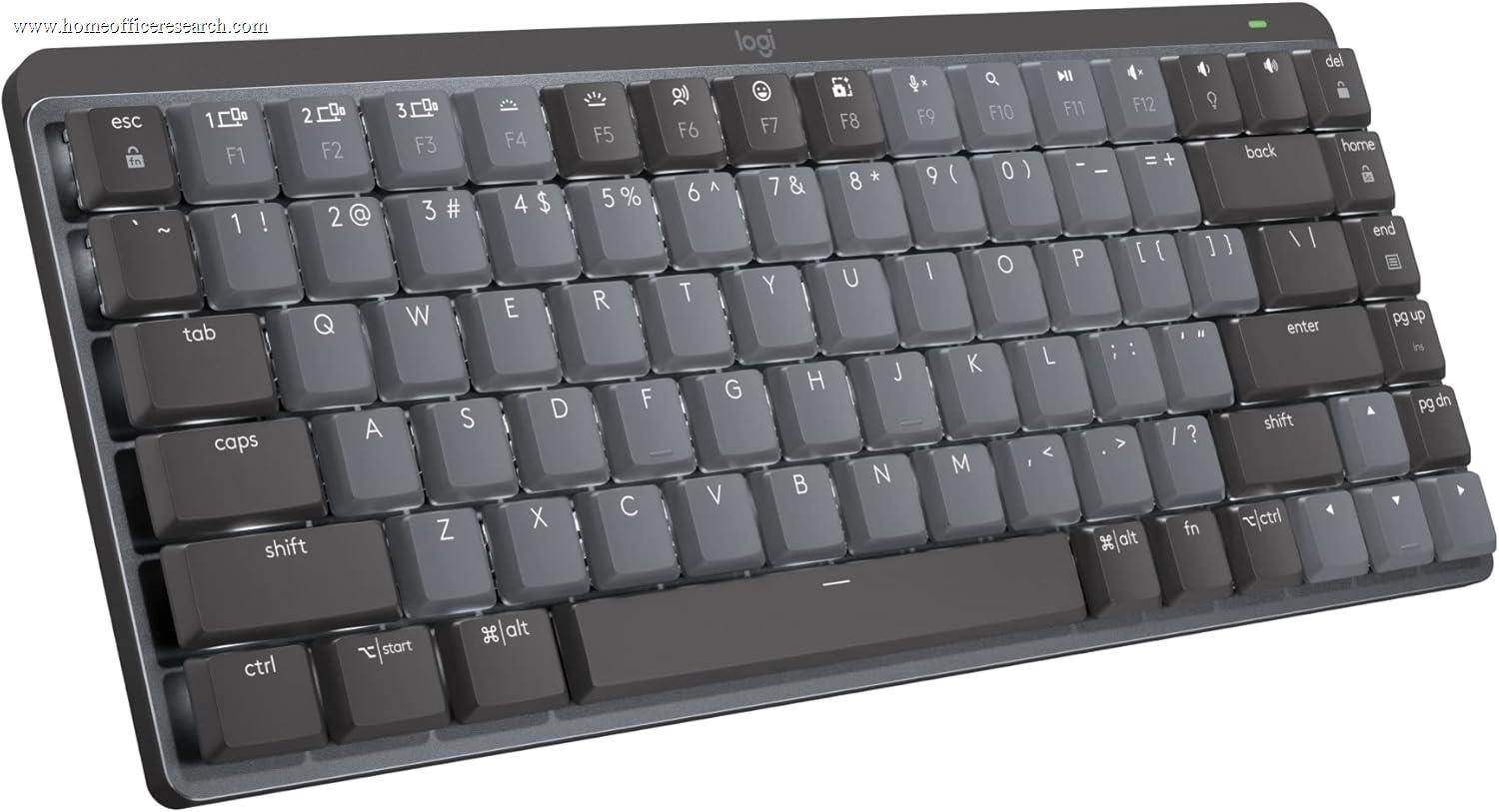
The Logitech MX Mechanical Mini applies the MX Mechanical’s core formula — low-profile silent mechanical switches, Logi Bolt wireless, three-device Easy Switch pairing, and smart proximity backlight — to a compact 65% layout that trims desk footprint and frees up mouse travel space. It earns the #9 spot in our rankings as a focused option for home office users who want genuine mechanical feedback in a smaller board, while surrendering the numpad and accepting a modest value penalty relative to its full-size sibling. Users who specifically need compact dimensions will find the trade-off reasonable; users without a desk space constraint will extract more value from the full MX Mechanical at a comparable price.
How We Scored It
Category Deep-Dives
Typing Feel & Comfort
7.0 / 10 30% weightingThe MX Mechanical Mini uses the same Kailh low-profile Tactile Quiet switches as its full-size sibling: 3.2mm total travel, 1.3mm pre-travel to actuation, and dampened stems that reduce both downstroke impact and upstroke return noise. The switch-level typing experience is identical to the MX Mechanical — tactile bump at actuation, lower-frequency dampened character, deliberate feel that is perceptibly more physical than scissor-switch keyboards while remaining appropriate for shared home office environments. Users who have typed on the full MX Mechanical will recognize the feel immediately.
The 7.0 score — one point below the full-size MX Mechanical — reflects the compact 65% layout’s adaptation cost. The absence of a dedicated numpad changes hand positioning for users who rely on numeric entry, and the compressed key matrix places some utility keys in non-standard positions that require relearning. For users coming from a full-size board, the initial transition involves measurable error rates in the first days of use. For users who primarily type prose and have prior compact keyboard experience, this penalty is largely absent — the switches and key spacing translate cleanly from the full-size design. The layout penalty is real but user-dependent; the 7.0 is a population-weighted estimate that accounts for both groups.
Bottom line on typing feel: Identical switch quality to the full MX Mechanical. The gap to 7.9 is layout rather than hardware — the compact layout is an adjustment, not an improvement, for most users arriving from a standard board. If you already type on 65% or 75% keyboards and find the switch quality compelling, this penalty evaporates.
Build Quality
7.0 / 10 20% weightingThe MX Mechanical Mini’s plastic chassis is well-executed for its category. The shorter board — 312.6mm versus the full-size’s 433.9mm — is inherently more resistant to torsional flex, and the construction is tight with no chassis creak or key matrix wobble. Stabilizers on the wide keys perform consistently without tilt. The rubberized feet maintain position under normal typing forces. At 612g, the Mini is meaningfully lighter than the 828g full-size board, which is a transport advantage for users who move between workspaces.
The material story has the same limitations as the full-size. Integrated ABS keycaps will develop surface shine with sustained daily use — an inevitable consequence of the material that Keychron addresses with double-shot PBT at comparable and lower price points. The chassis, while solid, is plastic rather than aluminum; the Keychron Q1 Pro’s gasket-mounted aluminum construction provides a different build quality tier at higher cost. The Mini does not regress from the full-size on build; it simply carries the same material profile into a smaller frame, and the 7.0 reflects that consistent but not distinguished positioning.
Bottom line on build quality: Solid compact plastic construction — no flex, no rattle, appropriate for the Logitech MX positioning. The compact form factor eliminates the minor ergonomic consideration of the full-size layout (mouse placement relative to body centerline). ABS keycaps are the headline limitation at this price point.
Connectivity & Features
8.0 / 10 20% weightingThe MX Mechanical Mini carries the full Logitech connectivity suite: Logi Bolt 2.4GHz and Bluetooth dual wireless, three-device Easy Switch pairing, and USB-C charging. Logi Bolt maintains sub-1ms wireless stability in RF-congested environments where Bluetooth connections can degrade — a meaningful advantage in home offices contending with multiple Wi-Fi networks, smart home devices, and other wireless peripherals. Easy Switch device toggling is near-instantaneous and initiated from dedicated F1, F2, and F3 keys. The proximity-activated smart backlight — the same feature present on the full-size — detects approaching hands and activates per-key white LEDs without manual intervention, extending battery life without sacrificing the illumination experience.
The 8.0 connectivity score — half a point below the full MX Mechanical’s 8.5 — reflects a straightforward calculation: the Mini delivers the same connectivity package as the full-size at approximately the same price, but delivers fewer keys for that investment. The connectivity itself is unchanged and strong; the score differential acknowledges that the compact format does not add new wireless or feature capabilities to justify price parity with the larger board. Logi Options+ software support is identical, providing per-key remapping, app-specific profiles, and the Flow cross-computer workflow tool across Windows, macOS, and Linux.
Bottom line on connectivity: Full Logitech connectivity stack — Logi Bolt + Bluetooth, three-device Easy Switch, proximity backlight, Logi Options+ software. The 8.0 reflects genuinely strong wireless performance and software platform, scored one notch below the full-size to acknowledge that compact format at comparable price does not expand on those foundations.
Acoustics & Workspace Fit
7.5 / 10 15% weightingSilent mechanical switches produce the same acoustic profile regardless of board size: a dampened, lower-frequency thump at actuation and bottom-out, distinctly quieter than standard mechanical switches and broadly comparable in loudness to a firm scissor-switch keyboard. The sonic character differs from scissor-switch alternatives — less sharp, more muted — but total sound pressure is similar. In a shared home office, on video calls, or in an open-plan space, the MX Mechanical Mini is an appropriate choice. In a completely silent room or with a sensitive near-field microphone directly on the desk surface, the actuation noise remains perceptible, as it does with all mechanical keyboards regardless of dampening.
The compact 65% layout makes a modest positive contribution to workspace fit: the smaller footprint allows the mouse to be positioned closer to the body’s centerline, reducing shoulder abduction under extended use. For users who previously managed a full-size board’s rightward mouse displacement, this is a genuine ergonomic improvement. The 7.5 acoustics score is identical to the full MX Mechanical — the switch acoustics are the same, and the workspace fit advantage of the compact layout does not change the switch noise profile that drives this category.
Bottom line on acoustics: Same silent switch acoustic profile as the full MX Mechanical — near-scissor-switch noise levels, appropriate for shared home office environments and most video call setups. The compact layout’s desk footprint reduction is a workspace geometry improvement but does not affect the acoustic scoring. For users prioritizing acoustic performance above all else, the MX Keys S remains the quieter recommendation.
Value
6.0 / 10 10% weightingThe MX Mechanical Mini’s value case is the most exposed weakness in the product. At approximately the same retail price as the full-size MX Mechanical, the Mini delivers the same switch technology, the same connectivity package, and the same software platform — in a smaller chassis with fewer keys. Users who need desk space recovery or specifically prefer compact layouts will find the proposition reasonable. Users who are not space-constrained face a genuine question: the full MX Mechanical offers more keyboard for a similar spend, and the Mini’s 65% layout is not priced with the premium-compact positioning that commands a surcharge on keyboards like the Keychron Q1 Pro.
The competitive context reinforces the pressure. Keychron K2 HE — ranked immediately above the Mini at #8 — offers hot-swap sockets and double-shot PBT keycaps at a lower price point, with Hall Effect actuation that the MX Mechanical platform does not offer. The Mini’s advantage over K2 HE is the Logi Bolt wireless protocol and Logi Options+ software ecosystem — meaningful differentiators for users already invested in Logitech peripherals, but not sufficient to overcome the physical specification gap for buyers approaching keyboards on their merits. The 6.0 value score is a function of the price-to-capability relationship in its specific segment, not a judgment on the product’s quality in absolute terms.
Bottom line on value: Priced at parity with its full-size sibling while delivering fewer keys; priced above compact alternatives with stronger physical specs. The value proposition is defensible only for users who specifically need the 65% form factor and want Logi Bolt wireless reliability — the two conditions under which the Mini’s feature set aligns with its price positioning.
Customizability
5.0 / 10 5% weightingLogi Options+ provides the same software customization foundation on the Mini as on the full-size MX Mechanical: per-key remapping, app-specific profiles, smart actions, and the Flow cross-computer control feature. For users whose customization needs are software-side, this is a capable platform. The 65% layout does, however, reduce the number of available physical keys from which to build those remappings — fewer keys means a smaller base for custom assignments, and functions that have dedicated keys on full-size layouts must be accessed via function-layer combinations on the Mini.
Physical customization is not available through this platform. There are no hot-swap sockets, no replaceable keycaps, no RGB configuration (white backlight only), and no QMK or VIA firmware support. This is consistent with the full-size MX Mechanical’s approach — Logitech positions the MX platform around software customization and wireless ecosystem, not physical keyboard enthusiast features. The 5.0 score is one point below the full MX Mechanical’s 6.0, reflecting the reduced available key count for remapping on the compact layout. The gap is narrow because customizability carries only 5% weighting and the software platform is unchanged.
Bottom line on customizability: Software customization via Logi Options+ is capable and unchanged from the full-size sibling; physical customization — switch swapping, keycap replacement, custom firmware — is not available on this platform. Users for whom physical customization matters should evaluate the Keychron ecosystem, where hot-swap and PBT are standard features rather than premium additions.
About the Manufacturer
tech
Logitech International S.A. was founded in 1981, headquartered in Lausanne, Switzerland, and trades on the Nasdaq under the ticker LOGI. One of the largest PC peripheral companies globally, Logitech’s product portfolio spans keyboards, mice, webcams, speakers, gaming peripherals, and video conferencing hardware. The company’s MX (Master) product line is Logitech’s premium productivity tier — anchored by the MX Master mouse series and MX Keys keyboard family — and is designed for professional and creative users who want best-in-class performance without gaming aesthetics.
Logi Bolt is Logitech’s proprietary 2.4GHz wireless standard, developed to address Bluetooth reliability limitations in high-density wireless environments. Unlike the older Unifying receiver, Bolt uses a revised protocol that maintains connection stability in RF-congested settings — a meaningful distinction for home offices where spectrum is increasingly crowded with smart home devices, multiple Wi-Fi networks, and other wireless peripherals. Logi Options+ provides centralized configuration across all MX devices, enabling per-app key remapping, gesture customization, and the Flow cross-computer workflow tool.
The MX Mechanical Mini is the compact sibling to Logitech’s full-size MX Mechanical, offering the same low-profile silent mechanical platform in a 65% form factor. Rather than competing in the keyboard enthusiast market on switch selection, hot-swap sockets, or acoustic tuning, Logitech positioned the MX Mechanical line around its existing connectivity advantages — Logi Bolt, multi-device Easy Switch, Options+ software — applied to a mechanical design with silent switches. The Mini extends that positioning to users for whom desk footprint is the primary hardware constraint.