TS5 Plus
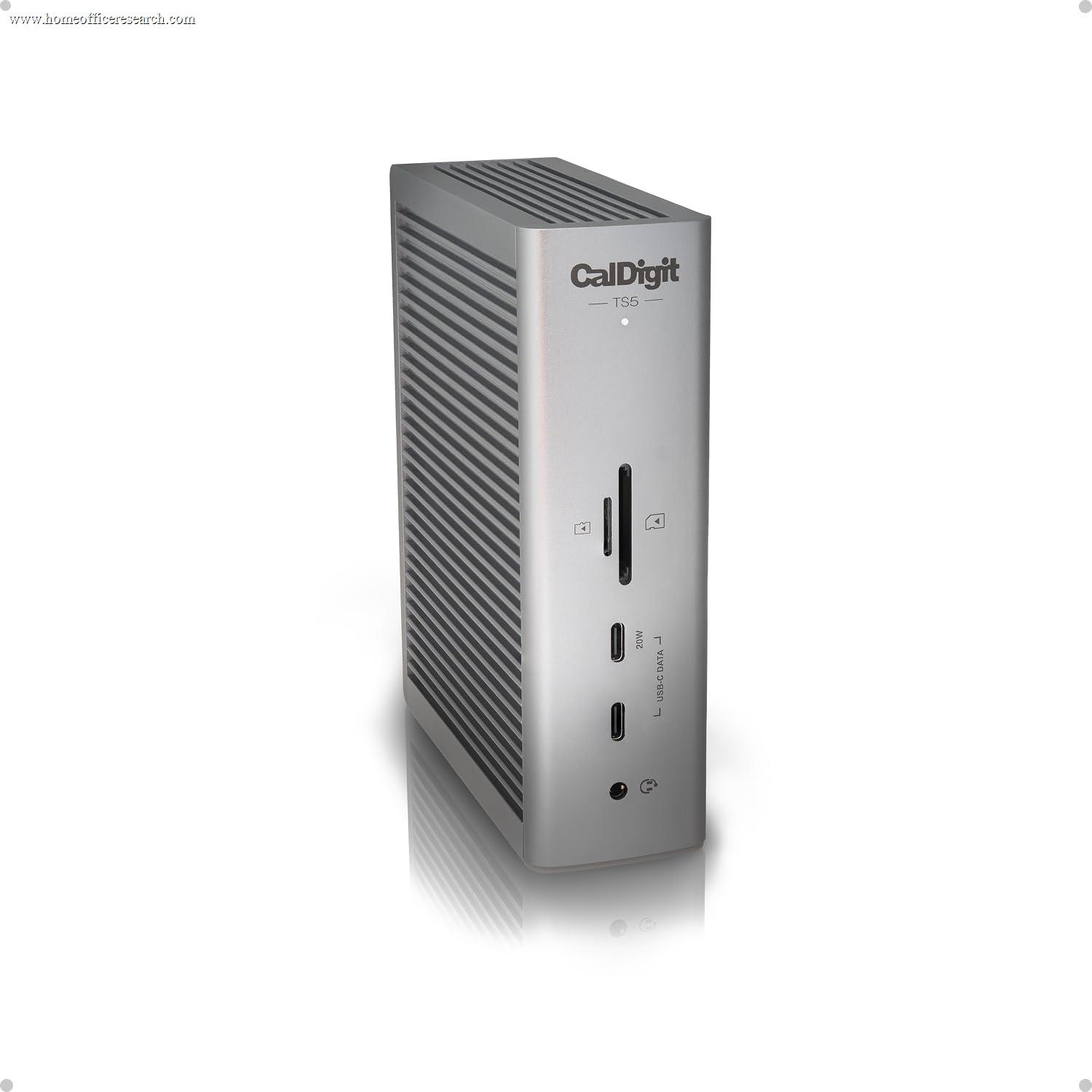
The CalDigit TS5 Plus is the first Thunderbolt 5 dock to take the top spot in our docking station guide, and it does so decisively. It pairs Thunderbolt 5’s 80Gbps symmetric bandwidth (up to 120Gbps in Bandwidth Boost mode) with the most complete port array on any dock we’ve evaluated — 20 ports, dual independent 10Gb/s USB controllers, and a rare 10 Gigabit Ethernet port on a Thunderbolt dock — plus 140W of dedicated host charging from a 330W supply. It is expensive and it is overkill for a single 4K monitor, but for a high-end multi-display, high-throughput home office it is the new single-cable benchmark. It replaces the TS4 as our #1.
How We Scored It
Category Deep-Dives
Connectivity & Bandwidth
10.0 / 10 30% weightingThe TS5 Plus is built on Thunderbolt 5, which is the headline reason it displaces the Thunderbolt 4 TS4 at the top of our rankings. Thunderbolt 5 delivers 80Gbps of symmetric bandwidth — double Thunderbolt 4’s 40Gbps — and can dynamically allocate up to 120Gbps in one direction (“Bandwidth Boost”) when driving extremely demanding displays. For a docking station, more host bandwidth is the resource that everything else draws from: it is what allows the dock to run multiple high-resolution displays and fast storage and 10-gigabit networking simultaneously without any one of them starving the others.
CalDigit used that bandwidth headroom to do something no previous Thunderbolt dock has: fit dual independent 10Gb/s USB controllers. On most docks, all the USB-A and USB-C data ports share a single controller and therefore a single pool of bandwidth — copy from two fast SSDs at once and they split the pipe. The TS5 Plus splits its ten 10Gb/s ports across two controllers, so heavy simultaneous transfers can run closer to full speed in parallel. This is a genuinely meaningful upgrade for anyone who works with external storage, capture devices, or card offloads as part of their daily workflow.
It is also one of the very few Thunderbolt docks with 10 Gigabit Ethernet (most top docks, including the TS4, top out at 2.5GbE). For users on a 10GbE network or a fast NAS, this removes the networking bottleneck entirely. Backward compatibility is complete: the TS5 Plus works with Thunderbolt 5, Thunderbolt 4, and USB4 hosts on both Mac and PC, falling back gracefully to the host’s available bandwidth.
Bottom line on connectivity: Thunderbolt 5’s doubled bandwidth, dual USB controllers, and a first-in-class 10GbE port make this the most capable dock connectivity package on the market. The 10.0 is unambiguous — nothing else in our evaluation matches it.
Display Capability
9.5 / 10 25% weightingThunderbolt 5’s bandwidth pays its most visible dividend in display support. On a Windows host the TS5 Plus can drive up to dual 8K@60Hz displays, or high-refresh configurations such as dual 4K at very high refresh rates that a Thunderbolt 4 dock cannot sustain. This is the capability that matters most as the productivity-monitor market itself moves toward 5K2K, 6K, and high-refresh 4K panels — a TB4 dock increasingly becomes the bottleneck on those displays, and the TS5 Plus removes it.
On Apple Silicon Macs the picture is more nuanced, and it’s worth being precise because it’s the most common point of confusion. macOS still does not support DisplayPort MST, so the number of independent displays you can run is governed by what the Mac itself allows over Thunderbolt — the TS5 Plus can feed the maximum the host supports (e.g., dual 6K-class displays on a Mac that permits them), but it cannot exceed the Mac’s own display limits. This is a macOS constraint, not a dock limitation, and it applies to every Thunderbolt dock equally.
Displays connect through the dock’s downstream Thunderbolt 5 ports (via USB-C, DisplayPort adapters, or directly to Thunderbolt/USB-C monitors) as well as a native DisplayPort 2.1 output on the rear. There is no dedicated HDMI jack, so HDMI monitors need an adapter — a reasonable trade at this tier, where most buyers are running Thunderbolt, USB-C, or DisplayPort displays already.
Bottom line on display: Best-in-class display headroom for Windows multi-monitor and future-proofed for the high-resolution, high-refresh panels now arriving. The 9.5 rather than a perfect score reflects the absence of a native HDMI jack (DisplayPort 2.1 is present) and the macOS display-count ceiling that constrains Mac users — neither of which is a flaw in the dock itself.
Power Delivery
9.5 / 10 20% weightingThe TS5 Plus supplies 140W of dedicated host charging over its upstream Thunderbolt 5 connection — enough to fully power and charge even a 16-inch MacBook Pro or a high-wattage Windows workstation laptop under load, not just trickle-charge it. This is the modern 240W-capable USB-C PD ceiling’s practical sweet spot for laptops, and it means the dock genuinely delivers on the single-cable promise: one Thunderbolt cable carries data, video, networking, and full charging power to the laptop.
Critically, that 140W is dedicated rather than shared from a common pool, drawn from a substantial 330W external power supply. On lesser docks, aggressive use of downstream ports can quietly reduce the power available to charge the host; the TS5 Plus’s oversized supply means host charging and downstream device power (including fast-charging phones and bus-powered SSDs on its ports) are provisioned independently. The external brick is large — the one ergonomic cost of all that power — but it is the correct engineering choice for sustained reliability.
Bottom line on power: 140W of dedicated charging from a 330W supply covers essentially every laptop a home office would dock, with headroom to spare for downstream devices. The 9.5 reflects category-leading delivery; only a 240W-class host output (overkill for current laptops) would push it higher.
Port Mix
10.0 / 10 15% weightingWith 20 ports, the TS5 Plus has the most comprehensive port array of any dock in our evaluation. The data complement is ten 10Gb/s USB ports (a mix of USB-A and USB-C) spread across the two controllers described above, three Thunderbolt 5 ports (one upstream to the host, the rest downstream for displays, storage, or daisy-chaining), 10GbE, and a 3.5mm audio combo jack. Front-facing ports include fast-charge-capable USB for phones and quick device connections, with the bulk of the connectivity on the rear for permanent peripherals.
Unlike some Thunderbolt docks that omit card slots, the TS5 Plus retains front-panel UHS-II SD 4.0 and microSD 4.0 card readers — both running at full UHS-II speed and usable simultaneously — alongside its high-speed USB ports. For photographers and videographers, that means the card-import workflow is built in, with no separate USB card reader required.
Bottom line on port mix: Twenty ports, dual-controller USB, and three Thunderbolt 5 connections make this the most flexible single-dock layout available. The 10.0 reflects a layout that covers card-reader-dependent workflows and high-bandwidth USB alike — front-panel UHS-II SD and microSD readers sit alongside ten 10Gb/s USB ports and three Thunderbolt 5 connections.
Value
7.5 / 10 7% weightingThe TS5 Plus is among the most expensive docks on the market, and the 7.5 value score reflects that honestly. Thunderbolt 5 carries a real price premium today, and the TS5 Plus sits at the top of even the TB5 tier because of its port count, dual controllers, and 10GbE. The crucial buyer question is therefore not “is it good” — it clearly is — but “do you need it.”
The value case is strong specifically for users who will use the bandwidth: multiple high-resolution or high-refresh displays, fast external SSDs and capture hardware running in parallel, and a 10GbE network or NAS. For that buyer, no other single dock consolidates the workflow as cleanly, and the price is justified. For a user running a single 4K monitor, a keyboard, a mouse, and a 1GbE connection, the TS5 Plus is genuine overkill — a Thunderbolt 4 dock like the TS4 (still our #2) or a well-chosen USB-C dock delivers the same day-to-day experience for far less. The TS5 Plus loses value points not because it’s overpriced for what it is, but because its full capability is wasted on a modest setup.
Bottom line on value: Excellent value for a high-throughput, multi-display, 10GbE home office; poor value for a single-monitor desk that will never approach its limits. Match the dock to the workload — and if your workload is modest, buy down to the TS4.
Build Quality
9.5 / 10 3% weightingCalDigit’s hardware reputation is built on exactly this category, and the TS5 Plus upholds it. The enclosure is a precision aluminum chassis that doubles as a passive heatsink, keeping the dock cool under sustained load while running quiet — important for a device that lives on the desk and may be pushing 10GbE, multiple displays, and 140W charging at once. It can be oriented vertically (with the included stand) or laid flat, which helps on space-constrained desks.
CalDigit has a strong track record for firmware support and long-term reliability on its Thunderbolt docks — the TS3 Plus and TS4 both remained well-supported for years after release — which is a meaningful consideration on a premium device intended to anchor a desk for the better part of a decade. The large external power brick is the only build-related downside worth noting, and it is the direct consequence of the 330W supply that enables the dock’s power story.
Bottom line on build: Premium aluminum construction, quiet thermals under full load, and CalDigit’s proven support history. The 9.5 reflects category-leading build; the bulky power brick is the only minor mark against it.
About the Manufacturer
Digit
CalDigit is a California-based manufacturer that has specialized in Thunderbolt connectivity and professional storage for over two decades, and it is the brand most consistently recommended in the Thunderbolt dock category. Its Thunderbolt Station line — the TS3 Plus, then the TS4, and now the TS5 and TS5 Plus — has set the benchmark for port count and reliability in each successive Thunderbolt generation.
The TS5 Plus, released in 2025, is CalDigit’s flagship Thunderbolt 5 dock and sits above the standard TS5 (15 ports, 140W) in the lineup. CalDigit positioned it explicitly as a maximum-capability single-cable solution, leaning into the dual-controller USB architecture and 10GbE that Thunderbolt 5’s bandwidth makes possible.
For buyers assembling a long-term desk, CalDigit’s history of sustained firmware updates and its reputation for honest specification (published port speeds and power figures that match real-world behavior) are practical reasons the brand is so frequently the default recommendation in this category.