Magic Keyboard (Touch ID)
The Magic Keyboard is the definitive choice for Mac home office users who want seamless ecosystem integration — Touch ID biometric login, precisely tuned macOS function keys, and Apple’s aluminum construction. Non-Mac users should look elsewhere: the MX Keys S delivers comparable typing quality with actual cross-platform support.
How We Scored It
Category Deep-Dives
Typing Feel & Comfort
9.0 / 10 30% weightingThe Magic Keyboard’s 1.0mm scissor-switch actuation is the reference standard for laptop-style keyboard feel — because it is, in fact, the same mechanism Apple uses in MacBook keyboards. Users moving from a MacBook to an external keyboard find the experience essentially continuous; no retraining is required. The light actuation force and consistent key return make for a low-fatigue typing experience over long sessions. For users who prefer mechanical feedback with longer travel, this is a different category of feel. But on its own terms — quietest, most precise, most consistent scissor-switch in our guide — the Magic Keyboard earns a 9.0.
At 1.0mm of total travel, the Magic Keyboard sits at the shallow end of the keyboard spectrum. This is not an accident — Apple’s engineering priority is a keyboard that disappears beneath the hands and requires the minimum possible finger displacement per keystroke. The result is a typing feel that rewards high-speed typists who have already adapted to MacBook keyboards: the key return is snappy and the actuation event is crisp, without the mushy bottom-out characteristic of lower-quality scissor designs. Users arriving from mechanical keyboards with 3.5–4.0mm of travel will notice the difference immediately; those users may want extended acclimation time before forming a final judgment.
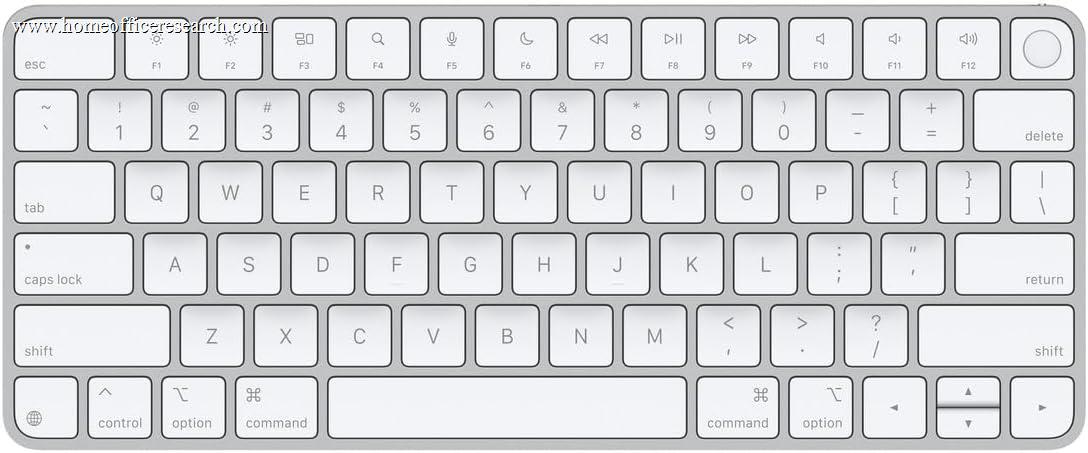
The keycap geometry is flat rather than spherically dished — a meaningful distinction from the Logitech MX Keys S, which uses a concave dish to center the fingertip. Apple’s keycaps rely on precise spacing and key sizing to guide finger placement rather than topography. This is the typing feel native to every MacBook shipped in the last six years, and it is the reason the 9.0 score reflects a high ceiling: for the large population of Mac users whose muscle memory was formed on this exact mechanism, the Magic Keyboard is the external keyboard with zero adaptation cost.
Bottom line on typing feel: The definitive scissor-switch reference for MacBook users. Light, fast, consistent, and essentially zero-adaptation for the Mac-native typist. For users coming from mechanical keyboards, the 1.0mm travel is a genuine category shift that requires deliberate adjustment.
Build Quality
9.5 / 10 20% weightingAluminum case construction distinguishes the Magic Keyboard from virtually every other keyboard in our guide, which use plastic housings at all price points. The chassis is rigid, premium to the touch, and shows no flex under heavy typing. This is the highest build quality score in our keyboard rankings — the material choice alone sets a bar that plastic-bodied competitors don’t clear regardless of price.
The aluminum extrusion forms the entire upper deck of the keyboard, with the key mechanisms sitting in precise machined apertures. There is no panel flex, no rattle from the chassis, and no perceptible torsion when the keyboard is twisted by its corners — tests that reveal cheap construction in plastic boards. Apple’s manufacturing tolerances on the Magic Keyboard are consistent with its laptop hardware, not its peripheral category competitors. The result is a keyboard that feels more like a piece of computer hardware than an accessory.
The keyboard’s very low profile — sitting nearly flush with the desk surface — is an architectural choice that complements the aluminum chassis. Without tall plastic sidewalls to flex or a raised key bed to rattle, the entire keyboard behaves as a single rigid unit. The non-slip rubber pad on the underside secures this form to any desk surface. The USB-C port is positioned on the right edge, used for both wired connection and battery charging. The battery is internal and non-user-replaceable, which is standard for this product class.
Bottom line on build quality: The highest build quality score in our keyboard rankings. Aluminum construction at this price point is genuinely rare in the keyboard category, and the manufacturing precision Apple brings to this product is evident in every interaction with it.
Connectivity & Features
7.5 / 10 20% weightingTouch ID enables biometric authentication at the keyboard — fast, reliable fingerprint login without requiring the user to move their hand to the Mac’s built-in sensor. In a home office setting where screen locking is a regular habit, Touch ID at the desk is a genuine quality-of-life improvement. The sensor sits in the top-right corner of the keyboard, integrated into the power button, and draws on Apple’s Secure Enclave architecture for cryptographic fingerprint matching. Authentication is near-instantaneous and works reliably across a range of environmental conditions that cause problems for lower-quality fingerprint sensors.
Wireless connectivity is single-device Bluetooth — the Magic Keyboard pairs with one device at a time and has no multi-device Easy-Switch keys. Moving the keyboard to another machine means re-pairing it (or briefly reconnecting the USB-C cable), unlike the Logitech MX Keys S, which switches between three paired devices with a keypress. For a single-Mac desk this is a non-issue; for anyone who works across a Mac and a second machine, it is a real daily limitation and the main reason this category does not score higher. USB-C provides a wired connection option and doubles as the charging port. The macOS function key row is precisely mapped to Apple system functions — Mission Control, Spotlight, Do Not Disturb, dictation, screen brightness, media controls — with no software configuration required. These keys operate natively in macOS as first-class system controls.
The deduction is clear and significant: Touch ID is Mac-only. On Windows, the keyboard registers as a generic Bluetooth HID device. The fingerprint sensor produces no output, the macOS-specific function keys default to generic F-row behavior, and the ecosystem integration that justifies this keyboard’s existence is entirely absent. This is not a limitation of the hardware per se — it is a deliberate architecture choice by Apple that ties the Secure Enclave authentication chain to macOS. The Magic Keyboard is an Apple ecosystem keyboard, not a cross-platform peripheral, and buyers outside that ecosystem receive a plastic-equivalent product in an aluminum case.
Bottom line on connectivity: Touch ID biometric login and native macOS function key integration are the two features that justify this keyboard for Mac users. But single-device Bluetooth with no Easy-Switch, plus a feature set that works only on macOS, hold the 7.5 below the multi-device, cross-platform leaders. On any other platform the standout features disappear — buy this keyboard only if your primary machine runs macOS.
Acoustics & Workspace Fit
8.5 / 10 15% weighting1.0mm travel produces a soft, low-pitched keystroke sound — among the quietest in our guide. The physics of shorter travel are straightforward: less finger displacement means lower impact velocity at bottom-out, which translates directly to reduced sound emission. The Magic Keyboard produces a muted tap that sits well below the ambient noise floor in most home office environments. Video call noise is essentially a non-issue at any practical microphone sensitivity setting.
The compact layout reduces desk footprint and brings the mouse closer to the typing hand, reducing shoulder rotation over long sessions. For users who have migrated from a full-size keyboard, the absence of a numpad requires a brief spatial adjustment for mouse positioning, but the ergonomic benefit of reduced lateral reach — particularly in setups where the monitor is centered — is measurable over the course of a full work day. The keyboard sits nearly flat on the desk at a very shallow angle, with no height-adjustment feet; this fixed geometry suits the majority of standard desk setups.
The absence of a numpad is a real trade-off for users who rely on numerical entry. Apple offers a full-size Magic Keyboard with Numeric Keypad for those users, and that model deserves separate evaluation. For everyone else, the compact layout is the correct choice for a home office footprint.
Bottom line on acoustics: Reference-quiet for the scissor-switch category, with a compact layout that improves mouse ergonomics. The only meaningful workspace trade-off is the absent numpad — users with heavy numerical input requirements should evaluate the numeric keypad variant.
Value
6.0 / 10 10% weightingApple’s premium pricing over cross-platform alternatives with comparable or better feature sets is the primary value limitation. The Logitech MX Keys S — our #1 ranked keyboard — delivers similar typing quality with cross-platform compatibility, per-key illumination, full-size layout, and Logi Bolt wireless at a comparable price point. For a non-Mac user, the value case for the Magic Keyboard does not close: you are paying Apple pricing for a keyboard that functions as a basic Bluetooth HID device on your platform.
For committed Mac users, the value calculus is different. Touch ID at the desk eliminates a friction point that accumulates dozens of times daily in a typical work session. The aluminum chassis longevity likely exceeds that of plastic-bodied competitors at similar prices. The zero-adaptation typing experience for MacBook users has real productivity value in the first weeks of use. These are genuine returns on the premium — but they accrue only within the Apple ecosystem.
The 6.0 value score reflects the keyboard’s strong performance for its target user weighted against a cross-category evaluation that includes keyboards with broader utility. A Mac-only buyer might reasonably score this higher on personal value; a platform-agnostic buyer lower. The 6.0 represents our best estimate of value across the range of home office buyers who will consider this keyboard.
Bottom line on value: Fair-to-good value for Mac users who will use Touch ID daily and appreciate the aluminum build. Weak value for anyone outside the Apple ecosystem, where you’re paying a platform premium for features that don’t function.
Customizability
4.0 / 10 5% weightingNo switch options, no keycap replacement, no backlight on the standard model, no per-key programming in hardware. Apple’s System Preferences allows modifier key remapping — Caps Lock, Control, Option, Command, and Function keys can be reassigned to alternate modifier functions. That is the extent of customization available. The Magic Keyboard is not a keyboard for users who want to configure their setup — it is a keyboard for users who want to use their setup.
This is not surprising and not really a criticism: Apple’s design philosophy for the Magic Keyboard is uniformity and integration, not modularity. The keyboard is a finished product, not a platform. There is no QMK firmware, no hot-swap PCB, no third-party keycap compatibility, no RGB to tune, and no per-key macro programming. For the buyer who wants any of these things, the Keychron Q1 Pro — our #2 ranked keyboard — is the correct recommendation. For the buyer who wants none of these things and simply wants a keyboard that works perfectly with their Mac from day one, the absence of configuration options is not a deficiency.
Bottom line on customizability: The lowest customizability score in our top-five rankings. Modifier remapping via System Preferences is the only meaningful customization available. This score reflects a category constraint, not a product failure — but buyers seeking a configurable setup should look at the Keychron Q1 Pro.
About the Manufacturer
Inc.
Apple Inc. was founded in 1976 in Cupertino, California, by Steve Jobs, Steve Wozniak, and Ronald Wayne. Originally a personal computer company, Apple expanded across four decades into consumer electronics, mobile devices, software, and services. Apple designs first-party input peripherals as extensions of its Mac product line — keyboards, mice, and trackpads are developed in-house as tightly integrated hardware components of the Mac experience rather than as standalone peripheral products.
The Magic Keyboard line has evolved continuously since 2009. The current scissor-switch generation replaced Apple’s controversial butterfly mechanism in 2019 and has since become the standard mechanism across the MacBook Pro, MacBook Air, and external keyboard product lines. Touch ID biometric integration — introduced on external keyboards with the M1 Mac generation — extends Apple’s Secure Enclave authentication system to desk peripherals, allowing fingerprint login and Apple Pay authentication without requiring the user to reach toward the laptop’s built-in sensor.
Apple sells the Magic Keyboard through its own retail stores, Apple.com, and authorized resellers including Amazon. The keyboard is sold in multiple configurations: the standard compact layout with Touch ID reviewed here, a full-size variant with numeric keypad and Touch ID, and a Touch ID + Touch Bar variant. All current Magic Keyboards use USB-C for charging and wired connection.