Pro Click V2
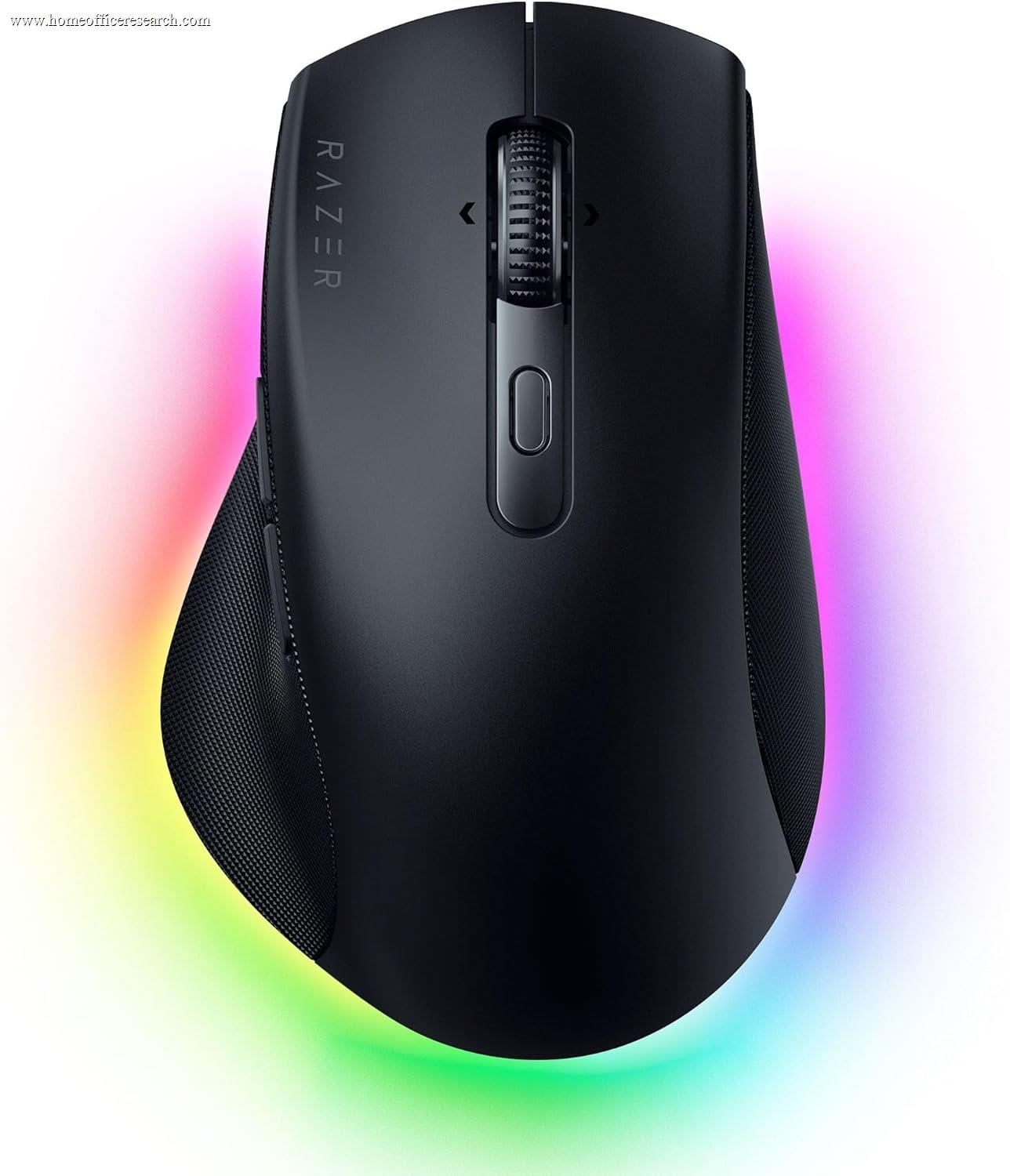
The Razer Pro Click V2 is the power-user pick of our evaluation — Razer’s attempt to bring gaming-grade hardware to a productivity shape. It has the most programmable buttons in our table (nine), a flagship 30,000 DPI Focus Pro sensor, a tilting HyperScroll free-spin wheel, and tri-mode wireless including a low-latency 2.4GHz mode, in a right-handed body with a 30° tilt and a thumb rest. For someone who wants one mouse that does demanding office work and competitive gaming, it is the strongest crossover here. For a pure home office, three things hold it back: its clicks are not silenced, it carries a premium price, and Razer’s Synapse software is heavier and more gaming-focused than the productivity-tuned alternatives.
How We Scored It
Category Deep-Dives
Ergonomics & Comfort
7.0 / 10 30% weightingThe Pro Click V2 is a right-handed productivity mouse with a gentle 30° tilt and a contoured thumb rest, a shape carried over from Razer’s collaboration with the ergonomics firm Humanscale on the original Pro Click. The mild tilt eases the wrist toward a more neutral angle without going to a full vertical posture, and the thumb rest supports the hand for long sessions. It is a comfortable, competent shape for medium-to-large hands and palm grips.
What it is not is a class-leading ergonomic design for pure all-day productivity. The sculpting is good but does not match the hand-filling support of the MX Master series, and the 30° tilt is a modest comfort aid rather than the meaningful pronation relief of a true vertical mouse like the MX Vertical or Lift. There is also a heavier, gaming-influenced character to the body and its Chroma RGB lighting that some office users will find out of place. For a buyer choosing purely on all-day comfort, the dedicated productivity and ergonomic mice in our guide are more focused tools.
The 7.0 reflects this honestly: a solid, comfortable shape that works well for extended use, but one that sits below both the sculpted MX Master ergonomics and the targeted relief of the vertical options. Its ergonomic value is real but secondary to its standout traits — the sensor, button count, and crossover versatility covered below.
Bottom line on ergonomics: A comfortable 30°-tilt productivity shape with a supportive thumb rest, good for long sessions. The 7.0 reflects that it trails the sculpted MX Master comfort and the dedicated vertical mice — its strengths lie elsewhere.
Tracking & Sensor
9.5 / 10 20% weightingThis is where the Pro Click V2’s gaming pedigree pays off. It carries Razer’s flagship Focus Pro optical sensor with up to 30,000 DPI, the same caliber of sensor found in Razer’s top gaming mice — far beyond anything office work requires, and tracking that is flawless and lag-free at any realistic setting. Combined with the low-latency HyperSpeed 2.4GHz mode, it is genuinely competitive with dedicated gaming mice, which is what makes this the strongest productivity-and-gaming crossover in our guide. If you game on the same machine you work on, this is the one mouse here that does both at a high level.
For pure office work, that sensor performance is overkill in the best sense — it does no harm and guarantees pristine tracking across multi-monitor layouts. And unlike most conventional optical sensors, Razer’s Focus Pro is rated to track on glass and high-gloss surfaces — Razer specifies tracking on all surfaces, including glass — so the Pro Click V2 is not tied to a normal desk or mousepad the way most non-Darkfield optical mice are. On a standard surface tracking is impeccable, and on a glass or glossy desk it remains usable where ordinary optical mice fail.
Bottom line on tracking: A flagship 30,000 DPI Focus Pro sensor with low-latency wireless that also tracks on glass and high-gloss surfaces — among the very best tracking in our guide and a genuine work-and-gaming crossover. With glass capability included, it earns a 9.5, alongside the strongest sensors here.
Connectivity & Multi-Device
8.0 / 10 20% weightingThe Pro Click V2 is a true tri-mode mouse: Razer’s low-latency HyperSpeed 2.4GHz dongle, Bluetooth, and USB-C wired. The HyperSpeed mode is the standout — it delivers the gaming-grade responsiveness that sets this mouse apart, while Bluetooth covers devices without a free port and wired mode both charges and provides a zero-latency fallback. It also supports multi-host pairing so you can switch between machines.
Where it trails the Logitech MX line is the polish of office-style multi-device switching. Razer’s multi-host implementation works, but it is not as seamless as Logitech’s three-device Easy-Switch and Flow (which adds cross-computer cursor and clipboard sharing). Battery life, rated up to roughly 3.5 months, is solid and charges over USB-C, though it depends heavily on whether Chroma RGB lighting is left enabled — turning the RGB off meaningfully extends runtime. The 8.0 reflects excellent connection technology with a slightly less refined multi-machine workflow than the category leaders.
Bottom line on connectivity: Genuine tri-mode wireless with a standout low-latency HyperSpeed mode and solid battery. The 8.0 reflects connection tech that rivals anyone’s, held back only by multi-device switching that is less seamless than Logitech’s Easy-Switch and Flow.
Buttons & Scrolling
7.5 / 10 15% weightingOn raw capability, this is the most button-rich mouse in our guide: nine programmable buttons, more than the MX Master series, giving power users a deep set of controls to map to shortcuts, macros, and app functions. It also has a tilting HyperScroll wheel with a free-spin mode for flying through long documents plus left/right tilt for horizontal scrolling — functionally similar in spirit to Logitech’s MagSpeed-and-thumbwheel combination, and genuinely strong for spreadsheets and long pages. There is also a dedicated button Razer markets for an AI prompt/assistant shortcut, remappable to whatever you prefer.
The decisive home-office drawback is acoustic: the Pro Click V2 uses tactile mechanical click switches that are not silenced. In a guide where quiet clicks are weighted as a meaningful feature for call-heavy and shared workspaces, this is a real mark against it — every click is audible through most microphones, where the MX line and even budget Logitech mice are near-silent. If you take a lot of calls, this alone may rule it out. The strong button count and excellent scroll wheel earn this category a 7.5; the non-silent clicks are what keep it from going higher.
Bottom line on buttons & scrolling: The most buttons in our guide (nine) plus a tilting free-spin HyperScroll wheel — excellent for power users. The 7.5 reflects the one home-office liability: clicks that are not silenced, a drawback for call-heavy or shared workspaces.
Value
6.0 / 10 10% weightingPriced alongside the flagship MX Master 4, the Pro Click V2’s value question turns on whether you will use what you are paying for. A meaningful share of its cost goes to gaming-oriented capability — the 30,000 DPI sensor, HyperSpeed wireless, and Chroma RGB — that a pure home office user will never tap. If you genuinely want a single work-and-gaming crossover mouse, that spend is justified and the value is fair. If you only work, you are paying a premium for headroom you won’t use, while giving up quiet clicks that cheaper mice include.
For perspective, the value-focused alternatives are strong: the Keychron M6 8K delivers a comparable flagship sensor and a silent-click option for roughly half the price, and the MX Master 3S offers a more office-tuned feature set (quiet clicks, Darkfield, refined ergonomics) at the same or lower price. The Pro Click V2 earns its place on capability and crossover versatility, not on value — which is why this category scores a 6.0.
Bottom line on value: Fair value only if you will use its gaming-grade sensor and wireless; otherwise a premium price for unused headroom, minus the quiet clicks cheaper rivals include. The 6.0 reflects that the Keychron M6 8K and MX Master 3S are stronger value for most office buyers.
Software & Customizability
6.0 / 10 5% weightingThe Pro Click V2 is configured through Razer Synapse, which is capable — all nine buttons are remappable, with profiles, macros, DPI stages, and Chroma RGB control. For a power user willing to invest time, it offers deep customization, and per-application profile switching is supported.
The reason this scores below the Logitech mice is fit and polish for a productivity context. Synapse is a heavier, more gaming-oriented application than Logi Options+ — it runs more background components, leans toward gaming features and RGB, and is generally regarded as less lightweight and less productivity-focused than Logitech’s software. It lacks a clean equivalent to Logitech Flow’s cross-computer cursor and clipboard sharing, which is one of the more useful productivity features in this category. The customization ceiling is high, but the experience is built for gamers first and office users second — hence the 6.0.
Bottom line on software: Razer Synapse offers deep customization across nine buttons, but it is heavier and more gaming-focused than Logi Options+, with no clean Flow equivalent. The 6.0 reflects capability paired with a less productivity-tuned experience.
About the Manufacturer
Razer, founded in 2005 and headquartered in the US and Singapore, is one of the best-known gaming hardware brands, with a deep portfolio of high-performance mice, keyboards, and laptops. Its sensor and wireless technology — the Focus Pro sensor line and HyperSpeed wireless — is among the most respected in the gaming space.
The Pro Click line is Razer’s effort to bring that engineering to a productivity audience. The original Pro Click was developed with the ergonomics firm Humanscale; the Pro Click V2, released in 2025, modernizes it with the Focus Pro sensor, a tilting HyperScroll wheel, tri-mode wireless, and a dedicated AI-shortcut button, alongside a Pro Click V2 Vertical variant for buyers who want the button set in a handshake geometry.
For buyers already invested in Razer’s ecosystem, or who want one mouse capable of both demanding office work and competitive gaming, the Pro Click V2 is a logical choice. For a pure home office, its gaming heritage shows in the non-silent clicks, Chroma RGB, and Synapse software — strengths for some users, overhead for others.