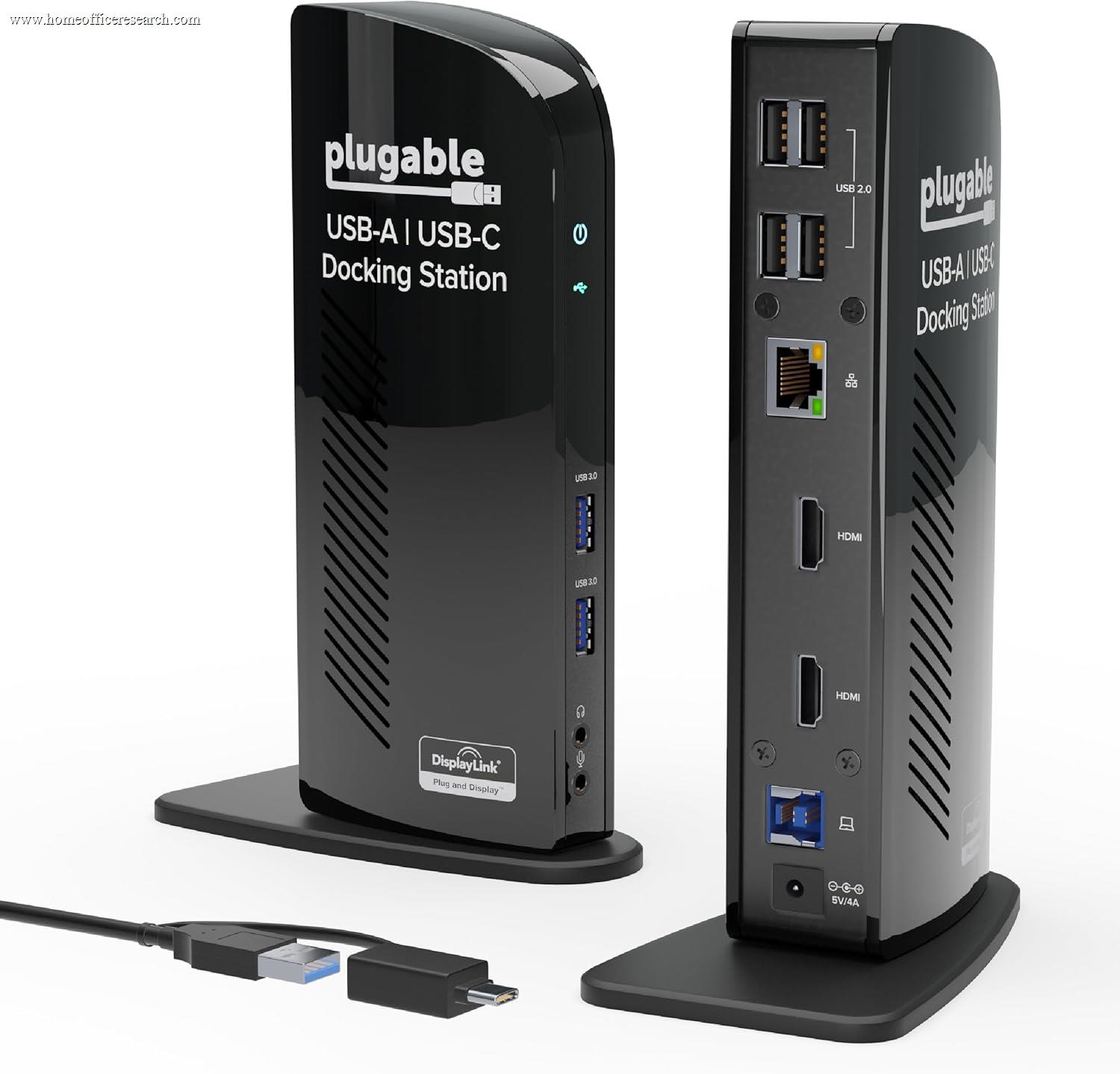
USB 3.0 Docking Station (UD-3900)
The Plugable UD-3900 is a USB-A 3.0 docking station built around a DisplayLink chip that extends two monitors from a single USB-A cable. Launched in 2014 and largely unchanged in the decade since, it represents a category — USB-A DisplayLink docks — that has been superseded at every meaningful specification by USB-C and Thunderbolt alternatives: display resolution tops out at 2K, well short of 4K; the USB-A host connection is absent from many modern thin-and-light laptops; and there is no power delivery capability of any kind, so the laptop’s own charger is still required on the desk. The UD-3900’s genuine strengths are its port count — six USB 3.0 ports and Gigabit Ethernet, all reliably AC-powered — and Plugable’s above-average driver documentation and US-based support. Those strengths matter for the specific buyer who has a legacy USB-A laptop, needs dual 1080p monitors, and is working within a tight budget. For most 2024 buyers, the USB-A DisplayLink category has aged past its usefulness and a USB-C dock covers the same ground with better resolution, cleaner compatibility, and modern charging.
How We Scored It
Category Deep-Dives
Connectivity & Bandwidth
4.0 / 10 30% weightingThe UD-3900’s host connection is USB-A 3.0 at 5Gbps — a single cable that carries both the DisplayLink video signal and all USB data traffic simultaneously. The 5Gbps ceiling is shared across the two display outputs, six USB 3.0 data ports, and Gigabit Ethernet. In practice, with two displays active and ethernet connected, the remaining bandwidth available to USB data transfers is meaningful but not unlimited. Heavy simultaneous use — dual monitors plus transferring files to an external drive — will compress USB throughput toward the bottom of the 5Gbps envelope.
The host connection itself is the deeper problem in 2024. A USB-A port is absent from the port inventory of most current thin-and-light laptops — including all MacBook models since 2016, many current-generation Dell XPS and HP Spectre configurations, and the Surface Pro 11. Buyers with these laptops would need a USB-C to USB-A adapter to use the UD-3900, which introduces a second adapter into the connection chain and may further compress available bandwidth. The UD-3900 was designed for laptops that carry USB-A as a primary data port; the market has shifted substantially since 2014.
Compared to USB-C docks at similar price points, the connectivity gap is stark. A modern USB-C Alt Mode dock operates on a 10Gbps channel and connects directly to the laptop’s USB-C port — the same port the laptop already uses for charging. The UD-3900’s 5Gbps USB-A connection predates the bandwidth requirements that high-resolution displays and fast storage created. The 4.0 connectivity score reflects a bus that was adequate for its era but is structurally limited against current alternatives.
Bottom line on connectivity and bandwidth: USB-A 3.0 at 5Gbps shared across displays, six data ports, and ethernet. The connection protocol is functional but slow by current standards, and the USB-A form factor is increasingly absent from modern laptops. The 4.0 score reflects a connectivity profile that was reasonable in 2014 and has been lapped by the market in the decade since.
Display Capability
4.0 / 10 25% weightingThe UD-3900 supports two simultaneous displays via a DVI-I port and an HDMI port, both driven by the DisplayLink DL-3900 chip. Maximum resolution per display is 2048×1152@60Hz — enough for 1080p monitors (1920×1080) and the slightly wider 1152p format, but nowhere near 4K (3840×2160). For buyers who already own 1080p monitors and have no near-term plans to upgrade to 4K, this ceiling is not a daily friction point. For anyone considering 4K monitors, the UD-3900 cannot support them.
DisplayLink adds software-based video compression at both endpoints. The DisplayLink driver captures what the system intends to display, compresses it, transmits it over USB, and decompresses it at the dock for output to the monitor. This process is largely invisible under static or slowly changing content — a spreadsheet, a document, a web page — but introduces compression artifacts under fast motion: high-framerate video, rapid scrolling, and full-screen animations will look noticeably softer than the same content on a native connection. The CPU overhead of DisplayLink compression runs at approximately 3–8% on a modern CPU during typical office workloads — modest but not zero.
DisplayLink on macOS carries two specific limitations that are worth understanding before purchase. First, the DisplayLink Manager app requires Screen Recording permission in macOS System Settings — a permission that reads as invasive even though it is technically necessary for DisplayLink to capture the framebuffer. Second, HDCP-enforcing streaming services — Netflix, Disney+, Apple TV+ — may display a black screen or refuse playback on DisplayLink-connected monitors due to HDCP handshake failures over the USB path. Neither of these issues is unique to Plugable; they are properties of DisplayLink technology across all manufacturers.
Bottom line on display capability: Dual-display support up to 2K (2048×1152@60Hz) via DisplayLink software compression. Functional for 1080p office use; not 4K capable. DisplayLink requires driver installation, Screen Recording permission on macOS, and degrades under motion-heavy content. The 4.0 score reflects a display specification that was competitive in 2014 and sits at the low end of the guide in 2024.
Power Delivery
1.0 / 10 20% weightingThe UD-3900 provides no laptop charging whatsoever. The USB-A 3.0 host connection is a data-only pathway; USB-A does not carry USB Power Delivery, so there is no mechanism for the dock to pass power back to the laptop. Every buyer who uses the UD-3900 must keep their laptop’s original charger plugged in separately. This means two cables running to the laptop — one USB-A cable to the dock, one charging cable to the power adapter — rather than the single-cable setup that defines the appeal of modern docking stations.
This is not a design oversight or cost-cutting decision unique to Plugable: it is a structural limitation of USB-A 3.0. The USB-A protocol predates USB Power Delivery, which was introduced with USB-C. No USB-A dock can charge a laptop through the dock connection. When the UD-3900 was released in 2014, this was the industry norm; by 2024, every competitive dock at this price tier connects via USB-C and can pass at least 60–85W of power to the laptop through the same single cable that carries data and video.
The practical consequence is a more cluttered desk and a more complicated setup. For buyers who are used to managing two cables and do not prioritize single-cable simplicity, the absence of charging is workable. For buyers who selected a docking station specifically to reduce desk clutter, the UD-3900’s two-cable requirement is a step backward compared to any USB-C dock on this list. The 1.0 score reflects the complete absence of charging capability in a scoring category where all competitive alternatives provide it.
Bottom line on power delivery: The UD-3900 cannot charge a laptop under any configuration — this is a structural limitation of USB-A 3.0, not a missing feature. Buyers must maintain a separate laptop charger alongside the dock. The 1.0 score is the lowest possible and reflects the total absence of a capability that every USB-C competitor provides.
Port Mix & Usability
7.0 / 10 15% weightingPort mix is the UD-3900’s strongest argument. The dock provides six USB-A 3.0 ports — all running at full USB 3.0 speed (5Gbps) — plus Gigabit Ethernet, a 3.5mm headphone jack, and a 3.5mm microphone jack. Six USB-A ports is a generous allocation; most compact USB-C hubs at this price tier provide three or four USB-A ports, with one or two downgraded to USB 2.0 speed. The UD-3900 provides six USB 3.0 ports without any speed stratification, making every port equally useful for storage devices, peripherals, or hubs.
The dock is AC-powered via an included external power adapter. This is a meaningful advantage over bus-powered hubs: the AC power supply ensures that all six USB ports deliver their rated power to connected devices simultaneously, without the thermal throttling or current-sharing compromises that bus-powered designs impose. External drives, USB audio interfaces, and powered peripherals will find reliable current at every port. The tradeoff is a power brick on the desk, but for a fixed desktop setup, AC power provides more reliable USB performance than bus-powered alternatives.
The display outputs — DVI-I and HDMI — are functional for their era but limited by contemporary standards. DVI is rarely found on modern monitors; buyers with newer displays will need an HDMI monitor on one output and either an HDMI monitor or a DVI-to-HDMI adapter on the other. The audio jacks are a practical inclusion for wired headsets and desktop speakers, separating the UD-3900 from hubs that omit audio entirely. The 7.0 port mix score reflects genuinely useful peripheral connectivity undermined by the DVI output anachronism.
Bottom line on port mix and usability: Six USB 3.0 ports at full speed, Gigabit Ethernet, dual 3.5mm audio jacks, and AC-powered reliability make the UD-3900’s peripheral connectivity strong for its class. DVI-I as one of two display outputs shows its age. The 7.0 score is the UD-3900’s highest category result and reflects a port mix that punches above its overall score on raw peripheral connectivity.
Value
7.5 / 10 7% weightingThe UD-3900 is typically priced at the low end of the docking station market. At that price, the combination of dual-display output, six USB 3.0 ports, Gigabit Ethernet, and AC-powered reliability is a strong feature-to-dollar ratio in absolute terms. The value proposition is strongest for a very specific buyer: someone who already has a USB-A laptop, already owns 1080p monitors, and simply needs more USB ports and wired ethernet at minimal cost. For that buyer, the UD-3900 delivers what it promises without requiring an upgrade to USB-C infrastructure.
The value calculation changes substantially when compared to modern USB-C docks at similar prices. A comparably priced USB-C dock will typically offer 10Gbps bandwidth, 4K@60Hz display output, 60–85W laptop charging, and native compatibility with current laptop port configurations — advantages that compound over a multi-year lifespan. The UD-3900’s price advantage over USB-C alternatives has narrowed considerably as USB-C dock prices have fallen, making the technology gap harder to justify on cost grounds.
The 7.5 value score acknowledges that the UD-3900 is honestly priced and delivers a genuine set of capabilities for buyers who fit the narrow use case it addresses. It is not inflated by comparison to its overall score; the value category is scored on price-to-feature ratio within the product’s category tier, and the UD-3900 delivers at its price point. The important caveat is that value is category-relative: a low-priced product that is obsolete for most buyers scores differently on value than a low-priced product that is genuinely competitive.
Bottom line on value: Strong price-to-feature ratio for the narrow audience the UD-3900 serves — legacy USB-A laptops, 1080p monitors, budget constraints. The value case weakens for any buyer who would need to add adapters or who is comparing to USB-C docks at similar prices. The 7.5 score reflects genuine price competitiveness within a category that has been largely superseded.
Build & Design
5.5 / 10 3% weightingThe UD-3900 uses a horizontal plastic enclosure that sits flat on the desk or can be oriented vertically with an included stand. The form factor is compact for a six-port dock with an integrated AC power supply, and the port layout places all USB-A ports on the rear panel with a single USB port on the front for convenient access — a practical arrangement for a stationary desktop setup. Build quality is consistent with Plugable’s brand standard: functional, durable over time, and unremarkable in premium feel. Port fitment is solid; no significant owner-reported issues with loose USB connections or cable retention failures.
The design reflects its 2014 origins. The enclosure is larger and heavier than equivalent-function USB-C hubs, carries DVI as a display output, and uses a USB-B upstream connector — the square printer-cable style — rather than the USB-C upstream connectors found on all current docks. These are functional ports rather than design failures, but they date the product immediately to someone familiar with current-generation hardware. Plugable includes a USB-A to USB-B cable in the box along with the display cables necessary to connect the DVI and HDMI outputs, which is a positive inclusion that reduces day-one accessory purchases.
Bottom line on build and design: Functional, practical, dated. Horizontal-or-vertical orientation, solid port fitment, and all necessary cables included are genuine positives. A 2014-era enclosure with USB-B upstream and DVI display output signals the product’s age clearly to any buyer who examines it. The 5.5 score reflects a build that is reliable but not competitive with the design quality of current USB-C alternatives at this price tier.
About the Manufacturer
GAB
Plugable Technologies is a US-based peripheral brand founded in 2009 and headquartered in Bothell, Washington. The company focuses on USB and Thunderbolt docking stations, hubs, cables, and adapters, and has built a reputation for clear technical documentation, explicit compatibility listings (including known limitations by laptop model), and US-based customer support — a differentiated proposition in a market dominated by Asian-sourced hardware with limited pre-sale technical guidance.
Plugable holds a significant number of DisplayLink-related models in its catalog, including the UD-3900 reviewed here and the newer UD-6950PDH — a dual-4K DisplayLink dock that represents Plugable’s current best-in-class DisplayLink offering. The UD-3900 occupies the bottom of Plugable’s own lineup today, sitting well below the USB-C and Thunderbolt 4 products the company has introduced since 2020. Buyers who value Plugable’s support reputation but need modern specifications should look at the UD-6950PDH or the TBT4-UD5 Thunderbolt 4 dock rather than the UD-3900.