TS4 Thunderbolt Station 4
The CalDigit TS4 is the most capable Thunderbolt 4 docking station we evaluated, earning the top spot among Thunderbolt 4 docks — second only to the newer Thunderbolt 5 CalDigit TS5 Plus overall — through a combination of port density, sustained power delivery, and connection quality that competitors at its tier do not match. With 18 ports including three downstream Thunderbolt 4 connections, 2.5GbE Ethernet, SD 4.0 and microSD UHS-II card slots, and a genuinely sustained 98W of laptop charging, the TS4 handles every peripheral and workflow a demanding home office can throw at it — all driverless, all over a single cable.
How We Scored It
Category Deep-Dives
Connectivity & Bandwidth
9.5 / 10 30% weightingThe TS4 operates at the full Thunderbolt 4 ceiling of 40Gbps bidirectional bandwidth — the same specification that underpins every TB4 dock in our guide. Where the TS4 distinguishes itself is in how it allocates that bandwidth across its port topology. Most Thunderbolt 4 docks provide a single downstream TB4 port for daisy-chaining additional devices; the TS4 provides three, each rated at 40Gbps. This is not a marketing flourish — it means you can connect a Thunderbolt NAS, a TB4-enabled display, and a second Thunderbolt dock simultaneously without any single device competing for bandwidth at the host connection level. In practice, the TS4 is capable of serving as the root of an entire Thunderbolt hub tree rather than a simple leaf node.
All data ports operate driverless — native Thunderbolt 4 without any DisplayLink compression layer or USB video adapter software. This matters because DisplayLink-based docks introduce latency, consume CPU cycles for video compression, require OS-level screen recording permissions on macOS, and are incompatible with HDCP-protected content. The TS4’s five USB-A ports all run at USB 3.2 Gen 2 (10Gbps), which is meaningfully faster than the 5Gbps USB 3.2 Gen 1 ports found on competing docks at similar price points. For users connecting fast external SSDs or USB 3.2 storage, the 10Gbps floor on every data port eliminates the speed guessing game.
The additional sixth USB-A port is dedicated for 7.5W charging rather than data — a considered design decision that reserves a clean charging path for phones and accessories without occupying a high-speed data port. The two USB-C data ports at 10Gbps round out a port count of 18 total connections — the highest of any dock in our guide, and more importantly, the highest count where each port serves a defined function rather than duplicating marginally useful connectivity.
Bottom line on connectivity: The TS4’s three downstream TB4 ports elevate it above every other dock in its class. Combined with universal 10Gbps USB-A speeds and fully driverless operation, this is the highest-bandwidth, most expansion-capable dock in our guide — and it is not close.
Display Capability
9.5 / 10 25% weightingThe TS4 supports up to three independent 4K@60Hz displays simultaneously: one via the dedicated DisplayPort 1.4 output, and two additional displays via the downstream Thunderbolt 4 ports. This triple-display configuration works natively on Thunderbolt-equipped Windows laptops and on Mac M1 Pro, M1 Max, M2 Pro, and subsequent Pro/Max chips, which support multiple external displays without restriction. Base M1, M2, and M3 MacBook Air models remain limited to a single external display regardless of dock — a hardware limitation in Apple’s silicon that no Thunderbolt dock resolves. If you need dual monitors on a base MacBook Air, a DisplayLink dock is the only Thunderbolt-independent solution.
For users with Thunderbolt-capable hardware, the TS4’s display configuration is class-leading. The DisplayPort 1.4 output supports 8K@30Hz over a single cable using Display Stream Compression (DSC), or 4K@120Hz without compression — useful for users pairing the dock with a high-refresh-rate monitor. The downstream TB4 ports use SST (Single-Stream Transport) natively, which is fully macOS-compatible and does not require the MST daisy-chain configuration that breaks multi-display output on all Macs. Compared to docks that rely on MST hubs to split a single DisplayPort signal into multiple outputs — configurations that silently fail on macOS — the TS4’s SST-based multi-display architecture works as specified across both major desktop platforms.
CalDigit has also maintained a firmware update cadence for the TS4 that has, over its product lifetime, improved display output compatibility with new monitor standards and updated laptop firmware. This matters because display handshake and negotiation issues — where a dock and monitor fail to establish a stable connection at full resolution — are often firmware-resolvable, and CalDigit’s support history shows a willingness to ship updates that address field-reported compatibility problems rather than treating the shipped firmware as final.
Bottom line on display capability: Native SST triple-display support, DisplayPort 1.4 with 8K/DSC capability, and proven macOS multi-display compatibility put the TS4 at the top of its class. The one genuine limitation is the Apple silicon base chip restriction — which is an Apple hardware constraint, not a TS4 deficiency.
Power Delivery
9.5 / 10 20% weightingThe TS4 delivers 98W of power to the connected laptop through its Thunderbolt 4 host port — the highest sustained figure in our guide. The critical word is sustained: CalDigit explicitly designed the TS4’s 135W power supply with the margin required to maintain full 98W laptop charging while all downstream ports are simultaneously occupied. Some competing docks advertise high charging wattage figures based on peak capability but use undersized power bricks that throttle delivery once multiple devices are connected. The TS4 delivers its rated wattage regardless of connected device load — a real-world distinction that matters for users with 16-inch MacBook Pros or high-performance Windows laptops that draw 90–96W under sustained CPU/GPU load.
For context, Apple’s MagSafe charger for the 16-inch MacBook Pro M3 Max is rated at 140W. The TS4’s 98W is below that ceiling, which means the laptop’s battery will charge more slowly under maximum sustained load (simultaneous CPU, GPU, and all cores pinned) than it would on the dedicated MagSafe adapter. In normal mixed-use work conditions — documents, browser, video calls, light development — 98W is comfortably sufficient to maintain charge and charge from depleted. For heavier compute workloads involving GPU rendering or video encoding, pairing the TS4 with a connected power adapter is the more conservative approach.
The downstream USB-C ports each deliver up to 18W for device charging, and the dedicated USB-A charging port provides 7.5W — enough for fast-charging phones and powering accessories without consuming power from the primary data ports. The total 135W power supply capacity provides approximately 37W of headroom above the host’s 98W allocation for all downstream charging combined. In practice, a typical home office peripheral load (keyboard, mouse, webcam, phone charging) draws 10–20W total, leaving the TS4 well within its supply budget.
Bottom line on power delivery: 98W sustained, backed by a properly specified 135W power supply, is the gold standard in our guide. CalDigit’s engineering integrity on this spec — designing to maintain rated output under load rather than citing a peak figure — sets the TS4 apart from docks that advertise similar numbers on paper.
Port Mix & Usability
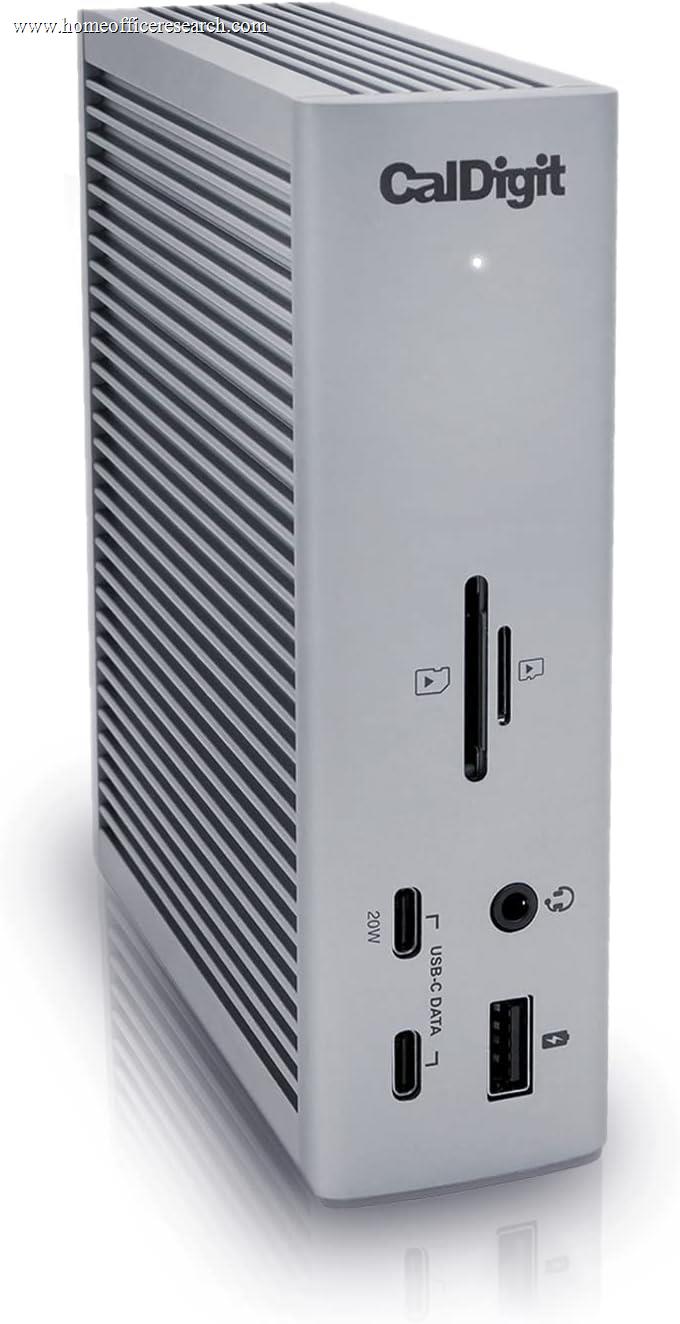
9.5 / 10 15% weightingThe TS4’s 18-port complement is the most comprehensive in our guide, and its organization reflects deliberate thinking about home office use patterns. Frequently accessed ports — SD 4.0, microSD UHS-II, USB-C, and a USB-A port — are positioned on the front face of the dock. Permanent infrastructure connections — Thunderbolt host, downstream TB4 ports, DisplayPort, Ethernet, audio, and the remaining USB-A ports — sit at the rear. This front/rear division keeps the desk clean: once cabling is established, the rear of the dock never needs to be touched again for daily operation, while front ports remain accessible without reaching around the unit.
The SD 4.0 card slot is a meaningfully faster implementation than the SD 3.0 or UHS-I readers found on most competing docks. SD 4.0 supports transfer speeds up to 985 MB/s versus the ~104 MB/s ceiling of UHS-I — a difference that is immediately tangible when offloading a 64GB camera card. The microSD slot is rated for UHS-II, supporting speeds up to ~312 MB/s, which covers high-speed microSD cards used in drones and action cameras. For photography, video, and content creation workflows, this is the best card reader combination available in a Thunderbolt dock. Competing docks that include card readers typically use UHS-I SD and standard microSD implementations — functional, but meaningfully slower.
The separate 3.5mm audio input and output jacks — rather than the combined headset jack found on most docks — enable simultaneous connection of studio monitors and a microphone without an adapter. For home office setups that involve regular recording or audio work, this distinction eliminates an entire category of adapter-related compatibility issues. The overall port mix covers every common home office peripheral class without requiring USB hubs, adapters, or compromises between connected devices.
Bottom line on port mix: The best-curated port selection in our guide. The SD 4.0 and microSD UHS-II readers are class-leading, the front/rear port organization is thoughtfully designed, and 18 total ports is more than sufficient for any home office configuration without redundancy for its own sake.
Value
8.0 / 10 7% weightingThe TS4 is the most expensive Thunderbolt 4 dock in our guide. This is not a price point that needs apologizing for, but it does require honest framing. For users whose workflows do not require three downstream TB4 ports, SD 4.0, or 2.5GbE Ethernet, the Kensington SD5700T or Plugable TBT4-UD5 deliver the core Thunderbolt 4 experience for notably less. The TS4’s premium is real and specific — if you are not using the features that justify it, you are paying for capability you will not access.
For users who do need the TS4’s full feature set, the price-to-capability ratio is reasonable. A standalone 2.5GbE Ethernet adapter is an added cost on its own, as is a separate SD 4.0-capable card reader. The three downstream TB4 ports are not available at any lower price point — the TS4 is the only dock in its category that provides them. The 2-year warranty is standard for CalDigit but shorter than Kensington’s 3-year coverage, which is a genuine competitive disadvantage at this price tier. Active firmware maintenance and CalDigit’s strong user community reduce the practical warranty risk somewhat, but the coverage gap is a fair knock against the TS4 for long-term infrastructure investment.
Bottom line on value: Expensive but specific. The TS4 is excellent value for users who need its distinguishing features — three TB4 downstream ports, SD 4.0, 2.5GbE — and moderate value for users who do not. It is the right choice for demanding setups; not necessarily for simpler ones.
Build & Design
9.0 / 10 3% weightingThe TS4 uses a ribbed aluminum enclosure specifically engineered for passive thermal dissipation. The longitudinal fins increase surface area along the top and sides of the chassis, allowing heat generated by the internal power circuitry and Thunderbolt controller to radiate away without a fan. Under sustained multi-port load, the TS4 runs warm to the touch on its upper surface — normal for a 135W-class device dissipating that power passively — but not hot. The fanless design keeps the dock completely silent at all times, which matters for home office environments where a fan-cooled dock would be audible on quiet calls.
The unit can be oriented both horizontally and vertically, with a removable stand included for vertical placement. Vertical orientation reduces the footprint on a crowded desk, and CalDigit provides clear guidance on which thermal orientation is preferable. The overall physical footprint is compact for a dock with 18 ports — roughly the size of a thick paperback book when stood vertically. Build quality is premium: the chassis has no flex, the ports are solidly mounted with no lateral play, and the included Thunderbolt 4 cable is the thick, high-quality type that CalDigit cables are known for rather than the thin afterthought cables that sometimes ship with competing products. The only minor design note is that the rear port density makes cable management somewhat involved for first-time setup — with 10+ cables potentially entering the rear face simultaneously, organizational patience is required.
Bottom line on build and design: Premium ribbed aluminum construction, passive cooling that remains silent under full load, and a well-considered front/rear port division make the TS4 one of the better-designed docks on the market. Rear cable management requires attention during initial setup, but the result is a clean desk once organized.
About the Manufacturer
Digit
CalDigit was founded in 2003 in Milpitas, California, initially focusing on high-speed storage solutions for media professionals. The company expanded into Thunderbolt connectivity with the introduction of the original TS (Thunderbolt Station) line, which rapidly became a reference standard for professional Mac workstations requiring high-bandwidth peripheral expansion. CalDigit’s products have appeared on Apple’s retail site as recommended accessories and are frequently found in broadcast, film post-production, and creative professional environments where connection reliability and thermal management under sustained load are non-negotiable.
The TS line progressed through Thunderbolt 1, 2, and 3 generations before arriving at the TS4, with each iteration expanding port count and improving power delivery. CalDigit’s consistency across generations — maintaining the same core design philosophy of aluminum construction, passive cooling, and comprehensive firmware support — has built significant loyalty among professional users who have followed the line through multiple product cycles. The company maintains an active compatibility database that documents specific laptop models and their behavior with CalDigit docks, a level of documentation transparency that distinguishes it from brands that ship docks with minimal compatibility guidance.
CalDigit’s firmware update history for the TS4 spans multiple releases addressing USB hub stability, display output improvements, and power delivery refinements — a meaningful commitment to post-launch product support. CalDigit docks are sold through Apple retail, B&H Photo, Amazon, and CalDigit’s own website, and come with a 2-year limited warranty.