SOHO Dock
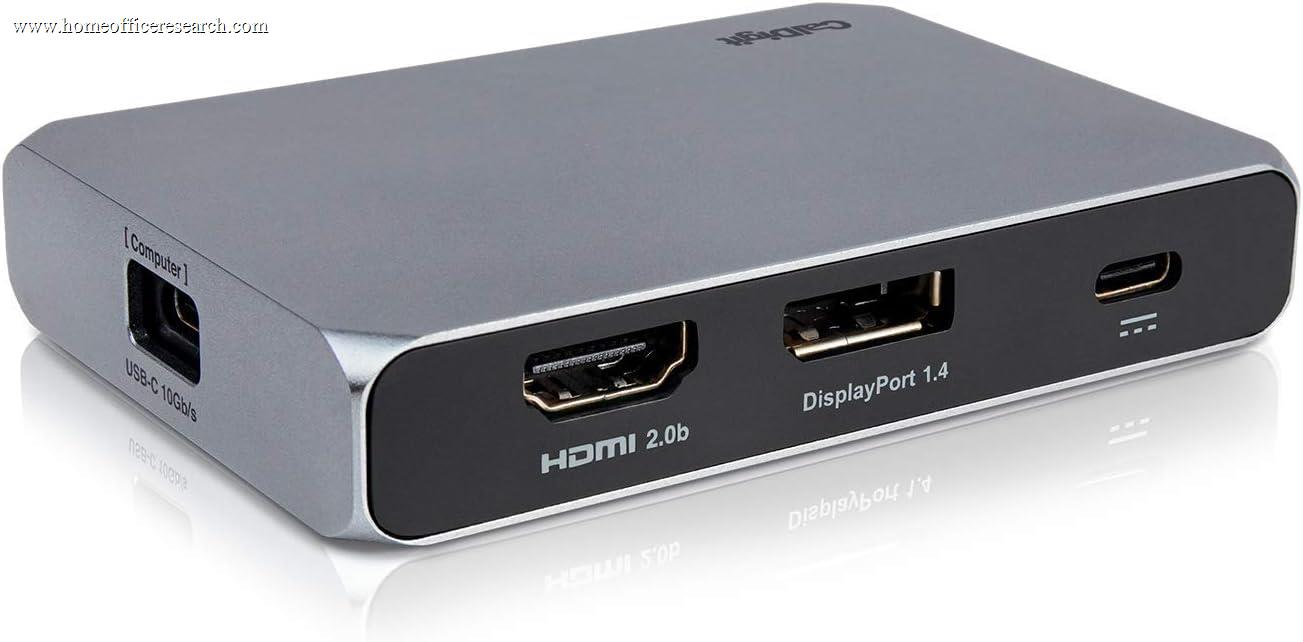
The CalDigit SOHO Dock is a compact USB-C hub built to CalDigit’s characteristically high hardware standards — aluminum construction, thoughtful port layout, reliable power delivery — wrapped around a USB-C 3.2 Gen 2 connection that imposes a firm 10Gbps bandwidth ceiling. That ceiling is the SOHO’s defining constraint: unlike Thunderbolt 4 docks that manage 40Gbps of headroom, the SOHO shares its total bandwidth across all connected peripherals and both displays simultaneously. For a single-display home office setup with light peripheral use, this is perfectly adequate. For dual-display setups with simultaneous high-bandwidth storage or data transfers, the bandwidth math becomes tight. The SOHO earns its place in the guide on the strength of CalDigit’s build quality and the genuine 85W power delivery — both of which outperform most competitors at this price — while the connectivity tier and port count keep it out of the top half.
How We Scored It
Category Deep-Dives
Connectivity & Bandwidth
6.0 / 10 30% weightingThe CalDigit SOHO Dock connects to the host via a single USB-C 3.2 Gen 2 cable, providing a maximum of 10Gbps of total bandwidth between the dock and the host computer. This is the foundational constraint that separates the SOHO from Thunderbolt-based docks in our guide. Thunderbolt 4 delivers 40Gbps of bidirectional bandwidth — four times the SOHO’s ceiling — which allows TB4 docks to simultaneously drive multiple high-resolution displays, transfer data at full USB 3.2 speeds, and maintain reliable ethernet connectivity without any of those activities competing for bandwidth. The SOHO’s 10Gbps must cover everything: display signal encoding (which consumes the majority of the budget when dual 4K@60Hz outputs are active), USB data transfers, and ethernet traffic.
In practice, this shared bandwidth model works well in light-to-moderate use scenarios. A typical single-display home office setup with a keyboard, mouse, and ethernet connected will not approach the bandwidth ceiling and will experience no performance issues. Dual 4K@60Hz display operation is technically supported, but activating both displays leaves significantly reduced bandwidth for USB data transfers — users moving large files or using high-speed USB storage simultaneously will see reduced transfer rates compared to what the same peripherals would achieve on a Thunderbolt 4 dock. The bandwidth constraint is not hypothetical; it is a direct function of the USB-C 3.2 Gen 2 interface specification.
The SOHO supports DisplayLink-free dual-display output using native Alt Mode — no additional driver is required, which avoids the latency and compatibility issues that some DisplayLink implementations introduce. This is a meaningful advantage over cheaper multi-display USB-C hubs that rely on DisplayLink for their second output, particularly for video conferencing and application workflows that are sensitive to display lag.
Bottom line on connectivity and bandwidth: USB-C 3.2 Gen 2 (10Gbps) is the tier boundary that places the SOHO behind every Thunderbolt dock in the guide. Single-display setups experience no practical limitations. Dual-display users will observe bandwidth compression when simultaneously running high-speed USB peripherals. For the home office user who wants one large display and reliable peripherals, the SOHO’s connectivity is adequate. For power users with a dual-display setup and active data workflows, a Thunderbolt dock is the correct choice.
Display Capability
7.0 / 10 25% weightingThe CalDigit SOHO Dock provides two dedicated display outputs: one HDMI 2.0 and one DisplayPort 1.4, both capable of driving a 4K display at 60Hz. The HDMI 2.0 port supports up to 4K@60Hz with HDR10; the DisplayPort 1.4 output supports up to 4K@60Hz and can drive higher refresh rates at lower resolutions (1440p@144Hz, 1080p@240Hz) for users whose workflow includes higher-refresh-rate monitors. Both outputs are available simultaneously, making the SOHO one of the more capable dual-display USB-C hubs in the market at its price tier — most competitors in the USB-C Alt Mode category limit dual-display output to lower resolutions or frame rates through their second port.
The display outputs use native Alt Mode signaling, not DisplayLink compression. This matters for display quality and system behavior: Alt Mode passes the display signal from the GPU through the USB-C connection without software re-encoding, producing clean, low-latency output that behaves identically to a direct cable connection from the user’s perspective. DisplayLink-based solutions — which appear in some competing hubs — introduce a software rendering layer that can produce visual artifacts, add latency, and create compatibility issues with certain applications, particularly hardware-accelerated video, screen sharing tools, and some DRM-protected content.
The practical limitation on display capability returns to bandwidth: with both 4K@60Hz outputs active, the display signal encoding consumes most of the 10Gbps USB-C budget. Users running dual 4K displays should anticipate this and plan peripheral connectivity accordingly — keeping high-speed USB storage on the host computer rather than through the SOHO when both displays are active. For the majority of home office display configurations — one primary monitor, keyboard, mouse, and ethernet — this bandwidth pressure does not arise.
Bottom line on display capability: Dual 4K@60Hz output via HDMI 2.0 and DisplayPort 1.4, both using native Alt Mode rather than DisplayLink. This is a strong display specification for a USB-C Alt Mode hub, and covers the needs of most single- and dual-display home office setups. The 7.0 score reflects genuinely capable display hardware constrained by the bandwidth ceiling shared with the rest of the dock’s ports.
Power Delivery
8.0 / 10 20% weightingThe CalDigit SOHO Dock delivers 85W of USB Power Delivery to the host laptop — the highest figure in the USB-C Alt Mode category and sufficient to charge the MacBook Pro 14″ (which requires 67W at minimum and benefits from 96W or more for full-speed charging under load) as well as most Windows ultrabooks and thin-and-light laptops. The 85W rating is notable because most competing USB-C hubs in the same price range deliver 60–65W, which is adequate for charging when the laptop is idle but falls short when the laptop is running demanding workloads that draw more power from the battery than a lower-wattage charger can replace. At 85W, the SOHO covers the MacBook Pro 14″’s peak charging requirement and keeps pace with most common professional laptop configurations.
The 85W power delivery is maintained regardless of display and peripheral load — the SOHO is externally powered via its own AC adapter, which provides independent power for both the host charging and peripheral operation. This is the correct implementation: self-powered docks maintain stable peripheral operation and full PD delivery simultaneously, unlike bus-powered hubs that must distribute a limited power budget across both functions. Users who have experienced unstable peripheral behavior when connecting power-hungry peripherals to bus-powered hubs will appreciate the SOHO’s externally-powered design.
The only laptop configurations that the 85W ceiling may fall short for are the MacBook Pro 16″, which benefits from 140W charging, and certain high-performance Windows laptops with 100W+ charging requirements. For these users, the SOHO will charge the laptop but may result in gradual battery drain during peak computational workloads. For MacBook Pro 14″ and all smaller laptops, 85W is a non-issue.
Bottom line on power delivery: 85W is the highest PD rating in the USB-C Alt Mode category in our guide, and it covers the MacBook Pro 14″ and virtually all thin-and-light laptops at full charging rate under load. Externally powered design ensures stable delivery regardless of peripheral load. The 8.0 score reflects genuinely leading power delivery for the tier — the only limitation is the gap between 85W and the 140W+ required for full-speed charging of the MacBook Pro 16″.
Port Mix
6.5 / 10 15% weightingThe CalDigit SOHO Dock provides 12 ports total: three USB-A 3.2 Gen 1 ports (5Gbps), one USB-C 3.2 Gen 2 data port (10Gbps), one HDMI 2.0, one DisplayPort 1.4, one SD 4.0 card reader, one microSD 3.0 card reader, one Gigabit Ethernet port, one 3.5mm audio combo jack, and the host USB-C connection plus power input. The port count is competitive for the category; the composition reflects some clear strengths and one notable limitation relative to peers.
The dual card reader implementation — separate SD 4.0 and microSD 3.0 slots — is a genuine differentiator. Many USB-C hubs either omit card readers entirely or include only a single SD slot with a microSD adapter tray, which forces the user to choose between formats. The SOHO accommodates both simultaneously and at meaningfully fast speeds: SD 4.0 supports up to 985MB/s read/write for compatible UHS-II cards, and the microSD 3.0 slot handles standard microSD cards at full rated speed. For photographers, videographers, or users who regularly transfer media from two card formats, this is a practical workflow advantage.
The USB-A count of three is the primary port mix limitation. Most competitors in this tier — including the Anker 565 ranked directly above — provide four USB-A ports, which accommodates a keyboard, mouse, USB headset, and a fourth peripheral simultaneously without requiring a separate hub. The SOHO’s three USB-A ports cover a keyboard, mouse, and one additional device — a configuration that works for most users but creates friction for those with four or more USB-A peripherals. The single USB-C data port at 10Gbps is useful for high-speed storage connection, but does not compensate for the USB-A shortfall for users with legacy peripheral sets.
Bottom line on port mix: Strong card reader implementation (dual SD 4.0 + microSD 3.0 simultaneously) and comprehensive port variety, limited by three USB-A ports versus the four-port standard found in most competing hubs at this price. The 6.5 score reflects an above-average port composition held back by the USB-A count — the desk photographer or videographer will find the SOHO’s card readers valuable enough to overlook the USB-A gap; the general office user with multiple USB-A devices will notice it.
Value
7.0 / 10 7% weightingThe CalDigit SOHO Dock is positioned in the upper-budget USB-C tier, a moderate premium over generic USB-C hubs with similar port counts but well below pricier Thunderbolt 4 docks. At its price, the SOHO delivers build quality — aluminum construction, refined port layout, stable power delivery — that meaningfully exceeds what cheaper generic USB-C hubs provide. The CalDigit premium is real and justified by the hardware; the question is whether the connectivity tier (USB-C rather than Thunderbolt) represents a good trade for a buyer who might otherwise step up to a TB4 dock.
For users whose laptop does not support Thunderbolt — which includes many Windows machines that implement USB4 or USB-C 3.2 rather than TB4 — the SOHO’s value proposition is clear: CalDigit build quality, 85W power delivery, dual 4K display output, and dual card readers at a price well below Thunderbolt alternatives. These users cannot leverage TB4’s bandwidth advantages regardless of which dock they purchase, so the SOHO’s connectivity tier is not a limitation relative to what their hardware supports.
For users with a Thunderbolt-capable laptop — all Apple Silicon Macs, many recent Intel and AMD Windows machines — the value calculation requires weighing the SOHO’s lower price against the CalDigit Element Hub’s pricier Thunderbolt 4 connectivity. The Element Hub’s 40Gbps bandwidth eliminates the SOHO’s bandwidth-sharing constraint and adds Thunderbolt daisy-chaining. For these users, the SOHO is a budget-conscious choice that trades capability for cost.
Bottom line on value: Excellent value for laptops without Thunderbolt support — CalDigit quality at USB-C hub prices. Reasonable but less compelling for Thunderbolt-capable laptops, where the Element Hub’s additional capability is available for a modest premium. The 7.0 score reflects genuine value for the right use case, with a caveat for users who have the hardware to benefit from a Thunderbolt upgrade.
Build Quality
9.0 / 10 3% weightingCalDigit’s build quality is the SOHO’s most obvious differentiator from its competitors at this price point. The unit is constructed from anodized aluminum with a compact form factor that fits comfortably on or beside a desk, or in a bag for users who want to bring their full peripheral setup to a different workspace. The aluminum housing serves both an aesthetic function and a thermal one: the SOHO runs warm under sustained load, and the aluminum case acts as a passive heatsink that dissipates heat without fan noise. Generic plastic USB-C hubs generate the same heat but trap it, which accelerates internal component degradation over time. CalDigit’s aluminum construction translates to a cooler, quieter, and longer-lasting product compared to similarly priced alternatives.
The port spacing and layout on the SOHO are deliberately considered — ports are separated to accommodate typical cable heads and adapters without requiring the removal of adjacent cables to plug something in. The USB-C host cable and power adapter are included and of appropriate quality; CalDigit does not ship the SOHO with a cheap cable that becomes a performance bottleneck. The unit sits flat and stable on a desk without a rubber pad, which is a minor but telling quality signal about the manufacturing tolerances applied to the base.
CalDigit’s long-term reliability track record across its product line is strong. The brand’s Thunderbolt docks have maintained consistent performance in owner communities for 5+ years, and the SOHO inherits the same commitment to component quality. For a dock category where generic units routinely develop port-contact degradation, ethernet instability, or power delivery inconsistency after 12–18 months of use, CalDigit’s quality floor is meaningfully higher.
Bottom line on build quality: The best build quality in the USB-C Alt Mode category in our guide. Anodized aluminum construction, passive thermal management, considered port layout, and CalDigit’s multi-year reliability track record separate the SOHO from generic competitors that match it on paper specifications. The 9.0 score reflects hardware quality that justifies the CalDigit premium on its own.
About the Manufacturer
DIGIT
CalDigit is a Brea, California-based peripheral manufacturer specializing in Thunderbolt and USB-C docking stations, storage solutions, and connectivity products. Founded in 2003, CalDigit has built a reputation for premium hardware quality and long-term product reliability — both of which are borne out in owner community feedback across the brand’s lineup. The company’s flagship TS4 Thunderbolt 4 Dock ranks #1 in our docking station guide, and the CalDigit Element Hub holds rank #6. The SOHO Dock at rank #10 represents CalDigit’s entry into the USB-C Alt Mode tier, where the brand’s build quality advantages are most apparent relative to the generic competition.
CalDigit designs its products in California and manufactures them with a focus on thermal management, port quality, and long-term component reliability that distinguishes its products from similarly specified alternatives at lower prices. The company provides solid firmware update support for its Thunderbolt products and offers responsive customer support. For the SOHO Dock specifically, CalDigit’s two-year warranty coverage is standard for the category and supported by the brand’s accessible service operation.
Users who start with the SOHO Dock frequently upgrade to CalDigit’s Thunderbolt products as their home office needs grow. The brand’s consistent quality across price tiers makes this progression natural — the SOHO delivers a version of the CalDigit experience at an accessible entry price, and the upgrade path to the Element Hub or TS4 is well-worn by users who outgrew the SOHO’s bandwidth constraints without outgrowing their trust in the brand.