Q1 Pro
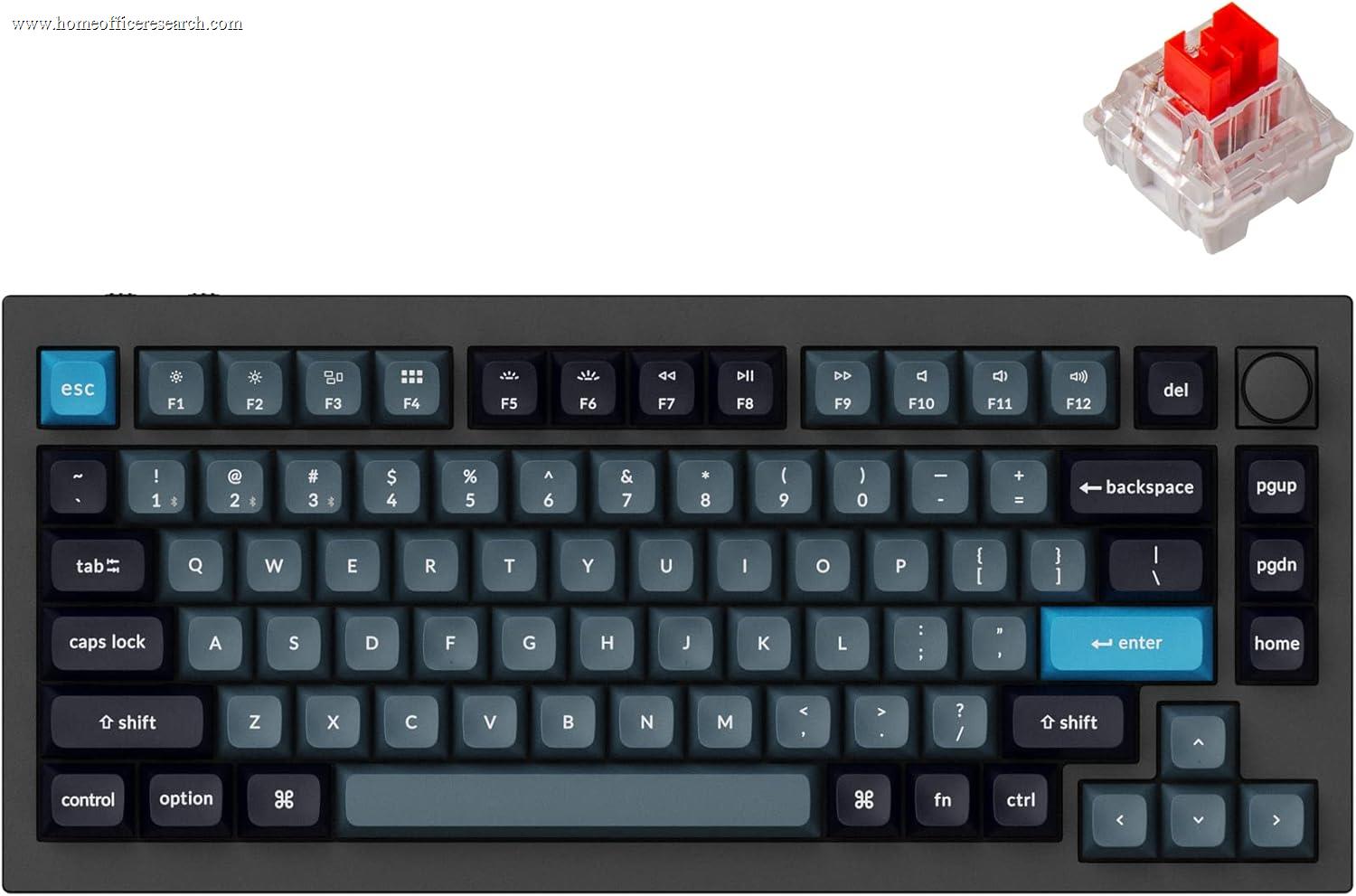
The Keychron Q1 Pro is the strongest premium mechanical keyboard in our evaluation, combining a CNC-machined full-aluminum chassis, gasket-mount plate suspension, 5-pin hot-swap PCB, QMK/VIA open-source firmware, and dual wireless connectivity in a compact 75% layout. It is the most expensive keyboard in our top three, and the premium is justified entirely by its build quality and hardware customizability — both of which are genuinely beyond what any competing wireless mechanical keyboard in this price range delivers. Its lower connectivity and acoustics scores are honest trade-offs of the mechanical category, not design failures.
How We Scored It
Category Deep-Dives
Typing Feel & Comfort
9.5 / 10 30% weightingThe Q1 Pro’s typing character is defined by two interdependent design decisions: the gasket-mount plate system and the choice of Gateron G Pro 3.0 switches. Unlike the rigid tray-mount or top-mount designs used in most keyboard price tiers below it, the Q1 Pro suspends its switch plate between silicone gaskets — compressible mounts that flex slightly under typing load. This flex is subtle: approximately 0.3–0.5mm of total plate travel before the gaskets compress fully, which is imperceptible as movement but creates a cushioned, “bouncy” bottom-out sensation that absorbs impact rather than reflecting it back into the fingertips. The result is a keyboard that sounds and feels substantially softer than its metal construction suggests, with a typing character that enthusiasts describe as “thocky” — a term for a deep, dampened acoustic profile that comes specifically from gasket-flex combined with a substantial case mass.
The Gateron G Pro 3.0 switches are available in three variants at purchase: Red (linear, 45g actuation, no tactile bump), Brown (tactile, 55g actuation, light bump at 2.0mm pre-travel), and Blue (clicky, 60g actuation, audible click at actuation). For home office use, Red and Brown are the appropriate choices — Blue switches are effectively ruled out in shared or call-heavy environments. The G Pro 3.0 generation represents a measurable improvement over earlier Gateron switches in factory lubrication consistency and stem tolerance, producing smoother linear travel and more consistent tactile feedback across the board than the prior G Pro 2.0 switches. At 4.0mm of total travel with a 2.0mm pre-travel actuation, the Q1 Pro’s switches offer a deliberate, fully mechanical typing experience with a clearly defined actuation event — the antithesis of the progressive, bottom-out-centric feel of scissor-switch keyboards.
The double-shot PBT keycaps shipped with the Q1 Pro contribute meaningfully to both typing feel and long-term satisfaction. PBT is a harder, denser plastic than ABS: at the same keypress, PBT keycaps produce a slightly crisper bottom-out sound and a firmer surface texture under the fingertip. The double-shot manufacturing process injects two colors of plastic — one for the legend, one for the cap body — during production, making the legends physically part of the keycap structure rather than a surface print or pad-printed layer. This means legends cannot fade, wear through, or shine regardless of how many years the keyboard is in daily use. For a keyboard intended as a primary work tool for five or more years, this is the correct keycap specification.
Bottom line on typing feel: Gasket-mount flex combined with well-lubed Gateron G Pro 3.0 switches and PBT keycaps produces the most refined mechanical typing experience in our evaluation. The 9.5 score reflects both the immediate feel and the long-term durability of the materials — a combination that no more affordable keyboard in our guide can match.
Build Quality
9.5 / 10 20% weightingThe Q1 Pro’s chassis is CNC-machined from a single block of aluminum — a manufacturing process that produces a case with no seam lines, no flex, and no panel gaps. The finished weight of approximately 1.3 kg (without the plate and PCB assembly) is the result of this construction, and it is noticeable: setting the Q1 Pro on a desk feels like placing a small appliance, not a peripheral. This mass is not incidental — it contributes directly to acoustic damping (the heavy case absorbs vibration rather than transmitting it to the desk surface) and to stability during use (the keyboard does not shift during vigorous typing without any rubber feet at all). Rubber feet are present on the underside, but the weight alone would be sufficient to anchor the keyboard to a smooth desk surface.
The 5-pin hot-swap PCB is one of the most practically valuable features in the Q1 Pro’s specification. Hot-swap sockets allow individual switches to be removed and replaced using a switch puller in under 30 seconds per switch, without any soldering. The 5-pin socket compatibility (versus the more common 3-pin) accepts both standard 3-pin switches and the sturdier 5-pin variants, which have two additional alignment pins that reduce lateral wobble in the switch housing. Gateron G Pro 3.0 switches are rated at 100 million keystrokes — double the typical scissor-switch rating and above the 50 million rating of many standard mechanical switches. When any switch eventually degrades, it can be replaced individually for pennies rather than requiring full keyboard replacement. This serviceability is the defining long-term advantage of the Q1 Pro over non-serviceable keyboards at the same price point.
The stabilizers for wide keys (spacebar, backspace, left shift, enter) are pre-installed and factory-lubed on the Q1 Pro. Well-implemented stabilizers are one of the more audible differentiators between entry-level and premium mechanical keyboards — cheap stabilizers rattle and clunk; good stabilizers feel solid and consistent. Keychron’s factory stabilizer preparation on the Q1 Pro is above-average for a retail keyboard, reducing rattle to an acceptable level without requiring user modification out of the box. Enthusiast users who want to further optimize stabilizer performance can remove and re-lube them using heavier-weight lubricants (Krytox 205g0 or similar) — the PCB plate combination makes access straightforward without soldering.
Bottom line on build quality: Full-aluminum CNC construction with a 5-pin hot-swap PCB is the specification ceiling for wireless mechanical keyboards in the mainstream market. Nothing at its price or below matches the Q1 Pro’s chassis rigidity, serviceability, or long-term durability story. The 9.5 score is the highest in our keyboard evaluation for this category.
Connectivity & Features
7.5 / 10 20% weightingThe Q1 Pro supports Bluetooth 5.1 with three-device multi-pairing — pairs with up to three devices simultaneously and switches between them with a dedicated key combination. This matches the MX Keys S’s device count, but differs in one important technical respect: the Q1 Pro has no proprietary 2.4GHz receiver option. All wireless connectivity is via Bluetooth only, which means the Q1 Pro is subject to the latency characteristics of Bluetooth HID — typically 5–15ms round-trip — rather than the 1–2ms round-trip achievable with the Logi Bolt 2.4GHz receiver. For typing work this latency difference is imperceptible; for gaming or precision timing tasks, it becomes relevant. USB-C wired mode is available for zero-latency connectivity when Bluetooth conditions are suboptimal or when charging simultaneously.
The 4000mAh battery is the largest in our keyboard evaluation and provides substantially longer wireless runtime than the MX Keys S’s smaller cell. With RGB backlighting enabled at moderate brightness, real-world battery life runs 2–3 weeks of daily professional use. With backlighting disabled, that extends to 1–2 months. The battery capacity also enables aggressive RGB brightness levels — the Q1 Pro’s south-facing per-key RGB can be configured to extremely vibrant output without the battery anxiety that smaller batteries in competing keyboards produce at high brightness settings. South-facing LEDs illuminate legends from below, producing a more even legend glow and cleaner light bleed between keys compared to north-facing implementations, though the difference is cosmetic rather than functional for home office users who primarily use backlighting for visibility rather than aesthetics.
The absence of a dedicated 2.4GHz dongle mode is the honest limitation in this score. In wireless environments with congested Bluetooth spectrum — a home with many smart devices, a shared office with multiple active Bluetooth connections nearby — Bluetooth HID can produce occasional connection instability that a dedicated 2.4GHz pairing avoids. The Q1 Pro’s Bluetooth 5.1 implementation is reliable in most home office environments, but it is not quite the “plug the dongle into any port” simplicity of Logi Bolt.
Bottom line on connectivity: Three-device Bluetooth 5.1 with USB-C wired fallback is a solid wireless package, and the 4000mAh battery is the most capable in our evaluation. The 7.5 score reflects the absence of a low-latency 2.4GHz receiver option that the MX Keys S provides through Logi Bolt — a real gap for users in RF-crowded environments.
Acoustics & Workspace Fit
7.5 / 10 15% weightingThe Q1 Pro’s gasket-mount construction and aluminum case dampen switch acoustics more effectively than tray-mount or top-mount designs, but the fundamental acoustic character of mechanical switches — regardless of how well the case is tuned — remains audibly louder than a scissor-switch keyboard at normal desk distances. With Gateron G Pro 3.0 Red (linear) switches, the Q1 Pro produces a deep, muted thud at bottom-out rather than the sharp click of clicky switches, but this thud registers at approximately 55–62 dB SPL during normal typing cadence — 10–15 dB louder than the MX Keys S under the same conditions. The Q1 Pro with Brown tactile switches adds an additional light click at the actuation point, raising perceived noise slightly. Neither Red nor Brown switches are disruptive in a solo home office environment; both are marginal for video calls at high typing speed without a directional microphone with good background rejection.
The 75% layout is a genuine workspace efficiency advantage over the full-size MX Keys S. By eliminating the numpad and compressing the navigation cluster, the Q1 Pro reduces total board width from 432mm (MX Keys S) to approximately 320mm — a 26% reduction in horizontal footprint. At a standard desk, this moves the mouse approximately 100mm closer to the keyboard’s centerline, reducing the shoulder angle required to reach the mouse during extended mixed keyboard-and-mouse workflows. For users who spend significant time in GUI-heavy applications (design tools, spreadsheets, video editing timelines), this ergonomic benefit compounds over hours of daily use. The trade-off is the function row compression: F-keys are present but require Fn-layer access for some secondary functions, which affects users whose workflows depend on direct F-key access.
Keychron includes a sound-dampening foam layer between the PCB and the aluminum bottom case on the Q1 Pro, which reduces hollow resonance — the characteristic hollow echo that occurs when switches bottom out in cases without damping material. This foam, combined with the gasket-mount flex and the sheer mass of the aluminum chassis, produces an acoustic profile that is as refined as any standard mechanical keyboard at this price level can achieve. Users who want to push further can add PTFE tape to the PCB bottom or replace the plate foam with a thicker alternative — modifications that are popular in the enthusiast community and accessible given the Q1 Pro’s screw-together construction.
Bottom line on acoustics: The most acoustically refined mechanical keyboard in our evaluation, but still a mechanical keyboard — which means it is louder than any scissor-switch or silent mechanical design. The 7.5 score reflects this category-inherent limitation honestly: excellent for a mechanical, but not appropriate for users whose primary constraint is typing noise during video calls or in shared spaces.
Value
8.5 / 10 10% weightingAt its premium price, the Keychron Q1 Pro is the most expensive keyboard in our top three, and the 8.5 value score reflects a genuine assessment that the price is justified by the specification. The only wireless mechanical keyboards with comparable construction — full-aluminum chassis, gasket-mount, hot-swap, QMK/VIA — in this price range are Keychron’s own Q Pro series and a small number of boutique alternatives that typically cost more. A comparable non-wireless gasket-mount aluminum keyboard (such as the Keychron Q1 V2) costs somewhat less; the wireless upgrade to the Q1 Pro’s Bluetooth 5.1 and 4000mAh battery is a reasonable, modest premium over its wired sibling.
The value proposition becomes clearer over a multi-year ownership horizon. The 100 million keystroke switch rating combined with hot-swap replaceability means the Q1 Pro can be maintained indefinitely as long as replacement switches remain available — which, given the industry-standard 5-pin MX-footprint socket, will be the case for the foreseeable future. A buyer who replaces a set of switches at the five-year mark effectively extends the keyboard’s useful life another five or more years for a marginal investment. Compared to a non-serviceable scissor-switch keyboard at the same price that must be replaced wholesale when it degrades, this is a concrete long-term cost advantage. For buyers who value total cost of ownership over initial price, the Q1 Pro’s value proposition improves substantially relative to its sticker price.
Bottom line on value: Its price is the correct one for this specification — not discounted, not inflated. The long-term cost advantage of a serviceable hot-swap keyboard with 100 million rated switch lifespan over a cheaper non-serviceable keyboard is real and should factor into the purchase decision for anyone planning to use the keyboard for five or more years.
Customizability
9.5 / 10 5% weightingThe Q1 Pro’s QMK/VIA firmware support is the deepest hardware-level customizability available in any keyboard at this price point. QMK (Quantum Mechanical Keyboard) is an open-source firmware that allows complete remapping of every key, including layer-based key mapping (the ability to give any key multiple functions depending on a held modifier), macro recording of any keystroke sequence, custom RGB lighting patterns programmed at the LED level, and tap-dance functionality where a single key performs different actions based on whether it is tapped, held, or double-tapped. VIA is a graphical front-end for QMK remapping that operates in a browser or desktop application without requiring firmware recompilation — changes take effect immediately when applied. For users who work with keyboard-heavy software (IDEs, terminal environments, video editors, Vim/Emacs workflows), this level of programmability is functionally unavailable elsewhere at this price.
The 5-pin hot-swap PCB extends customizability into the physical domain: any standard 5-pin mechanical switch can be installed without tools beyond a switch puller. This means the Q1 Pro’s typing feel can be changed entirely by swapping switches — from tactile to linear, from standard weight to a 70g heavy actuation, or to silent switch variants (such as Gateron Yellow Silent or Boba U4) that bring noise levels closer to scissor-switch territory. The double-shot PBT keycaps can also be replaced with aftermarket sets in any color, profile (Cherry, OEM, SA, MT3, or DSA height), or material preference — a breadth of options that the ABS integrated keycaps on the MX Keys S do not have. Enthusiast keycap sets for MX-compatible keyboards range from affordable to premium group-buy sets, and the Q1 Pro’s standard MX mounting means full compatibility with the entire aftermarket.
Bottom line on customizability: The highest customizability score in our evaluation, reflecting both QMK/VIA firmware and 5-pin hot-swap hardware — two features that together enable complete control over how the keyboard feels, sounds, and behaves at every level. For users who want a long-term platform rather than a fixed product, the Q1 Pro is the correct choice.
About the Manufacturer
chron
Keychron was founded in 2017 by a team with backgrounds in product design and technology, with a specific goal of bringing quality mechanical keyboards to the professional and creative market at accessible price points. The company launched via a successful crowdfunding campaign for its K1 low-profile mechanical keyboard and rapidly expanded into one of the most widely referenced keyboard brands in the enthusiast and productivity communities. Keychron is headquartered in Hong Kong and manufactures primarily in China, with a direct-to-consumer sales model supplemented by Amazon and selective retail partnerships.
The Q series represents Keychron’s premium tier — full-aluminum CNC construction, gasket-mount plates, and QMK/VIA firmware at prices that compete with entry-level custom keyboard group buys. The Q1 was Keychron’s first fully aluminum QMK-compatible keyboard, and the Q1 Pro added Bluetooth 5.1 wireless and an increased battery to the wired Q1 design. The Q series established Keychron’s reputation for delivering enthusiast-grade specifications to a broader market — a positioning that the keyboard enthusiast community has generally accepted, given that independent switch measurement data and owner teardown reports consistently confirm that the published specifications match the actual hardware.
Keychron publishes complete open-source QMK firmware repositories for all QMK-compatible keyboards, including the Q1 Pro, on GitHub — a level of transparency that is not universal in the keyboard market and that enables the community to maintain and extend firmware support beyond any commercial support window. This approach has contributed significantly to Keychron’s credibility in enthusiast communities that have historically been skeptical of commercially mass-produced keyboards positioned as enthusiast-grade alternatives.