K8 Pro
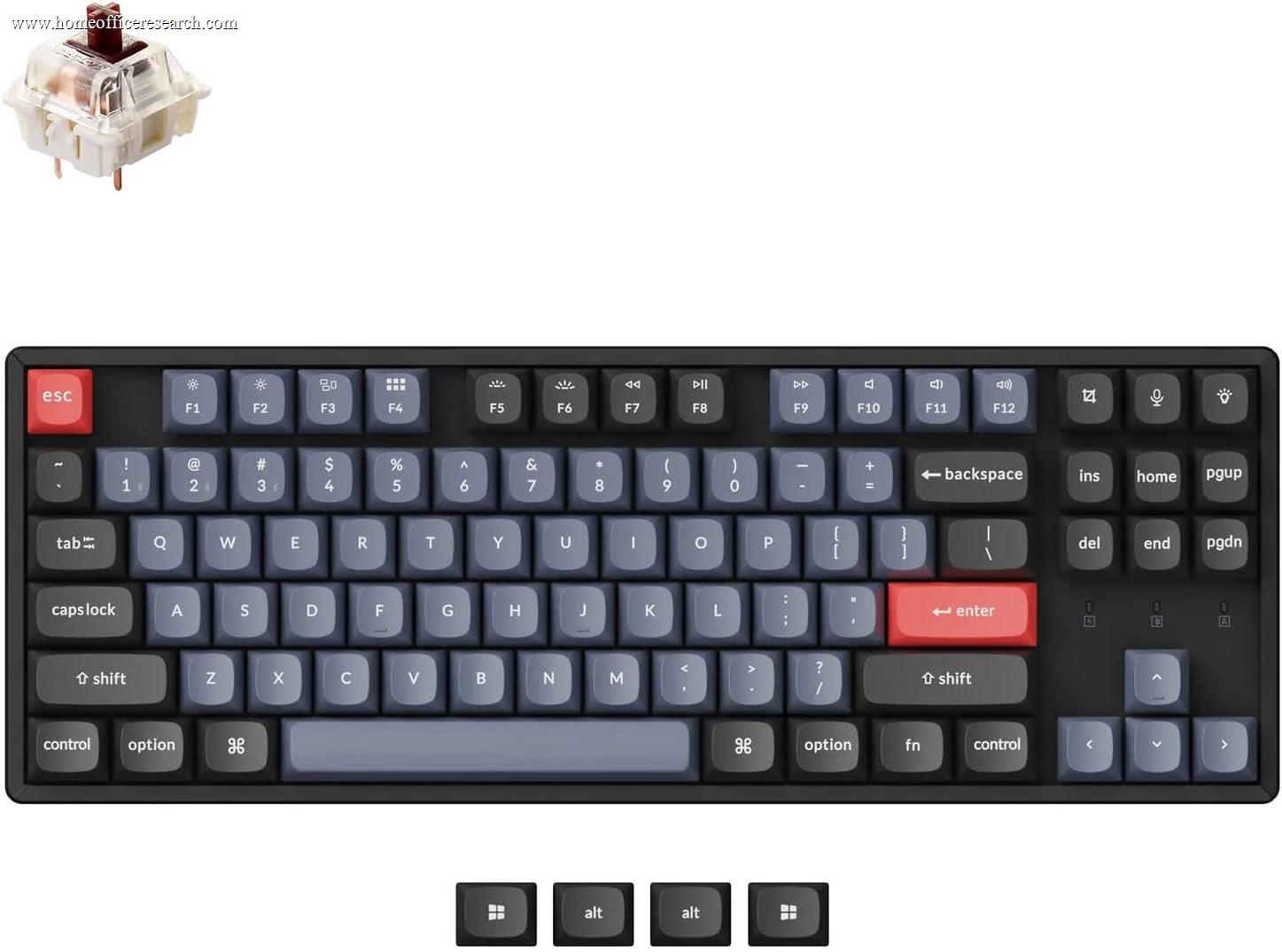
The Keychron K8 Pro is a hot-swappable TKL mechanical keyboard with Bluetooth 5.1 multi-device wireless, QMK/VIA open-source firmware, and an aluminum top plate option — a mid-range package that delivers the core mechanical customizability story at a price well below the full-premium Q1 Pro. The hybrid build (aluminum top, plastic base) and lack of gasket mounting explain its separation from the Q Pro tier, but for buyers who want a genuinely programmable, switch-swappable wireless TKL, the K8 Pro delivers that specification competently.
How We Scored It
Category Deep-Dives
Typing Feel & Comfort
8.0 / 10 30% weightingThe K8 Pro’s TKL layout is the productivity sweet spot for a broad category of home office users: it eliminates the numpad — which most non-accounting workflows rarely require — and reduces the horizontal footprint by roughly 20% relative to a full-size keyboard. That reduction moves the mouse closer to the keyboard’s centerline, shortening the shoulder angle required during extended mixed keyboard-and-mouse workflows. The absence of the numpad does not affect the navigation cluster or function row, both of which are retained at full size. For users who have dismissed TKL because they assumed it sacrificed keys beyond the numpad, the K8 Pro is worth a closer look.
The hot-swappable sockets mean switch selection is genuinely not locked in at the time of purchase. Gateron G Pro Browns, Reds, or Blues (or any compatible MX-footprint alternative) can be swapped without soldering, using only a basic switch puller. Stock Gateron G Pro switches are factory-lubed and produce smoother travel than unlubed switches at the same actuation weight — noticeably better than membrane and most budget mechanical alternatives. The tactile bump of Brown switches provides a defined actuation event without the audible click of Blue switches; Red switches deliver a smooth, consistent linear travel without any tactile feedback. Both are suitable for the home office environment; Blues are ruled out for shared spaces and video calls.
The OEM profile keycaps are taller than SA but lower than Cherry profile — they provide comfortable finger positioning for most users without feeling unfamiliar, particularly for users transitioning from a standard desktop keyboard. The keycap texture and resistance to shine vary by specific variant; the double-shot PBT keycaps available on the K8 Pro offer substantially better long-term durability than ABS alternatives, maintaining surface texture through years of daily use. OEM profile also means compatibility with a wide range of aftermarket keycap sets without requiring profile-specific sourcing.
Bottom line on typing feel: An 8.0 score reflects a genuinely capable mechanical typing experience — hot-swap sockets for switch flexibility, factory-lubed Gateron G Pro switches, and a TKL layout that improves ergonomic positioning. The gap from the Q1 Pro’s 9.5 is explained by the absence of gasket mounting and the OEM versus premium PBT keycap profile on the Q1 Pro — real differences, but not disqualifying ones at the K8 Pro’s price tier.
Build Quality
7.5 / 10 20% weightingThe K8 Pro’s aluminum top plate option adds significant rigidity and a premium feel relative to the full-plastic K8. The aluminum plate constrains the switch mounting surface, reducing deck flex and the acoustic “ping” common to thin plastic top-mount designs. Setting the aluminum variant on a desk, the board feels substantially more solid than plastic-construction keyboards at similar price points — the surface does not flex under vigorous typing, and the switches feel planted rather than springy. This is a meaningful upgrade over the non-Pro K8, and the aluminum variant is worth the incremental cost for buyers planning multi-year daily use.
The plastic base is the honest qualifier in the K8 Pro’s build story. The hybrid construction — aluminum top, plastic base — keeps overall weight moderate, making the K8 Pro travel-friendly compared to full-aluminum boards like the Q1 Pro. That weight reduction comes with a tradeoff: some deck flex is present in the base, particularly near the center of the board under sustained typing load. This is not a structural failing — the K8 Pro is a durable keyboard — but it distinguishes the K8 Pro’s build character from full-aluminum or gasket-mount constructions. The 7.5 versus the Q1 Pro’s 9.5 build score reflects precisely this: hybrid versus full-metal construction, no gasket suspension.
The stabilizers on wide keys (spacebar, backspace, shift, enter) are pre-lubed from the factory, with quality that is generally acceptable for stock use. Rattle on the spacebar and backspace is present at varying levels depending on the unit — it is the most common complaint in owner feedback — but it is rarely severe enough to require immediate modification. Enthusiast users who want to optimize stabilizer performance can re-lube with heavier-weight lubricant (Krytox 205g0 or similar), which meaningfully reduces rattle on a board that otherwise provides accessible disassembly for this kind of work.
Bottom line on build quality: The aluminum top plate version is the correct choice for buyers who plan to use the K8 Pro as a primary keyboard for multiple years. The hybrid build is a reasonable engineering decision at this price tier — it delivers a solidly above-average typing surface without the weight and cost of full-aluminum construction. Buyers who specifically want gasket-mount flex and full-metal construction should look at the Q1 Pro.
Connectivity & Features
8.0 / 10 20% weightingThe K8 Pro supports Bluetooth 5.1 with three-device multi-pairing — pairing with up to three devices simultaneously and switching between them with a keyboard shortcut. This covers the most common home office multi-device scenario: a desktop and laptop, or a Mac and a Windows machine, with the keyboard switching between them without re-pairing. The Bluetooth implementation is reliable in standard home office environments, and the three-device limit is sufficient for the majority of home office setups. USB-C wired mode is available for zero-latency use or when charging simultaneously under Bluetooth.
Mac and Windows dual compatibility is one of the K8 Pro’s genuine strengths. Keychron ships the keyboard with both Mac and Windows keycap sets, and the function row behavior is toggleable between the two operating systems via a physical switch. This is a practical advantage over keyboards that treat cross-platform use as an afterthought — the K8 Pro can be used natively on either platform without remapping or adaptation. VIA handles keymap customization without cloud dependency, which means all remapping configuration is stored on the keyboard and travels with the board when switching between machines.
The absence of a USB passthrough hub is a minor limitation for some desk setups, and the K8 Pro does not include a per-key LED software suite requiring cloud connectivity — all LED customization goes through VIA. This is an advantage for users who dislike required software installations, and a limitation for users accustomed to deep manufacturer-provided RGB configuration tools. The overall connectivity package scores 8.0 because the three-device Bluetooth with Mac/Windows switchability and QMK/VIA firmware represents a genuinely complete multi-platform wireless story at this price.
Bottom line on connectivity: Three-device Bluetooth 5.1 with USB-C wired fallback, Mac/Windows dual-keycap sets, and VIA remapping without cloud dependency is a well-designed connectivity package for a mid-range keyboard. The 8.0 score reflects strong multi-device wireless with no critical gaps for home office use.
Acoustics & Workspace Fit
7.0 / 10 15% weightingThe K8 Pro’s acoustic profile is determined primarily by switch choice. Brown switches produce a tactile bump sound — a light, crisp click at the actuation point without the full audible snap of Blue switches — resulting in a typing sound that is audibly mechanical but not aggressive. Red switches produce a quieter, more consistent thud at bottom-out, with no tactile sound event at actuation. Neither is silent. Under normal typing conditions, the K8 Pro with Red switches registers at approximately 55–65 dB SPL — meaningful in a quiet environment, clearly audible to nearby people, and borderline for video call microphones depending on microphone sensitivity and positioning.
The K8 Pro lacks a gasket mount, which means case resonance is not absorbed by flexible mounting. The aluminum top plate partially mitigates this by adding mass and rigidity to the switch mounting surface, but the plastic base allows some vibration to transmit to the desk. The result is a moderate case resonance that enthusiast users often address with aftermarket foam modification — placing a sheet of EVA foam between the PCB and the case bottom. This modification is inexpensive and meaningfully improves the keyboard’s acoustic character, reducing the hollow echo on bottom-out that characterizes plastic-base keyboards.
For workspace fit, the TKL layout reduces horizontal footprint relative to full-size, which is a positive factor for desk organization and ergonomics. The keyboard is not silent by default — open-plan office users or those who type frequently during video calls should consider silent switch alternatives (such as Gateron Yellow Silent or Bobagum) which can be installed via the hot-swap sockets without any modification to the board itself. For private home office use without strict noise constraints, the stock acoustic profile is entirely acceptable.
Bottom line on acoustics: A 7.0 score reflects an honest assessment of a standard mechanical keyboard without gasket damping or silent switches. The K8 Pro is appropriate for solo home office use; it requires switch modification for quiet open-plan or call-heavy environments. The hot-swap socket is the key enabler here — silent switch installation requires no soldering.
Value for Money
7.0 / 10 10% weightingThe K8 Pro is positioned between budget and premium mechanical keyboards — a mid-tier product that delivers hot-swap sockets, QMK/VIA firmware, multi-device Bluetooth, and an aluminum top plate option at a price substantially below the Q1 Pro. The hot-swap and QMK features justify the premium over entry-level TKL options from the same Keychron lineup (the C3 Pro being the most directly comparable budget alternative). Users who want a genuinely programmable, switch-customizable wireless TKL will find the K8 Pro’s price reasonable for the specification it delivers.
The clearest value context is the comparison with the Q1 Pro. The Q1 Pro’s gasket-mount full-aluminum construction, deeper acoustic refinement, and premium PBT keycaps command a significantly higher price. The K8 Pro delivers the same QMK/VIA firmware, the same three-device Bluetooth 5.1, and the same hot-swap PCB at a lower price — the trade is build construction and acoustic refinement, not fundamental functionality. For buyers who prioritize the programmable keyboard capability and wireless flexibility without the full premium build, the K8 Pro’s price-to-specification ratio is defensible. Comparable hot-swap wireless TKL keyboards from Ducky, Varmilo, and similar brands at equivalent price points generally do not offer QMK/VIA support, which is a genuine differentiator.
Bottom line on value: The 7.0 score reflects a keyboard that delivers its core specification honestly at a mid-range price, without the full premium build the price suggests to some buyers. The hot-swap plus QMK combination at this tier is the key value proposition — it is harder to find than the sticker price would imply.
Customizability
8.5 / 10 5% weightingThe K8 Pro’s QMK/VIA firmware support enables complete keymap remapping at the hardware level — every key can be reassigned, layers can be programmed for alternate key functions, macros can be created for any keystroke sequence, and RGB lighting can be configured without cloud dependency. VIA provides a graphical interface for this remapping that works in a browser, applying changes to the keyboard immediately without firmware recompilation. For keyboard-heavy workflows — software development, terminal environments, video editing, or Vim-style text editing — this level of programmability is genuinely valuable and is not universally available at this price tier.
The hot-swap sockets accept any 3-pin or 5-pin MX-compatible switch, providing access to the full range of aftermarket mechanical switches — linear, tactile, clicky, silent, and specialty variants. The ability to change switches without soldering is the defining long-term customization advantage of the K8 Pro over non-hot-swap alternatives: when a switch variant no longer suits a user’s preferences, it can be replaced for minimal cost without tools beyond a switch puller. Keycap compatibility is broad — the K8 Pro’s standard TKL layout accepts third-party keycap sets without layout-specific sourcing concerns, and a large Keychron community provides mod guides, sound dampening tutorials, and firmware resources for users who want to take customization further.
Bottom line on customizability: An 8.5 score reflects QMK/VIA firmware plus hot-swap hardware plus broad keycap compatibility — a complete platform for keyboard customization at the mid-range tier. The gap from the Q1 Pro’s 9.5 is primarily in the keycap profile and the depth of the enthusiast ecosystem around the Q1 Pro, not in fundamental firmware or hardware capability.
About the Manufacturer
chron
Keychron is a Hong Kong-based keyboard manufacturer founded in 2017, launched via a Kickstarter campaign and grown into one of the most widely recognized brands in the enthusiast mechanical keyboard market. The company’s early differentiation was making Mac-compatible mechanical keyboards mainstream at a time when most competitors focused primarily on Windows — a positioning that opened the market to a large segment of professional users previously underserved by the mechanical keyboard category.
Manufacturing is contracted in China with documented QC specifications, and Keychron’s direct-to-consumer model (keychron.com) supplemented by Amazon distribution provides broad accessibility. The company has consistently expanded its lineup with generational updates — K8 to K8 Pro, K2 to K2 Pro — adding QMK/VIA firmware, hot-swap PCBs, and wireless connectivity to existing designs rather than replacing them with incompatible successors. This iterative approach has built credibility in enthusiast communities that have historically been skeptical of mass-market keyboard brands claiming enthusiast-grade specifications.
Keychron publishes open-source QMK firmware repositories on GitHub for all QMK-compatible keyboards, enabling community maintenance and extension of firmware support beyond any commercial support window. This level of transparency is not universal in the keyboard market and contributes meaningfully to the K8 Pro’s long-term support story — users can expect continued firmware updates and community resources regardless of Keychron’s commercial priorities at any given point.