MX Mechanical
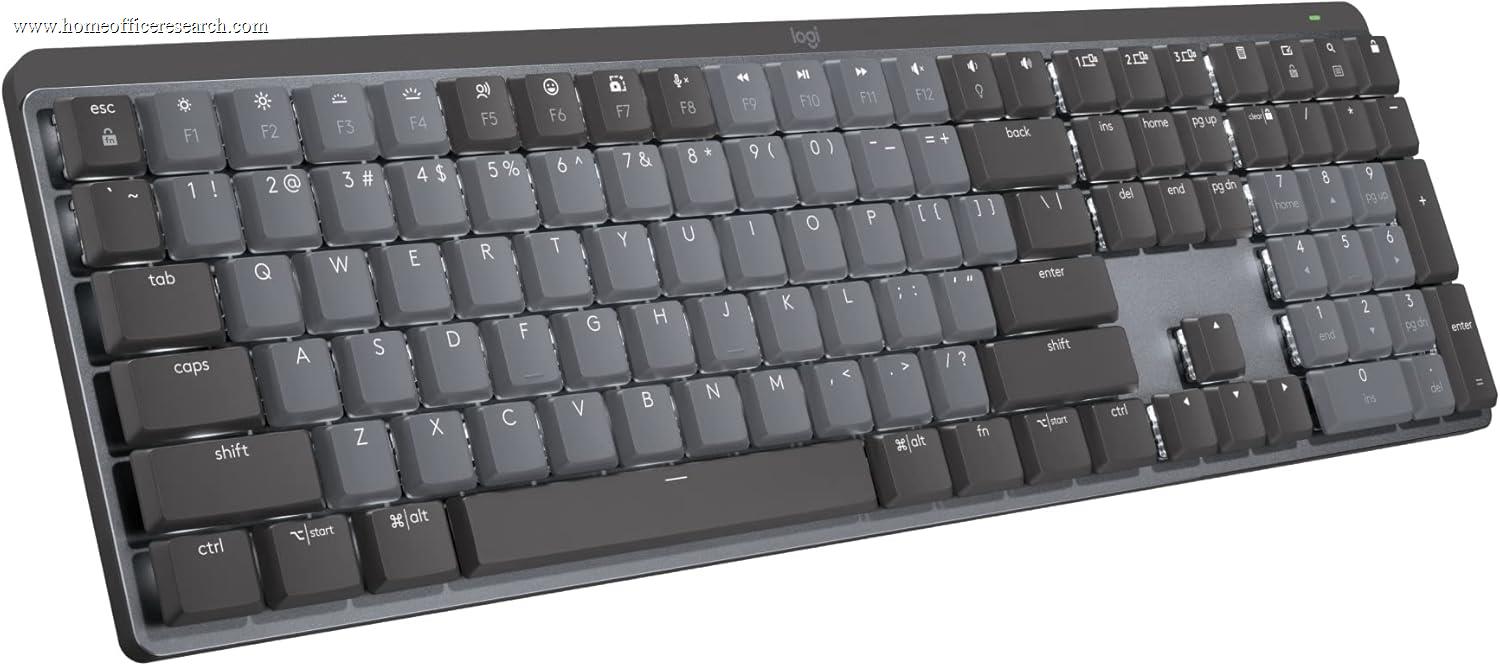
The Logitech MX Mechanical earns its position as our fifth-ranked home office keyboard by solving a specific problem well: delivering genuine tactile mechanical feedback — a perceptible bump, longer travel, a more deliberate keystroke — without the acoustic cost that makes standard mechanical keyboards inappropriate for shared spaces and video calls. Kailh Brown Silent switches, Logi Bolt wireless reliability, three-device Easy Switch pairing, and a smart proximity-activated backlight make it the most practical entry point into mechanical keyboards for home office users who need to type quietly.
How We Scored It
Category Deep-Dives
Typing Feel & Comfort
8.0 / 10 30% weightingKailh Brown Silent switches provide tactile feedback — a perceptible bump at actuation — with dampened stems that soften both downstroke impact and upstroke return. At 3.2mm travel, the feel is distinctly mechanical: more deliberate, more physical than scissor-switch keyboards, but meaningfully quieter than standard Brown or Blue mechanical switches. Users who want mechanical feedback in a home office setting — where noise is a shared-space consideration — will find this a satisfying compromise. The bump is tactile without being sharp; the feedback is clear without requiring the decisive bottom-out that linear switches demand. Finger recognition of the actuation event is reliable and consistent across the full key matrix.
The 8.0 reflects that the silence engineering is effective without being perfect. The MX Mechanical is quieter than standard mechanical keyboards but still perceptibly louder than scissor-switch alternatives like the MX Keys S. Users transitioning from laptop keyboards will notice the increased travel immediately — some find it more satisfying, others find it tiring over long sessions until muscle memory adjusts. The full-size layout distributes hand position naturally across the board, and the slight tilt in the chassis geometry suits most flat-desk typing postures without requiring a wrist rest.
Bottom line on typing feel: Kailh Brown Silent switches deliver genuine mechanical tactile feedback at meaningfully reduced noise — the defining trade-off this keyboard is built around. Users who specifically want that combination will find the typing experience well-executed. Users who want the quietest possible option should look at the MX Keys S instead.
Build Quality
8.0 / 10 20% weightingFull-size plastic construction, competently executed. The keyboard is stable under heavy typing, the feet hold their position, and there is no chassis flex across the 430mm+ width of the full-size layout. Build quality is appropriate for the Logitech MX positioning — reliable and professional — without reaching the material distinction of aluminum-bodied alternatives like the Keychron Q1 Pro. The stabilizers on wide keys (spacebar, shift, enter, backspace) perform consistently across their full span with no tilt or wobble, which is a quality indicator often overlooked in full-size boards.
The full-size layout and numpad add desk footprint relative to TKL or 75% alternatives; users should have the desk space to commit. The keyboard positions the mouse further right of the body’s centerline than a TKL design would, which is a minor ergonomic consideration for users who type extensively. The integrated ABS keycaps will develop surface shine with sustained daily use — a known limitation of the material at this price point that Keychron addresses with PBT on its competing designs.
Bottom line on build quality: Solid full-size plastic construction that performs reliably without the premium material distinction of aluminum-chassis competitors. The 8.0 reflects a keyboard that is well-built for its category and price positioning — not a limitation, but not a differentiator.
Connectivity & Features
8.5 / 10 20% weightingDual wireless protocol (Bluetooth + Logi Bolt) is Logitech’s strongest connectivity feature. Logi Bolt provides sub-1ms wireless latency in dense RF environments where Bluetooth connections can degrade — particularly valuable in home offices with many wireless devices competing for spectrum. Unlike older Unifying receiver designs, Logi Bolt’s protocol is purpose-built for reliability in congested 2.4GHz environments, making it the stronger choice for users whose home office shares spectrum with multiple Wi-Fi networks, smart home devices, and other wireless peripherals. Easy Switch allows one-button switching between three paired devices, and the toggle is near-instantaneous with no perceptible connection delay.
Logi Options+ software provides per-key remapping, app-specific profiles, and macro configuration — a more capable software platform than most competing keyboards offer outside the mechanical enthusiast ecosystem. Cross-platform support spans Windows, macOS, and Linux, with key mapping that adjusts modifier behavior between operating systems without requiring re-pairing. The smart backlight with proximity sensor auto-activation is a thoughtful feature that avoids the constant LED drain of always-on backlighting: the keyboard detects approaching hands and activates the per-key white LEDs, then dims them when hands leave the board. In practice this meaningfully extends per-charge battery life without any manual backlight management.
Bottom line on connectivity: The 8.5 is the MX Mechanical’s strongest category score, and it’s warranted. Logi Bolt + Bluetooth dual wireless, three-device Easy Switch, proximity-activated backlight, and a mature software platform combine to match or exceed the connectivity package of every keyboard ranked above it except the MX Keys S — which holds the advantage on USB-C charging and per-app adaptive backlight intelligence.
Acoustics & Workspace Fit
7.5 / 10 15% weightingSilent mechanical switches are measurably quieter than standard mechanical switches — in practice, comparable to a firm scissor-switch keyboard in overall noise level, though the sonic character differs. Where scissor-switch keyboards produce a muted, high-frequency tap, silent mechanical switches produce a dampened, lower-frequency thump at actuation and bottom-out. Both are quiet; the character of that quiet is different. In a shared home office or during video calls, the MX Mechanical is unlikely to be commented on. In a completely quiet room or with a sensitive near-field microphone, the actuation sound is perceptible — softer than standard mechanicals, louder than scissor-switch alternatives.
The 7.5 acoustics score reflects this honest positioning. The MX Mechanical is not as quiet as the MX Keys S (9.5) and not as acoustically demanding as a standard mechanical keyboard. It occupies a middle ground that is genuinely appropriate for most home office environments — including most video call setups — while falling short of the reference-level quiet that makes the MX Keys S the acoustics benchmark. The full-size layout’s desk footprint is standard for the category; no adjustment is needed for users already accustomed to a full-size board.
Bottom line on acoustics: Silent mechanical switches achieve near-scissor-switch noise levels — appropriate for shared home offices and most video call setups. The 7.5 reflects that the MX Mechanical does this well without quite reaching the acoustic ceiling set by scissor-switch keyboards. For users whose primary constraint is noise, the MX Keys S remains the stronger recommendation.
Value
7.5 / 10 10% weightingThe MX Mechanical is competitive in the wireless silent mechanical segment. The Logitech ecosystem advantages — Options+ software, Logi Bolt reliability, Flow cross-computer control — justify its positioning for users already invested in that ecosystem and specifically seeking Logitech’s full-size wireless mechanical option. The feature package is strong: dual wireless protocol, three-device pairing, smart backlight, and a full-size layout with numpad are difficult to replicate at this tier from any other manufacturer.
The honest comparison for keyboard-first buyers is against Keychron. Keychron options at similar or lower price points offer hot-swap capability and double-shot PBT keycaps — physical customization advantages the MX Mechanical cannot match. The MX Mechanical’s counterargument is the Logi Bolt wireless protocol, the mature Options+ software platform, and the Logitech ecosystem integration. The choice between them is largely an ecosystem question: Logitech software and wireless reliability vs. Keychron physical customization and switch flexibility. Neither is objectively better; they solve different buyer profiles.
Bottom line on value: Fair positioning for the wireless connectivity package and software platform offered. Buyers who prioritize Logitech ecosystem integration will find the value proposition sound. Buyers comparing only typing fundamentals will note Keychron’s hot-swap and PBT advantages at comparable price points.
Customizability
6.0 / 10 5% weightingLogi Options+ provides software customization well above the category average — per-key remapping, smart actions tied to specific applications, and app-specific behaviors are genuinely useful for productivity workflows. The Flow feature, which enables cursor and clipboard sharing between paired devices, extends the three-device pairing from a convenience into a functional multi-computer workflow tool. For users whose customization needs are software-side, the MX Mechanical is well-served.
Physical customization is limited by the platform design. No hot-swap sockets are provided, integrated ABS keycaps cannot be replaced, and the backlight is white-only with no per-key RGB configuration. QMK or VIA firmware is not available. For switch or keycap customization — the core physical customization that keyboard enthusiasts prioritize — Keychron is the better platform at every price point. The 6.0 score is not a judgment against the MX Mechanical’s software capabilities, which are legitimately strong; it is an accurate reflection that physical keyboard customization is not part of what this product offers.
Bottom line on customizability: Strong software customization via Logi Options+; no pathway for physical switch or keycap modification. Users who want to try different switches, replace worn keycaps, or flash custom firmware should consider the Keychron platform. Users satisfied with software-side customization will find Options+ a capable and well-maintained platform.
About the Manufacturer
tech
Logitech International S.A. was founded in 1981, headquartered in Lausanne, Switzerland, and trades on the Nasdaq under the ticker LOGI. One of the largest PC peripheral companies globally, Logitech’s product portfolio spans keyboards, mice, webcams, speakers, gaming peripherals, and video conferencing hardware. The company’s MX (Master) product line is Logitech’s premium productivity tier — anchored by the MX Master mouse series and MX Keys keyboard family — and is designed for professional and creative users who want best-in-class performance without gaming aesthetics.
Logi Bolt is Logitech’s proprietary 2.4GHz wireless standard, developed to address Bluetooth reliability limitations in high-density wireless environments. Unlike the older Unifying receiver, Bolt uses a revised protocol that maintains connection stability in RF-congested settings — a meaningful distinction for home offices where spectrum is increasingly crowded with smart home devices, multiple Wi-Fi networks, and other wireless peripherals. Logi Options+ provides centralized configuration across all MX devices, enabling per-app key remapping, gesture customization, and the Flow cross-computer workflow tool.
The MX Mechanical represents Logitech’s entry into the mechanical keyboard segment as a direct extension of its existing MX productivity ecosystem. Rather than competing in the keyboard enthusiast market on switch selection, hot-swap sockets, or acoustic tuning, Logitech positioned the MX Mechanical around its existing connectivity advantages — Logi Bolt, multi-device Easy Switch, Options+ software — applied to a full-size mechanical design with silent switches. It is aimed squarely at users who want mechanical feel within the Logitech ecosystem, not at users arriving from the keyboard enthusiast market.