MX Anywhere 3S
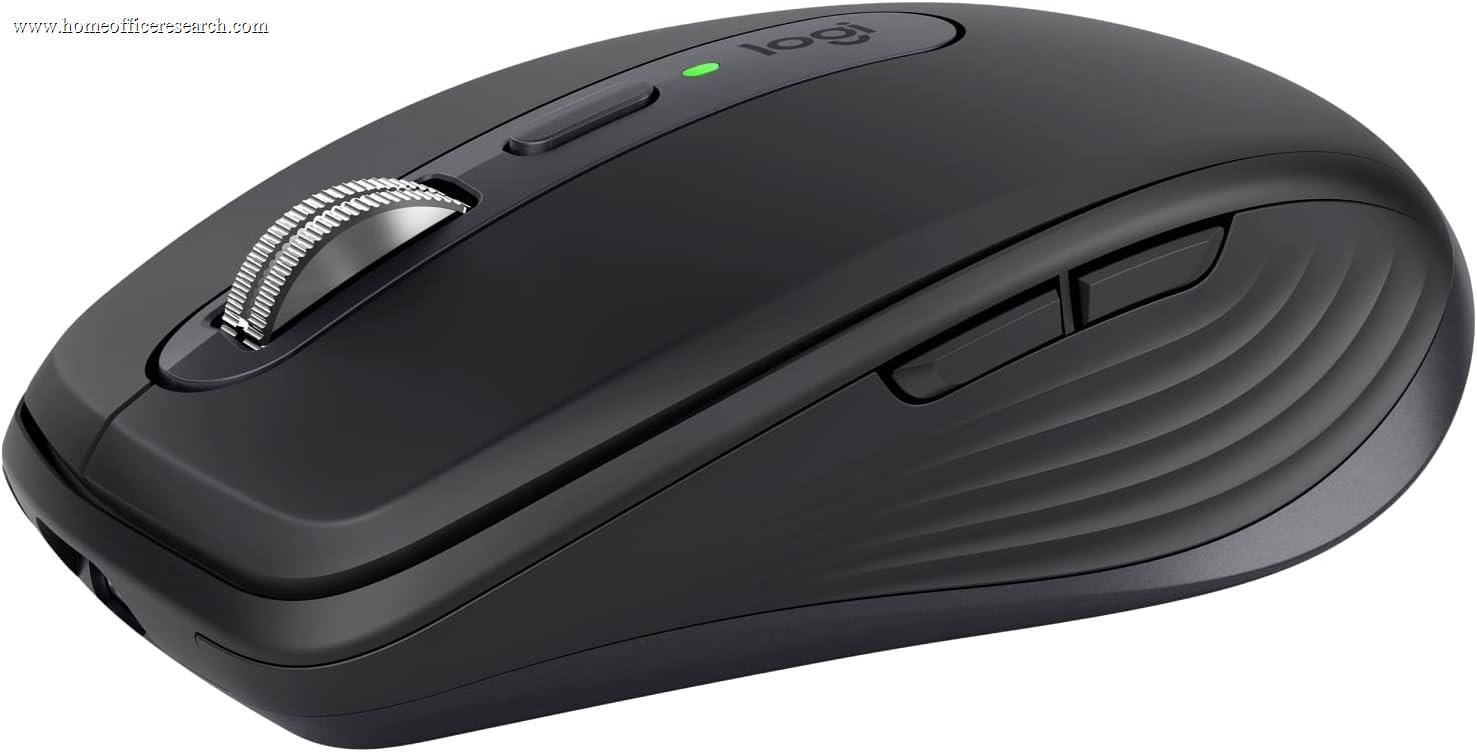
The Logitech MX Anywhere 3S is the top compact productivity mouse in our evaluation — the MX line’s capabilities shrunk into a travel-friendly body. It keeps the Darkfield any-surface sensor, the MagSpeed electromagnetic wheel, Quiet Click switches, and three-device wireless, in a shell light and small enough for a laptop bag, a small desk, or a claw/fingertip grip. The trade is real: you give up the MX Master series’ sculpted palm support and its dedicated horizontal thumbwheel. For a primary all-day desk mouse with large hands, the MX Master 3S is the better choice; for travel, tight spaces, or smaller hands, the Anywhere 3S is the one to buy.
How We Scored It
Category Deep-Dives
Ergonomics & Comfort
8.5 / 10 30% weightingThe MX Anywhere 3S is a compact mouse, roughly 30g lighter and noticeably smaller than the MX Master 3S, and its comfort profile follows directly from that size. The low, rounded shell is comfortable for claw and fingertip grips and for smaller hands, and its light 99g body is easy to lift and reposition repeatedly — an advantage for high-movement work and a small or cluttered desk. It is also the mouse to pair with a laptop bag: it takes up little space and tracks anywhere.
The trade-off is that it does not provide the sculpted, hand-filling palm support of the MX Master series. A large-handed user resting the whole palm on the mouse for eight hours will find the Master shape more supportive; the Anywhere is more of an active, controlled-by-the-fingers mouse than a relaxed palm rest. It is comfortable for extended use — not a tiny travel nub — but it is optimized for portability and versatility rather than maximal all-day palm ergonomics.
For the right user, this is exactly the point. Buyers with smaller hands, a fingertip or claw grip, a tight desk, or a need to move between locations will often find the Anywhere 3S more comfortable than a large Master-series mouse, not less. Fit is personal, and the Anywhere fills the half of the market the Master shape does not.
Bottom line on ergonomics: A light, versatile compact shape that excels for claw/fingertip grips, smaller hands, tight desks, and travel. The 8.5 reflects genuine all-day comfort for its intended users; it sits below the MX Master shape only for large-handed palm-grippers who want maximal support.
Tracking & Sensor
9.0 / 10 20% weightingThe Anywhere 3S carries the same Darkfield high-precision sensor as the full-size MX Master models, with a 200–8,000 DPI range. That is the headline reason it punches above a typical compact mouse: Darkfield tracks on glass and high-gloss surfaces (down to roughly 4mm glass) where ordinary optical sensors fail. For a mouse explicitly designed to be used “anywhere” — a glass conference table, a glossy hotel desk, an armrest, your knee — this any-surface capability is the defining feature, not a footnote.
Tracking quality is identical to its larger siblings: consistent and artifact-free across the full DPI range, equally at home with fine document edits and broad multi-monitor sweeps. Despite the small body, there is no compromise in sensor performance — you are getting the flagship sensor in a compact shell.
As with the rest of the MX line, the 9.0 rather than higher is category context: it is a productivity sensor at a standard report rate, not a high-polling gaming sensor. For all office and travel use that distinction is invisible.
Bottom line on tracking: The same flagship Darkfield any-surface sensor as the MX Master line, in a compact body — arguably even more valuable here, since this mouse is meant to be used on whatever surface is available. The 9.0 reflects excellent, surface-agnostic precision for office and travel use.
Connectivity & Multi-Device
8.0 / 10 20% weightingThe Anywhere 3S connects via the encrypted Logi Bolt USB receiver and Bluetooth, pairing with up to three devices and switching between them with the underside button or automatically via Logitech Flow. For users who carry one mouse between a desktop and a laptop, or a work and personal machine, this three-device flexibility is genuinely useful and a natural fit for a travel mouse.
It scores 8.0 here — a half-step below the MX Master 3S’s 8.5 — for two small reasons. Like the 3S it uses a USB-A Bolt dongle and the prior-generation wireless chip rather than the MX Master 4’s USB-C receiver, which is a minor friction on modern USB-C-only laptops. And as a smaller-bodied mouse, its battery, while still excellent, carries the same up-to-70-day rating without the larger cell of the full-size models. Neither is a practical problem; both are the kind of small concession a compact form factor implies.
Battery is rechargeable over USB-C with a one-minute quick charge giving about three hours, and cross-platform support spans Windows, macOS, Linux, iPadOS, and ChromeOS — the iPadOS support being especially relevant for a travel mouse paired with a tablet.
Bottom line on connectivity: Three-device Bolt-plus-Bluetooth switching and strong battery make it a flexible travel companion. The 8.0 reflects the USB-A receiver and prior-generation wireless chip — minor concessions typical of the compact class.
Buttons & Scrolling
7.5 / 10 15% weightingThe Anywhere 3S keeps the MagSpeed electromagnetic scroll wheel — the same excellent mechanism as the MX Master line, switching automatically between precise ratcheted scrolling and a near-silent free-spin that flies through long documents. It also keeps the Quiet Click main buttons that cut click noise by roughly 90%, which makes it call-friendly out of the box.
The clear concession relative to the MX Master series is the absence of a dedicated thumbwheel. The Master mice have a separate horizontal scroll wheel under the thumb that is genuinely useful for wide spreadsheets and editing timelines; the Anywhere 3S omits it to save space, offering side buttons that can be mapped to horizontal scroll or other functions instead. It also has six buttons total rather than the Master’s seven-plus. For most office work this is plenty, but power users who lean on horizontal scrolling or want a deep button set will feel the difference.
This is the single biggest reason the Anywhere 3S sits below the MX Master models overall: the scroll-and-button package is very good, but it is a step down from the best-in-class control set the Master series offers. It is a deliberate trade of capability for portability.
Bottom line on buttons & scrolling: The same MagSpeed wheel and Quiet Clicks as the flagship, but with six buttons and no dedicated thumbwheel. The 7.5 reflects a strong compact control set that gives up the Master series’ horizontal thumbwheel and deeper button count.
Value
8.0 / 10 10% weightingThe MX Anywhere 3S sits below the MX Master 3S and well below the MX Master 4, and for the right buyer it is excellent value: you get the flagship Darkfield sensor, MagSpeed scrolling, and Quiet Clicks in a portable body for less than the full-size models cost. If you specifically want a compact or travel mouse, nothing else in our guide offers this combination of any-surface tracking and premium scrolling at the price.
The value is more nuanced if you are choosing it purely to save money on a primary desk mouse. In that case the modest extra for the MX Master 3S buys a meaningfully more capable everyday tool — the sculpted shape, the thumbwheel, the larger battery — and is usually worth it for stationary use. The Anywhere 3S earns its value on portability and form factor, not on being a cheaper Master.
Bottom line on value: Strong value if you want a compact or travel mouse with flagship internals. The 8.0 reflects that for a stationary primary mouse, the slightly pricier MX Master 3S is usually the better buy — the Anywhere’s value is in its portability.
Software & Customizability
9.0 / 10 5% weightingLogi Options+ support is identical to the rest of the MX line. Every button is remappable, with per-application profiles that change control behavior depending on the active app, plus MagSpeed threshold tuning, DPI steps, Logitech Flow for multi-computer cursor and clipboard sharing, and Smart Actions for multi-step macros bound to a single control. For a compact mouse, this depth of customization is unusual and welcome — it lets users map the side buttons to recover some of the functionality (like horizontal scroll) that the smaller body omits in hardware.
The 9.0 matches the MX Master 3S: the software experience is the same, and the only reason it isn’t higher is the same across the line — the very top score is reserved for the MX Master 4, whose exclusive haptic and Actions Ring features extend what Options+ can drive. As always, the software must be installed to unlock the depth; without it the mouse still works as a capable standard pointer.
Bottom line on software: The full Logi Options+ experience — per-app profiles, Flow, Smart Actions — in a compact mouse, which also helps remap around the missing thumbwheel. The 9.0 matches its full-size siblings.
About the Manufacturer
tech
Logitech is a Swiss-American company founded in 1981 and one of the longest-established names in computer peripherals. Within its premium MX line, the MX Anywhere series is the compact, portable counterpart to the full-size MX Master mice — built for users who want MX-grade capability in a travel-friendly body.
The MX Anywhere 3S, released in 2023, refined the MX Anywhere 3 with an 8,000 DPI Darkfield sensor and the Quiet Click switches that have become standard across the modern MX range. It shares the Logi Options+ software, Logi Bolt receiver standard, and Flow multi-computer control with its larger siblings, so it slots cleanly into a Logitech-based desk setup as the “take it with you” mouse.
Logitech’s scale gives buyers broad retail availability, strong warranty support, and an ecosystem of interoperable peripherals — useful if you are assembling a complete setup or want a desk mouse and a travel mouse that share the same software and receiver standard.