M6 8K
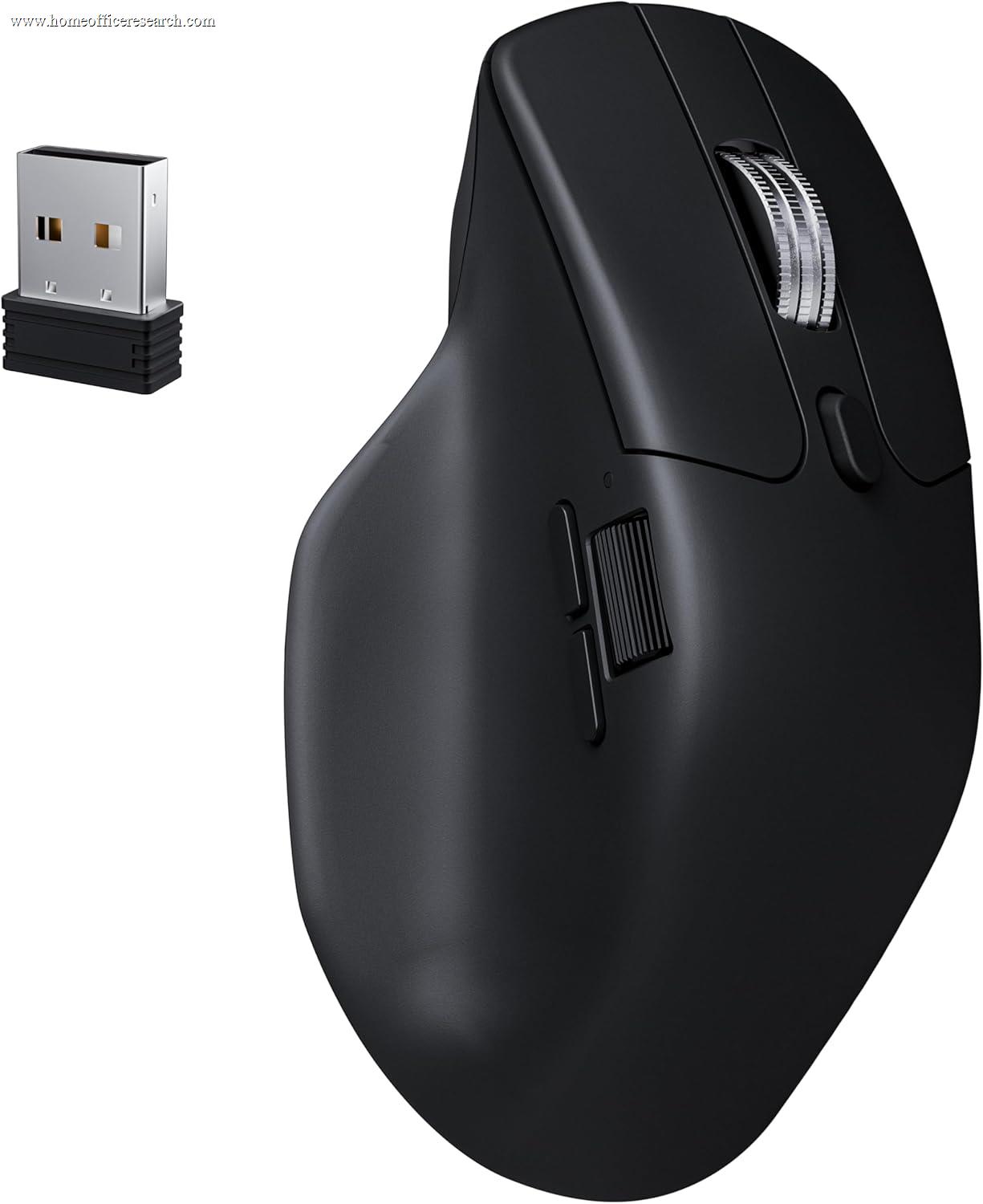
The Keychron M6 8K is the value standout of our mouse evaluation: a 78g wireless mouse with a flagship PixArt 3950 sensor, 8,000Hz polling, tri-mode connectivity, and a near-frictionless magnetic scroll wheel — at roughly half the price of a premium productivity mouse. It does not try to be an MX Master: there is no dedicated thumbwheel, no MagSpeed ratchet, and the software is less polished. But for a buyer who wants gaming-grade responsiveness and a genuinely light mouse that can still be ordered with silent clicks for calls, nothing else in this guide delivers as much capability per dollar.
How We Scored It
Category Deep-Dives
Ergonomics & Comfort
7.0 / 10 30% weightingThe M6 8K uses a moderate right-handed ergonomic shape that borrows from the gaming-mouse playbook rather than the sculpted productivity tradition. At 78g (86g in the All Silent variant), it is dramatically lighter than the 150g MX Master 4 — and that weight difference defines its comfort character. A light mouse reduces the effort of repeated lift-and-reposition and fast cursor travel, which many users find less fatiguing for high-movement work, and which is a genuine advantage on a smaller desk or for a claw/fingertip grip.
The tradeoff is that the M6 8K does not provide the same all-day palm support as a dedicated productivity mouse. There is no pronounced thumb scoop or rest, the arch is lower and more neutral, and the overall body is a familiar mid-size gaming silhouette rather than a hand-filling sculpt. For palm-grip users with larger hands who keep their hand planted on the mouse for hours, the MX Master shape is more supportive. For users who prefer a lighter, more agile mouse — or who use a claw grip — the M6 8K’s profile is comfortable and unobtrusive.
The build is solidly assembled with no creak or flex despite the low weight, and the surface texture provides reliable grip. This is a competent, comfortable shape rather than an ergonomic statement — which is exactly what its score reflects.
Bottom line on ergonomics: A light, agile, competently shaped mouse that suits fingertip/claw grips and high-movement work, but does not match the sculpted all-day palm support of a dedicated productivity mouse. The 7.0 reflects a good general-purpose shape rather than a category-leading ergonomic design.
Tracking & Sensor
9.5 / 10 20% weightingThis is where the M6 8K dramatically outperforms its price. It carries the PixArt PAW3950 — a genuine flagship gaming sensor — rated up to 30,000 DPI and 750 IPS, paired with an 8,000Hz polling rate over its 2.4GHz and wired connections and a measured latency around 0.43ms. These are specifications you would normally find in mice costing two to three times as much, and they are, frankly, far beyond what office work requires.
For the home office specifically, the practical benefit is not the headline DPI — most users will run 800–1,600 DPI regardless — but the sensor’s flawless tracking consistency and the option to drive a large multi-monitor layout with zero perceptible lag or smoothing. If you also game on the same machine, this is the one mouse in our guide that is genuinely competitive with dedicated gaming mice on sensor performance, making it a true crossover device.
The one office-relevant caveat is surface dependence: unlike Logitech’s Darkfield sensor, the PAW3950 is a conventional (if excellent) optical sensor and will want a normal desk or mousepad — it is not designed to track on glass. On any standard surface, tracking is impeccable.
Bottom line on tracking: A flagship gaming sensor at a value price — overkill for office work in the best way, and the reason this is the one true productivity-and-gaming crossover in our evaluation. The 9.5 stops just short of a perfect score only because it lacks the glass-tracking ability of a Darkfield sensor.
Connectivity & Multi-Device
7.5 / 10 20% weightingThe M6 8K is a tri-mode mouse: a low-latency 2.4GHz dongle, Bluetooth 5.3, and USB-C wired. The 2.4GHz mode is what enables the 8,000Hz polling and sub-millisecond latency; Bluetooth is there for travel and for connecting to devices without a free USB port; and wired mode both charges the mouse and provides a zero-latency fallback. This is a more flexible connectivity stack than a Bluetooth-only mouse, and the low-latency dongle is a real advantage over the standard Bluetooth/Bolt approach if responsiveness matters to you.
Where it trails the Logitech MX line is in office-style multi-device switching. The M6 8K stores up to five onboard profiles and can move between its connection modes, but it does not offer the same frictionless “press a button to hop between three paired computers” Easy-Switch experience that makes the MX Master so convenient on a multi-machine desk, nor anything equivalent to Logitech Flow. For a single-computer setup the connectivity is excellent; for a user who constantly switches between a work laptop and a personal desktop, Logitech’s implementation is smoother.
Battery is rechargeable over USB-C. Real-world battery life depends heavily on the polling rate selected — running the full 8,000Hz over 2.4GHz draws meaningfully more power than a 1,000Hz office setting, so most office users will dial the rate down and enjoy long runtime, while those chasing maximum responsiveness will charge more often.
Bottom line on connectivity: Excellent tri-mode flexibility with a genuine low-latency advantage, held back only by less polished multi-computer switching than Logitech’s. The 7.5 reflects strong single-machine connectivity with a weaker multi-device story.
Buttons & Scrolling
7.0 / 10 15% weightingThe M6 8K offers six programmable buttons — the standard left/right, two thumb buttons, wheel-click, and a DPI/profile control — which covers the essentials but is fewer than the seven-plus controls on the MX Master line or the nine on the Razer Pro Click V2. There is no dedicated thumbwheel for horizontal scrolling, which is the one productivity-specific control its premium rivals offer and it does not.
The standout here is the zero-contact magnetic metal scroll wheel. Using Hall-effect sensing, the wheel reads rotation without physical contact, which makes it exceptionally smooth and quiet and eliminates a common long-term wear point. It is a genuinely premium scroll mechanism that punches above the mouse’s price, even if it lacks the automatic free-spin/ratchet switching of Logitech’s MagSpeed.
Crucially for a home office, the M6 8K is available in an All Silent variant with dampened click switches, bringing it into the quiet-click category alongside the MX line — important for anyone who takes calls. (The standard variant uses normal-feel switches.) Choose the All Silent model if call-quiet operation matters to you; choose the standard model if you prefer a more tactile click and work alone.
Bottom line on buttons & scrolling: A superb magnetic scroll wheel and an optional silent-click model, but a smaller button count and no horizontal thumbwheel. The 7.0 reflects a strong-but-not-flagship control set — the scroll wheel is the highlight, the missing thumbwheel the main gap.
Value
8.0 / 10 10% weightingThe M6 8K is the value proposition of our mouse guide. It delivers a flagship-class sensor, 8,000Hz polling, a magnetic scroll wheel, tri-mode wireless, and an optional silent-click build for a price well below the MX Master 4 and even below the MX Master 3S. For a buyer whose priorities are responsiveness, light weight, and price — and who does not need the MX line’s thumbwheel, MagSpeed, and multi-computer polish — this is comfortably the most capability per dollar on the page.
The honest framing is that it is a different kind of mouse than the premium productivity options, not a cheaper version of them. You are trading the sculpted ergonomics, the dedicated horizontal-scroll thumbwheel, and the polished multi-device software for a flagship sensor and a much lower price. If those productivity-specific features matter to your workflow, the value gap narrows; if they don’t, the M6 8K is an easy recommendation.
Bottom line on value: The best capability-per-dollar in our evaluation for buyers who value sensor performance and light weight over sculpted productivity ergonomics. The 8.0 reflects genuinely strong value with a clear-eyed view of what you trade to get it.
Software & Customizability
5.5 / 10 5% weightingKeychron configures the M6 8K through its Launcher (a web-based tool) and on-board profile storage rather than a heavyweight resident application. The upside of this approach is that settings are stored on the mouse itself across its five profiles, so they travel with the device and do not require background software to be running. Button remapping, DPI steps, and polling rate are all adjustable.
The downside, relative to Logi Options+, is depth and polish. There are no automatic per-application profiles that switch as you change apps, no equivalent to Logitech’s Smart Actions multi-step macros or Flow cross-computer control, and the overall configuration experience is more utilitarian. For a mouse used primarily as a fast, responsive pointer this matters little; for a user who wants to build elaborate per-app button layouts and automations, Logitech’s ecosystem is meaningfully more capable.
Bottom line on software: Functional, on-board-memory configuration that gets the job done without a resident app, but well short of Logi Options+ in depth and per-app intelligence. The 5.5 reflects competent basics without the advanced workflow features of the category leaders — a minor factor at 5% weighting.
About the Manufacturer
chron
Keychron, founded in 2017 and headquartered in Hong Kong, built its reputation in the mechanical-keyboard enthusiast community by delivering specifications normally reserved for boutique custom builds at accessible, direct-to-consumer prices. That same value-engineering approach now extends to its mouse line.
The M6 8K applies Keychron’s formula to the mouse category: take genuinely flagship components — here, a PixArt PAW3950 sensor and an 8,000Hz wireless implementation — and price them well below the established premium players. Keychron supports the mouse through its web-based Launcher and offers it in both standard and All Silent click variants, the latter aimed squarely at quiet office and shared-space use.
For buyers who already trust Keychron from its keyboards, the M6 8K is a logical companion. For everyone else, it is a credible value alternative to the Logitech and Razer incumbents — strongest for users who prioritize sensor performance, low weight, and price over the sculpted ergonomics and software ecosystem of the established productivity-mouse brands.