K2 HE Wireless Magnetic Switch Keyboard
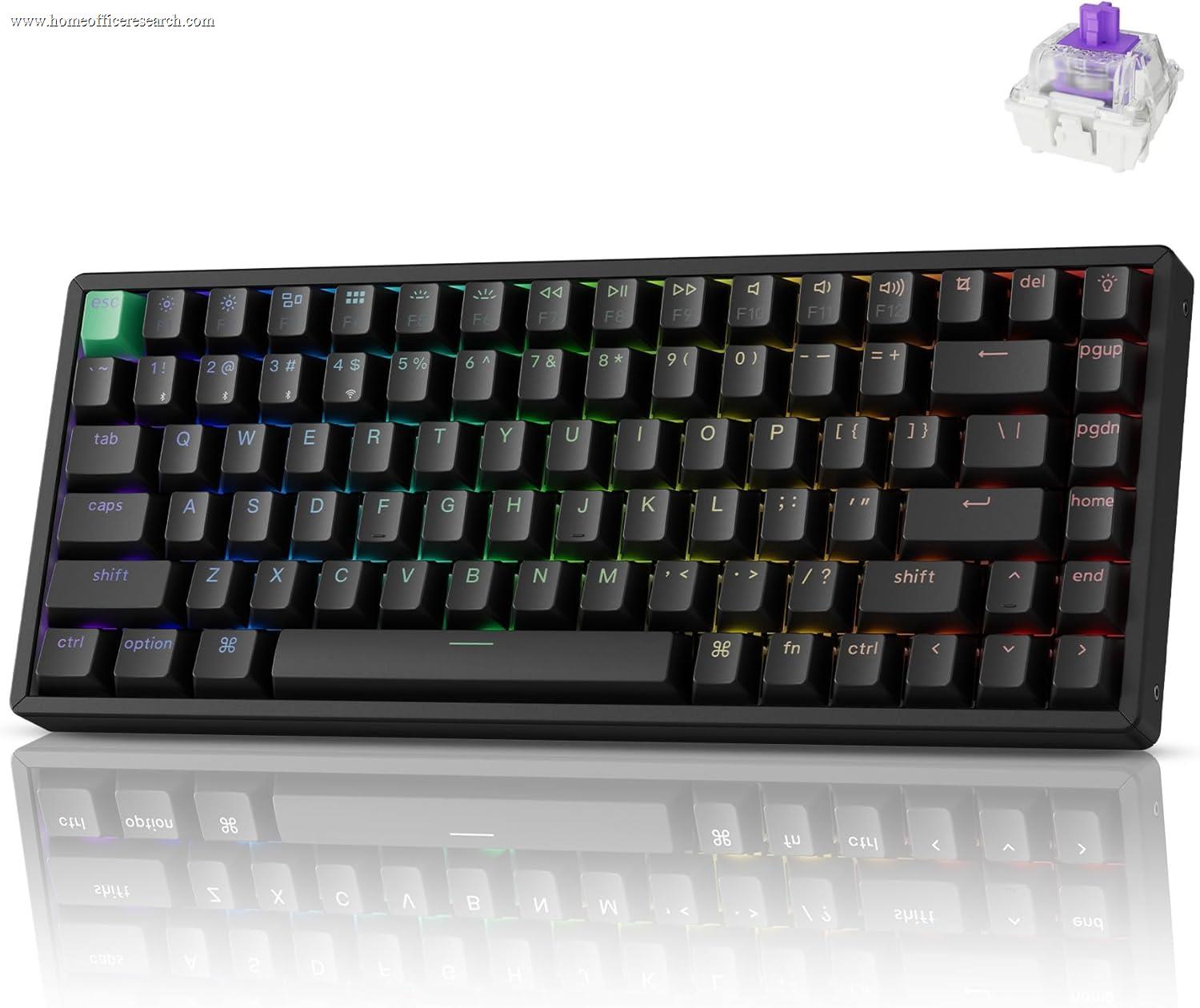
The Keychron K2 HE is the most technologically interesting keyboard in our guide — a 75% wireless board built around Hall Effect magnetic switches that bring adjustable actuation, Rapid Trigger, and effectively unlimited switch lifespan to a productivity-first form factor. It earns its rank #8 position honestly: the typing feel and build quality are excellent, but the premium price, niche acoustics, and limited customizability compared to hot-swap QMK boards keep it from displacing keyboards that optimise more squarely for the office.
How We Scored It
Category Deep-Dives
Typing Feel
8.5 / 10 30% weightingHall Effect switches operate on an entirely different physical principle from every other switch type in our keyboard guide. Where mechanical switches use metal contacts that physically touch and separate — wearing down with every keystroke — and optical switches use a light beam interrupted by a physical actuator, Hall Effect switches use a magnetic field sensed by a contactless semiconductor. There are no metal contacts to oxidise, no spring fatigue mechanisms, no light emitters to drift. Gateron rates the magnetic switches in the K2 HE for 100 million keystrokes, a figure that is functionally unlimited for any office use case. The practical consequence is a switch that feels the same on day one as it will in year five.
The more immediately noticeable consequence of magnetic sensing is fully adjustable actuation. The K2 HE allows each key’s actuation point to be set anywhere from 0.2mm to 3.8mm of travel — individually, per key, via Keychron’s software. For office typing, a comfortable 2.0mm setting gives a tactile-feeling response similar to a quality scissor switch without the shallow travel ceiling. For users who type heavily and want to avoid misfires, setting actuation deeper at 3.0mm adds genuine error reduction on long documents. The default setting ships at approximately 2.0mm, which suits most productivity typing without adjustment. The feel out of the box is smooth, consistent, and slightly linear — there is no tactile bump in the traditional mechanical sense, but the resistance curve feels natural and does not fatigue quickly during long sessions.
The gasket-mounted construction contributes meaningfully to the typing feel by decoupling the switch plate from the case frame. Rather than the switches sitting on a plate rigidly bolted to the case — which transmits all keystroke impact directly into the desk — the gasket mounting allows a small amount of flex throughout the typing surface. The result is a softer, less percussive feel per keypress that reduces finger fatigue over hours of typing. This is a construction approach typically found in premium boards; at the K2 HE’s price tier, it represents genuine premium specification. Combined with the OSA-profile PBT keycaps — which have a textured matte surface that resists shine and provides consistent finger tracking — the typing experience is among the most polished in our guide.
Bottom line on typing feel: The combination of contactless Hall Effect switches (adjustable 0.2–3.8mm actuation) and gasket mounting produces a refined, fatigue-resistant typing experience that competes with keyboards costing significantly more. The absence of a traditional tactile bump is the main trade-off for users accustomed to clicky or tactile mechanical switches.
Build Quality
7.5 / 10 20% weightingThe K2 HE uses an aluminum top frame that gives the board a rigidity and weight that distinguishes it immediately from the plastic-chassis keyboards at lower price tiers. At approximately 800g, it sits solidly on a desk without shifting during typing, even without the rubber feet gripping a slippery surface. The CNC-machined aluminium has no flex across the width of the board and no audible case rattle — two failure modes common in lower-cost keyboards that the K2 HE avoids entirely. The build quality narrative here is not exceptional in the way that a fully CNC-machined custom board would be, but it is entirely appropriate for a mass-market wireless productivity keyboard at its price point, and significantly ahead of the plastic competition.
The hot-swappable switch sockets are present but carry a caveat: they are specifically compatible with Hall Effect 5-pin switch footprints, not standard MX-compatible mechanical switches. A user wanting to swap to their preferred Cherry MX Browns or Gateron Yellows cannot do so — the K2 HE’s sockets are electrically and physically incompatible with contact-based switches. This is a design reality that Keychron is transparent about, and it limits the hot-swap feature to swapping between different Hall Effect switch variants (Gateron offers multiple magnetic switch options with different pre-travel and force curves). For users who want the hot-swap option for MX-style switches, the Keychron Q1 Pro at rank #2 in our guide is the correct comparison. The K2 HE’s hot-swap function is genuinely useful for HE switch tuning, but it is not the universal upgrade path that “hot-swappable” implies on other boards.
The USB-C port is positioned on the left side of the board — a placement that works well for desk setups where cable management routes left, but can be inconvenient for right-sided cable runs. The battery door and Bluetooth pairing button are integrated cleanly without disrupting the board’s profile. The included USB-C to USB-A cable is braided and adequately long for a desktop connection. Keychron ships the K2 HE with a keycap puller and switch puller included — practical accessories that signal the board is intended for users who engage with the hardware, not just consumers who want a plug-and-play peripheral.
Bottom line on build quality: Solid aluminum frame with genuine rigidity, gasket mounting, and PBT keycaps represent strong build specification at the K2 HE’s price. The hot-swap sockets are HE-specific, not MX-universal — an important clarification for buyers expecting standard switch compatibility.
Connectivity & Features
7.0 / 10 20% weightingThe K2 HE offers three connectivity modes: Bluetooth 5.1 for up to three paired devices, a 2.4GHz USB receiver for low-latency wireless, and USB-C wired. This is the full complement for a modern wireless keyboard and covers every practical home office configuration — switching between a desktop and laptop via Bluetooth, using the 2.4GHz receiver for a primary workstation where wireless latency matters, or wired when charging. Device switching across Bluetooth channels is handled by Fn + 1/2/3 key combinations, which are responsive with no perceptible lag in the channel transition. The 2.4GHz receiver offers polling at 1000Hz — the same response rate as wired — making it suitable for users who want wireless convenience without the latency gap associated with Bluetooth.
The Rapid Trigger feature is the K2 HE’s most distinctive advanced function and the one most likely to be unfamiliar to productivity-focused buyers. In standard keyboards, a key registers a press when it passes the actuation point going down, and deregisters when it rises back above a reset point — typically 0.2–0.5mm above actuation. Rapid Trigger replaces this fixed reset point with a dynamic one: the key deregisters the moment it starts moving upward, regardless of absolute position. This enables significantly faster key repeat inputs — relevant for gaming, but also for certain keyboard shortcuts and text editing operations where rapid repeated keypresses are common. For standard typing, Rapid Trigger has no perceptible effect; it becomes relevant in specific high-speed input scenarios.
The 4,000mAh battery provides over 200 hours of use with RGB disabled, which translates to several weeks of typical office use between charges. With RGB enabled at moderate brightness, battery life drops substantially — expect 30–60 hours depending on brightness level. The USB-C fast charging capability tops the battery from depleted to full in under two hours, meaning even a heavy user who drains the battery can recover in a lunch break. Keychron’s Launcher software handles actuation configuration, key remapping (within the confines of the Hall Effect architecture), RGB settings, and firmware updates. It is functional rather than exceptional — adequate for configuring the HE-specific features but not as fully featured as the QMK/Via ecosystem available on the Q1 Pro.
Bottom line on connectivity and features: Full tri-mode wireless, 1000Hz 2.4GHz, and a genuinely useful Rapid Trigger implementation cover everything a home office user needs. The software is functional but constrained compared to QMK-capable boards — acceptable for most users, a limitation for those who want deep key remapping.
Acoustics
6.0 / 10 15% weightingHall Effect switches have a distinct acoustic signature that sets them apart from every other switch category in this guide. Because the sensing mechanism is contactless, there is no metal-on-metal click or snap associated with contact-type switches — the sound is produced entirely by the keycap and stem bottoming out on the switch housing. The result is what reviewers consistently describe as a “thocky” mid-pitched sound — full and resonant on the down stroke, with a shorter return sound on the upstroke. The K2 HE’s sound-absorbing foam layer (positioned between the PCB and bottom case) reduces hollow case resonance and keeps the acoustic profile relatively contained, but this is not a quiet keyboard by the standards of scissor-switch or low-travel board comparisons.
The OSA profile PBT keycaps contribute positively to the acoustic profile compared to ABS keycaps, which tend to produce a higher-pitched clack. PBT dampens the impact sound slightly and ages better — the matte texture resists shine over time, and the thicker construction compared to thin ABS caps adds mass that contributes to the lower-pitched profile. However, the overall sound level of the K2 HE typing at normal speed is audible across a shared workspace and on a video call microphone at typical settings. For users on frequent calls or in open office environments, this is a genuine consideration. The Keychron K8 Pro with its traditional low-profile option, or the Logitech MX Keys S at rank #1 with its scissor mechanism, would be quieter choices for call-heavy work.
Compared to the Keychron Q1 Pro at rank #2 — which ships with Keychron’s own gateron switches and benefits from a polycarbonate plate option — the K2 HE is not dramatically louder, but it lacks the same degree of acoustic tuning achievable through switch swapping and lubing on the Q1 Pro’s MX-compatible hot-swap sockets. The K2 HE’s HE-specific socket design means the switch sound profile is largely fixed without switching to alternative Gateron magnetic variants. Keychron does offer magnetic switches in different force curves (some described as quieter), but the fundamental acoustic character of the HE mechanism remains consistent across variants.
Bottom line on acoustics: A characterful, resonant typing sound that many users enjoy — but not a quiet keyboard. Call-heavy users or shared-desk workers should demo before purchasing or consider the lower-profile MX Keys series instead.
Value
6.5 / 10 10% weightingThe K2 HE is priced at a meaningful premium over its direct plastic-chassis competition in the 75% wireless segment, and at a slight premium over Keychron’s own Q1 Pro — a keyboard that ranks higher in our overall evaluation. The price premium is justified by genuine engineering differentiation: Hall Effect switches, gasket mounting, and a 4,000mAh battery in a wireless board are not features found on budget keyboards. Buyers who specifically want the adjustable actuation, Rapid Trigger, and contactless switch longevity are paying for a feature set that no cheaper board provides. In that context, the value is reasonable.
Where the value calculation becomes less favourable is the comparison to the Keychron Q1 Pro at a similar or lower street price, depending on configuration. The Q1 Pro offers full QMK/Via programmability, MX-compatible hot-swap sockets (compatible with hundreds of aftermarket switches), and a more extensively moddable acoustic and feel profile. For a pure productivity keyboard, the Q1 Pro’s deeper software ecosystem and switch variety give it more long-term flexibility. The K2 HE’s advantage is its HE switch technology — if you specifically want Rapid Trigger and adjustable actuation, it is the only keyboard in our guide that provides them, and it is worth its premium for that use case. If you are primarily evaluating on typing feel, build quality, and office integration, the Q1 Pro delivers comparable or better results at a comparable investment.
Bottom line on value: Fair pricing for a genuinely differentiated product — if Hall Effect switch features (Rapid Trigger, adjustable actuation, near-unlimited lifespan) are what you’re buying. If those features are incidental and you primarily want a high-quality typing keyboard, the Keychron Q1 Pro at rank #2 offers more long-term flexibility at a competitive price.
Customizability
5.0 / 10 5% weightingCustomizability is the K2 HE’s clearest limitation relative to its position in the market. The keyboard uses Keychron Launcher software — a proprietary configuration tool — for actuation adjustment, Rapid Trigger settings, per-key RGB configuration, and basic key remapping. It does not support QMK or Via, the open-source firmware and configuration standards that enable unlimited key mapping, macro assignment, tap-hold behaviours, and community-built layout overlays on compatible boards like the Q1 Pro. For home office users who want a keyboard that just works and may occasionally adjust RGB or actuation, Launcher is entirely sufficient. For users who want to deeply remap their keyboard layout — assigning application launchers, clipboard managers, or text expansion shortcuts to individual keys — Launcher’s capabilities are limited.
The HE-specific hot-swap sockets further constrain the customizability story. Standard keyboard enthusiast practices — lubing and filming MX switches, swapping in silent switches, installing aftermarket stabilisers compatible with standard PCBs — do not apply to the K2 HE’s architecture. Users who want to mod toward a specific feel or sound profile are limited to the variations within Gateron’s magnetic switch lineup, which is narrower than the hundreds of MX-compatible switches available to boards like the Q1 Pro. The sound-absorbing foam in the K2 HE does allow for case foam modding (adding or removing foam layers for acoustic tuning), and the gasket mounting can be adjusted by modifying gasket softness — but these are relatively advanced physical modifications, not the more accessible switch-swap approach available on MX hot-swap boards.
Bottom line on customizability: Adequate for configuration of HE-specific features (actuation, Rapid Trigger, RGB), insufficient for the deep firmware programming and switch-ecosystem access that QMK/MX-compatible boards provide. The weakest category for the K2 HE — but also the least weighted in our scoring for home office use cases.
About the Manufacturer
chron
Keychron was founded in 2017 and launched with a simple premise: bring the mechanical keyboard enthusiast experience to Mac users, who had been largely underserved by a market dominated by Windows-focused boards with incompatible modifier key layouts. The original K series — low-profile, wireless, with Mac-specific keycap legends — became a significant commercial success and established Keychron as the dominant brand in the affordable enthusiast keyboard segment.
The company has since expanded significantly across price tiers and feature categories. The K series remains the accessible entry point, with variants covering full-size through compact layouts, low-profile and standard switch options, and a range of connectivity modes. The Q series (of which the Q1 Pro is the flagship in our guide) represents Keychron’s premium fully-assembled offering — CNC aluminum construction, QMK/Via firmware, and premium switches. The K HE series, including the K2 HE, applies Hall Effect switch technology across the accessible-wireless K series platform, targeting users who want HE features without committing to the Q series premium. Keychron’s CES 2025 Innovation Award for the K2 HE reflects the keyboard industry’s recognition that Hall Effect technology has matured to the point of mainstream relevance beyond the gaming segment.
Keychron operates globally through its own website and major retail partners including Amazon, with direct sales offering the widest configuration selection (switch variants, frame colors, layout options). The company’s product support and firmware update cadence have been consistent across product lines, with Launcher software and firmware updates distributed through Keychron’s official channels. Keychron’s community presence — extensive documentation, user forums, and YouTube unboxing/review coverage — provides strong third-party support for troubleshooting and configuration questions.