K380
The Logitech K380 is a compact Bluetooth keyboard with three-device pairing and a 24-month AAA battery that has been a popular multi-device option since its 2016 launch. It is recognizable for its circular keycap design, which is either ergonomically comfortable or frustrating depending on the user, and its Bluetooth Classic 3.0 protocol — an older specification that the competition has moved past at the same price point. For buyers who are specifically drawn to the K380’s round keycap aesthetic or who are replacing an existing unit, it remains functional. For buyers starting fresh, the Keychron B1 Pro delivers Bluetooth 5.2, an additional 2.4GHz connection, and browser-based firmware programming at the same budget price.
How We Scored It
Category Deep-Dives
Typing Feel & Comfort
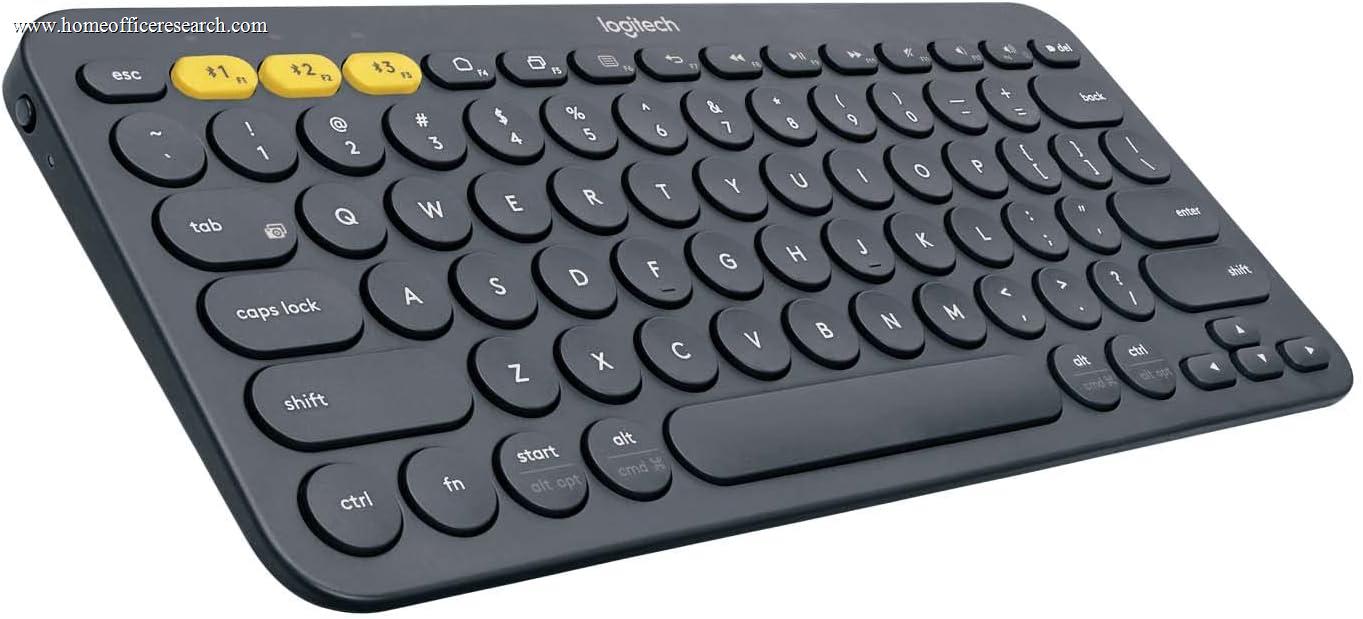
4.5 / 10 30% weightingThe K380’s most defining — and most polarizing — physical characteristic is its circular keycap design. Every key on the K380 is a small, slightly concave circle rather than a conventional rounded rectangle. The intent is ergonomic: the circular shape provides a consistent finger-landing target regardless of approach angle, and the concave dish in the center of each key guides the fingertip toward a centered keystroke. In practice, reactions split sharply between users who find this profile comfortable after a brief adaptation period and users who find the reduced key-to-key surface area disorienting for fast, accuracy-dependent typing. Touch typists — who rely on spatial memory of key positions rather than looking at the keyboard — often report lower accuracy on the K380 during the adaptation period, as the narrow key margins between adjacent circles differ from the conventional rectangular-key spacing that most typists have internalized over years of use.
The underlying scissor-switch mechanism offers 2.0mm of key travel — slightly more depth than the B1 Pro’s 1.7mm and the shallowest laptop keyboards, producing a keyboard that lands between ultra-slim designs and traditional office keyboards in tactile feedback. The 2.0mm travel provides a marginally more perceptible bottom-out than the B1 Pro without approaching anything resembling mechanical keyboard depth. Key actuation is light (approximately 45g), consistent, and quiet — appropriate characteristics for office use. The stabilization of the wider keys (spacebar, shift, enter) is standard for the category: functional, not exceptional.
The absence of backlighting is a consistent limitation in this tier of slim wireless keyboards. The K380 ships in multiple colorways — off-white (Rose, Lavender, Off-White) and darker options (Graphite, Blueberry) — but none include any LED illumination. This is an accepted trade-off for the 24-month battery life the K380 offers: LED circuitry is a meaningful power draw at this keyboard size, and Logitech made the explicit choice to maximize battery duration at the expense of backlighting. Users who touch-type in stable lighting conditions will not notice this absence; users who type in varied or dim environments will.
Bottom line on typing feel: The circular keycap design is the K380’s most consequential feature — and the most subjective one in this guide. It works well for some users and poorly for others, and there is no way to know which camp you fall into without trying the keyboard. The 4.5 score reflects this constraint alongside the scissor-switch typing ceiling that the K380 shares with all slim wireless keyboards at this tier.
Build Quality
5.5 / 10 20% weightingThe K380 uses an all-plastic construction with a compact form factor measuring 279mm wide × 124mm deep × 16mm at maximum height — slightly wider and taller than the B1 Pro, and with a more conventional rectangular keyboard profile rather than the ultra-slim wedge shape of newer competitors. At 423g including batteries, the keyboard has a solid desk feel without being heavy. The chassis produces minimal flex under typing pressure, and the rubber feet on the bottom keep the keyboard stable on smooth desk surfaces under normal use. There is no cable of any kind — the K380 is battery-powered with no charging port — which means the desk profile is entirely cable-free.
The 2× AAA battery requirement is the K380’s most operationally distinctive characteristic compared to rechargeable competitors. The K380 does not charge via USB-C or any other cable — it runs on user-supplied AAA batteries with an estimated 24-month service life. This means no dead-battery surprises during the workday caused by forgetting to charge the previous night. It also means a trip to the hardware store (or an Amazon order) when the batteries eventually deplete rather than a 30-minute desk tethering. The battery compartment is accessible from the bottom of the keyboard without tools. For users in environments without convenient USB charging or who dislike managing rechargeable devices, the AAA power model is genuinely preferable. For users who have fully standardized on USB-C rechargeable accessories, it is an anachronism.
The Easy-Switch buttons — three dedicated physical buttons on the top edge of the keyboard, one per paired Bluetooth device — are a physical device-switching mechanism that is faster and more reliable than keyboard-shortcut-only switching. Each button has a corresponding LED indicator that glows when that device is selected, making the active device visually apparent at a glance. This is a more polished multi-device switching implementation than keyboards that require memorizing function key combinations, and it remains one of the K380’s most genuinely useful ergonomic design decisions.
Bottom line on build quality: Solid all-plastic construction with a long-running design that has proven reliable at scale. The 5.5 score reflects dependable build quality appropriate to the price, with the AAA battery model as a legitimate differentiator (positive or negative depending on user preference) and no notable physical weaknesses.
Connectivity & Features
6.5 / 10 20% weightingThe K380 connects exclusively via Bluetooth Classic 3.0 — an older wireless specification introduced in 2009 that predates Bluetooth 5.x’s improvements in connection stability, speed, and range. Bluetooth 3.0 is functionally adequate for keyboard input — human typing speed does not approach the data rate limitations of BT 3.0, and latency in normal office use is not perceptible to most users during text entry. However, Bluetooth 3.0 has a higher susceptibility to interference in RF-dense environments (office buildings with many overlapping networks and Bluetooth devices) and does not support the energy-efficient operation introduced in Bluetooth 4.0 and improved in Bluetooth 5.x. In practice, the BT 3.0 limitation is mostly felt indirectly: the K380 cannot take advantage of the improved pairing reliability and faster reconnection that Bluetooth 5.2 devices like the B1 Pro exhibit when returning from sleep.
The K380 offers no 2.4GHz receiver option and no USB-C wired fallback. It is Bluetooth-only in a keyboard guide where several competitors now offer triple-mode connectivity at the same price. For buyers whose desks lack convenient USB-A ports for a 2.4GHz dongle, Bluetooth-only is a non-issue. For buyers who want the lowest-latency wireless connection available — relevant for fast typists who are sensitive to input lag — the absence of a 2.4GHz 1000Hz option is a genuine functional gap.
The three-device Bluetooth pairing with dedicated Easy-Switch buttons is the K380’s strongest connectivity feature. Switching between paired devices is physically visible (LEDs indicate the active channel) and requires a single button press rather than a key combination. The keyboard can pair with Windows, macOS, iOS, Android, and Chrome OS devices simultaneously — a practical advantage for hybrid work setups that combine a desktop, a tablet, and a phone. Reconnection when switching devices is relatively quick at approximately 1-3 seconds, which is acceptable for the use case.
Bottom line on connectivity: Three-device Bluetooth pairing with physical Easy-Switch buttons is well-implemented and remains a practical differentiator for multi-device users. The 6.5 score reflects this genuine capability alongside the Bluetooth 3.0 protocol age and the absence of 2.4GHz or wired connectivity that newer competitors provide at the same price.
Acoustics & Workspace Fit
6.5 / 10 15% weightingThe K380’s scissor-switch mechanism is quiet in the same way that all scissor-switch keyboards are quiet — there is no actuating click, no spring-return resonance, and no hard bottom-out characteristic of mechanical switches. Typing on the K380 at normal speed produces a soft, consistent thud at approximately 40–48 dB SPL, which is quiet enough for video call use without impacting call audio on most microphone setups. The circular keycap design may affect acoustics at the margins: the narrower surface area between adjacent circular keys means that off-center keystrokes land on the key surround rather than the keycap itself, producing a slightly different sound quality that some users find inconsistent compared to conventional rectangular keycap keyboards. This is a minor acoustic nuance rather than a significant noise issue.
The compact footprint (279mm × 124mm) fits comfortably on a constrained desk surface. The K380 is shorter in depth than most keyboards due to the absence of a numpad and the compressed layout, and its 16mm maximum height produces a moderate desk profile — taller than the B1 Pro’s 19mm max but in the same general category of low-profile keyboards rather than the tall-profile mechanical keyboards that dominate the upper rankings. The keyboard does not include angle adjustment feet, so the typing angle is fixed at the case’s built-in incline (approximately 4°), which suits flat typing preferences but is not adjustable for users who prefer a higher wrist angle.
The compact layout omits dedicated navigation keys (Home, End, Page Up, Page Down, Insert) in favor of a full function row and arrow keys — the same trade-off made by the B1 Pro. For heavy navigation key users, these functions require Fn layer access. The function row is full-height, which makes F-key shortcuts accessible without the small-key precision required on Apple’s half-height F-row keyboards. The keyboard fits comfortably alongside a standard-sized mouse on desks of 60cm depth or greater without requiring repositioning.
Bottom line on acoustics: Quiet scissor-switch acoustics consistent with the B1 Pro — suitable for video calls and shared workspaces. The compact footprint is a genuine workspace asset. The 6.5 score matches the B1 Pro’s acoustics rating as both keyboards occupy the same functional acoustic tier, differentiated only by the minor circular-keycap edge-strike inconsistency.
Value
6.5 / 10 10% weightingAt its budget price, the K380 competes directly on price with the Keychron B1 Pro, which offers Bluetooth 5.2, a dedicated 2.4GHz receiver at 1000Hz polling, browser-based ZMK firmware programming, a 1,200-hour rechargeable battery, and USB-C wired fallback. On a pure feature-per-dollar comparison, the K380 trails the B1 Pro at the same price. The K380’s value case rests on two genuine differentiators: the 24-month replaceable AAA battery model (which appeals to users who prefer not to manage rechargeable batteries) and the physical Easy-Switch buttons (which are more ergonomic than function-key switching). These are real advantages for specific users — but they are preference-based advantages rather than objective capability advantages.
The K380 has been available since 2016 and has benefited from extended market presence — it is available from a wider range of retailers, often at discounted prices during promotional events, and is available in a broader selection of colorways and special editions than newer competitors. For buyers who want a specific color or who find the K380 on sale, the value proposition improves materially. At full retail price, the B1 Pro represents objectively stronger value for a new buyer making a cold purchase decision.
The long-term cost picture includes periodic battery replacement — two AAA batteries every approximately 24 months at a negligible cost per pair. This is an operating cost the rechargeable B1 Pro does not have, but it is a negligible expense over a keyboard’s service life. The more relevant long-term consideration is that the K380, like all scissor-switch keyboards, has a finite service life that cannot be extended through switch replacement, and its Bluetooth 3.0 protocol will become increasingly difficult to pair with newer host devices as device Bluetooth stacks optimize for 5.x and later specifications.
Bottom line on value: Reasonable value within its original 2016 market context, and still acceptable for buyers who specifically want the AAA battery model or who find it at a discount. The 6.5 score reflects an honest assessment: at full retail, the B1 Pro is a stronger purchase for most buyers starting fresh, but the K380 is not a bad keyboard — it is a dated one.
Customizability
4.5 / 10 5% weightingThe K380 is customizable exclusively through Logi Options+, Logitech’s proprietary software that requires installation on Windows or macOS. Logi Options+ provides key remapping for the F-row function keys and a limited set of application-specific shortcuts, but does not offer full key remapping across all keys, multi-layer configuration, macro programming, or any of the deep firmware-level customization available through QMK/VIA on mechanical keyboards or ZMK on the B1 Pro. The K380 does not support any firmware programmability via USB (it has no USB port) and cannot be programmed via browser-based tools. Linux users receive no official software support.
The integrated scissor-switch design means there is no switch ecosystem access — the keyboard’s physical typing feel is fixed at the factory and cannot be altered by the user. The circular keycap design also limits aftermarket keycap replacement: standard MX keycaps are not compatible with scissor-switch mounts, and the K380’s circular form factor would not accommodate conventional rectangular aftermarket keycaps even if the mount were compatible. In practice, the K380 is not a platform for customization — it is a closed product that is what it is at purchase.
The Logi Options+ software does enable a few practical shortcuts: remapping the top-row function keys to behave as standard F1–F12 or as media/system keys based on application context, and creating a small set of macros for frequently used text strings or application launches. For buyers who want basic function-key remapping and are comfortable installing Logitech’s software on their primary machine, this is adequate. For buyers who want a keyboard they can reprogram without software installation or who use Linux, the K380 provides no customization path.
Bottom line on customizability: Proprietary software-only customization limited to function-key remapping, with no support for full key remapping, layers, or macros beyond basic shortcuts. The 4.5 score reflects the significant gap between what Logi Options+ provides and the browser-based ZMK programming of the B1 Pro, let alone the full QMK/VIA firmware available on mechanical keyboards at comparable or lower prices.
About the Manufacturer
tech
Logitech was founded in 1981 and has been one of the largest peripheral manufacturers in the world for decades, producing mice, keyboards, webcams, headsets, and related accessories for professional and consumer markets. The company occupies a strong position in the office accessory segment, where its MX series (MX Keys, MX Master) represents the premium tier of its keyboard and mouse lineup.
The K380 launched in 2016 as Logitech’s compact multi-device Bluetooth keyboard, positioning it as a portable alternative to the larger K810 and K811 keyboards. The circular keycap design was distinctive enough to become one of the most recognizable keyboard designs in the market, and the keyboard remained Logitech’s primary compact wireless option for several years. Logitech has since released the K380s (a follow-up with quieter switches) and the Pebble Keys 2 K380S (Bluetooth 5.1 upgrade) as iteration on the original K380 design, but the original K380 with Bluetooth Classic 3.0 remains available at its original price point.
Logitech’s strength in this category is brand recognition and retail availability. The K380 can be purchased from virtually every office supply and electronics retailer, appears in Logitech’s sustainability-certified product portfolio, and benefits from Logitech’s established warranty and support infrastructure. For buyers who prioritize purchasing from a known, widely-supported brand over feature maximization, Logitech’s position in the market is a meaningful consideration.