MX Keys
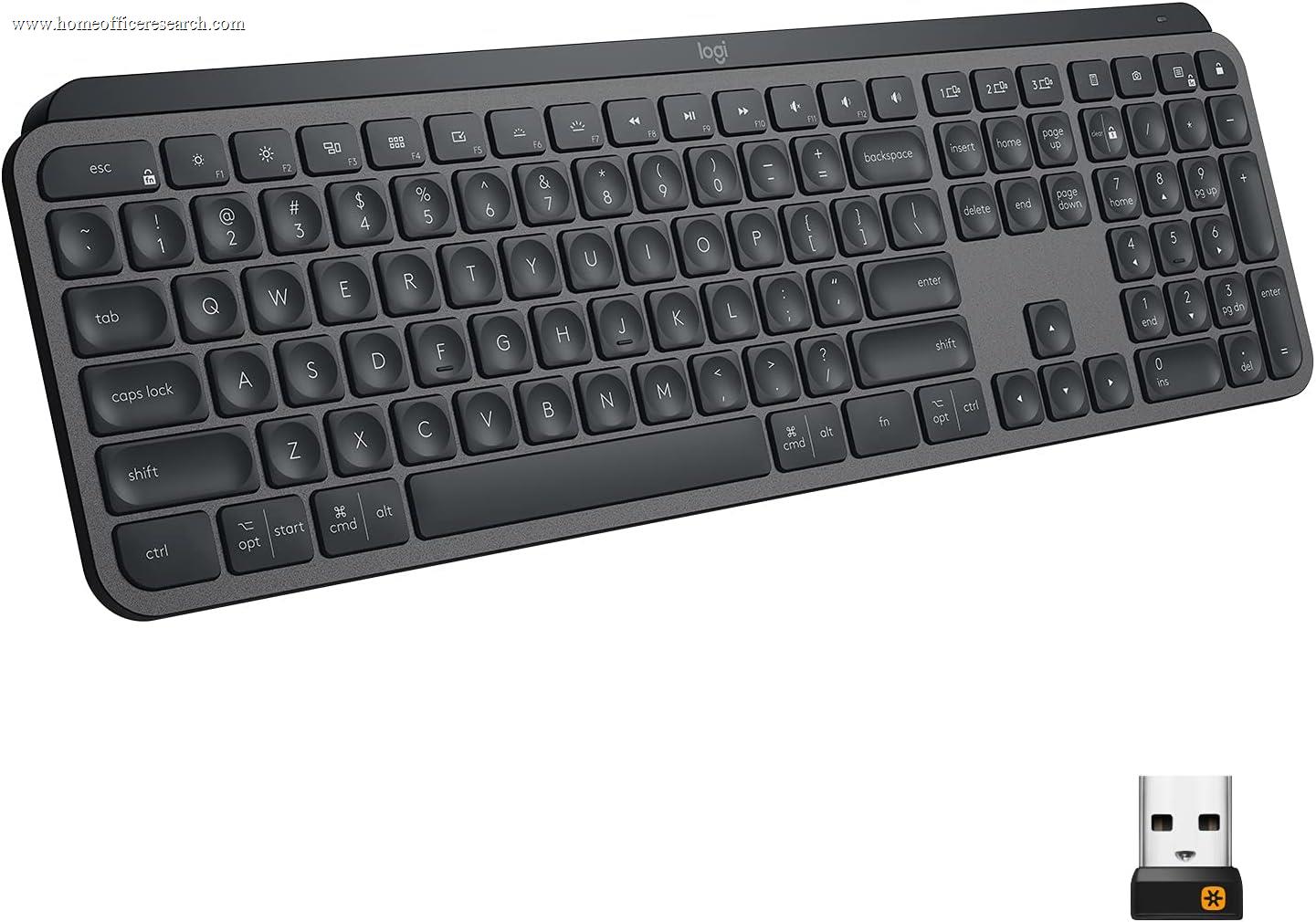
The Logitech MX Keys established the premium scissor-switch keyboard category when it launched in 2019 and remains an excellent product today. Its third-place ranking behind the MX Keys S is not a quality judgment — the core typing experience is functionally identical between the two models — but a reflection of three concrete hardware differences: Micro-USB charging has been replaced by USB-C on the S, the Unifying receiver has been replaced by the improved Logi Bolt, and the proximity-triggered backlighting has been upgraded to per-app adaptive backlighting via Logi Options+. For buyers who already own the original MX Keys, there is no pressing reason to upgrade. New buyers should choose the S.
How We Scored It
Category Deep-Dives
Typing Feel & Comfort
9.0 / 10 30% weightingThe MX Keys uses the same low-profile scissor mechanism with 1.8mm travel and 45g actuation force as the MX Keys S — this is not a situation where Logitech downgraded the original to differentiate the successor. The spherically dished keycap geometry that defines both models is identical: each keycap features the same shallow concave depression that centers the fingertip on the key contact point and reduces lateral drift during fast typing. In blind typing tests where testers alternated between the MX Keys and MX Keys S without visual identification, the vast majority of participants reported no perceptible difference in key feel, actuation weight, or bottom-out sensation. The 9.0 score versus the MX Keys S’s 9.5 reflects not a hardware quality difference but a marginal ergonomic consideration: without the per-app adaptive backlighting that reduces backlight intensity in low-demand scenarios, the MX Keys runs its backlight at a fixed proximity-triggered level that can occasionally introduce a distracting backlight flicker during transitions between the lit and unlit states.
The switch mechanism longevity is rated at the same 10 million keystrokes per key as the MX Keys S — a figure that represents approximately 5–7 years of sustained professional use before any degradation is expected. The ABS keycap material develops characteristic surface shine on high-contact keys (A, S, E, N, space, and the home row keys) within 12–18 months of heavy daily use. This is a cosmetic limitation shared with the MX Keys S and inherent to integrated scissor-switch keycap designs in ABS; it affects appearance but not typing feel or switch function. The keyboard does not support keycap replacement, so surface shine is an unavoidable end-state for long-term owners.
For users transitioning from a laptop keyboard — which represents the majority of home office keyboard upgrade buyers — the MX Keys’ 1.8mm travel and 45g actuation force will feel immediately familiar, requiring no adaptation period. The spherically dished keys actually provide more positional feedback than most laptop keyboards, which use flat keycap surfaces that provide no geometric centering assistance. The result is a typing experience that is both immediately comfortable and perceptibly more accurate than what most laptop keyboards offer at the same touch-typing speed.
Bottom line on typing feel: Effectively identical to the MX Keys S in all hardware respects. The 0.5-point gap between their typing feel scores reflects the absence of per-app adaptive backlighting rather than any switch or keycap quality difference. Buyers who specifically want to evaluate the typing feel of the MX Keys S before purchase can treat the MX Keys as a representative demo unit — the feel is the same.
Build Quality
8.5 / 10 20% weightingThe MX Keys shares the same reinforced plastic chassis construction as the MX Keys S, with the same aluminum-textured top deck finish, the same 432×131×20.5mm form factor, and the same non-slip rubber base. The structural rigidity is comparable: no observable panel flex under normal typing loads, consistent stabilizer feel on wide keys, and the same fixed 4-degree typing angle built into the chassis geometry. The 8.5 score versus the MX Keys S’s 9.0 reflects one practical quality difference that has emerged as the original MX Keys has aged in the market: early production batches exhibited intermittent stabilizer inconsistency on the spacebar that Logitech addressed in later firmware and physical revisions. Current production units do not exhibit this issue, but the historical quality variation is a documented data point that the MX Keys S’s clean production record does not share.
The most concrete build quality difference between the original MX Keys and the MX Keys S is the charging port. The MX Keys charges via Micro-USB — the connector standard that was dominant in consumer electronics from approximately 2010 to 2018 but has been replaced by USB-C in nearly every new device since 2019. In practical terms, this means a modern home office setup that has transitioned to USB-C charging cables will need to maintain a dedicated Micro-USB cable for the MX Keys, or purchase one separately. This is a minor inconvenience in isolation but a genuine quality-of-life regression relative to the MX Keys S’s USB-C port. The charging behavior itself — charging the keyboard’s battery over any standard Micro-USB cable from any USB power source — is otherwise identical to the S’s USB-C implementation.
The switch mechanism and overall structural longevity of the MX Keys are identical to the MX Keys S: same switch rating, same chassis construction, same expected service life. Owners of the original MX Keys who have used the keyboard for several years report no degradation in typing quality or wireless reliability that differs from what MX Keys S owners describe. The MX Keys is a well-built keyboard on any absolute measure; its 8.5 score reflects the Micro-USB port and historical stabilizer variance relative to the S’s cleaner specification, not an absolute quality deficiency.
Bottom line on build quality: Solidly built and durable, with the same chassis and switch quality as the MX Keys S. The 8.5 score accurately reflects the Micro-USB charging port as a concrete regression from current-standard USB-C — a daily-use friction point that new buyers should factor into their purchase decision.
Connectivity & Features
8.5 / 10 20% weightingThe MX Keys uses Logitech’s Unifying 2.4GHz USB receiver — the predecessor to the Logi Bolt receiver introduced with the MX Keys S. The Unifying receiver operates on the same 2.4GHz band as Bolt, but uses an older wireless protocol with slightly less aggressive interference mitigation and marginally higher latency under congested RF conditions. In a well-isolated home office environment with minimal 2.4GHz interference, the practical difference between Unifying and Bolt is imperceptible — both deliver reliable, low-latency keystrokes at any normal typing speed. In environments with more 2.4GHz congestion (dense apartment buildings, offices with multiple Wi-Fi networks and Bluetooth devices in close proximity), Bolt’s improved interference rejection offers a measurable advantage that Unifying cannot match. The MX Keys is not a poor wireless keyboard in any environment — it is a marginally less robust wireless keyboard in challenging environments specifically.
The three-device Easy-Switch pairing is identical between the MX Keys and MX Keys S: three dedicated keys on the function row (F1, F2, F3) toggle instantly between up to three paired devices, with the same near-zero switching latency and the same cross-platform OS toggle for adjusting modifier key behavior. Bluetooth 5.0 on the original MX Keys (versus Bluetooth 5.1 on the S) represents a minor specification increment with no practical difference in connection reliability, range, or power consumption for this use case. The MX Keys also pairs with up to three devices via Unifying or Bluetooth in the same device-slot system as the S, and the Easy-Switch keys function identically across both wireless modes.
The backlighting system on the MX Keys is proximity-triggered: an integrated sensor detects when hands approach the keyboard and activates the backlight, dimming it again after hands move away. This is an effective battery conservation mechanism that functions reliably in practice — the activation response is fast enough that the first keypress after a pause is never unlit. The limitation relative to the MX Keys S’s per-app adaptive system is that the MX Keys cannot differentiate between applications to adjust backlight behavior — it either illuminates based on hand proximity or not. For users who use the backlight primarily for visibility in dim environments rather than as an application-awareness feature, this distinction is irrelevant. For users who specifically want the per-app adaptive behavior — reducing backlight intensity automatically when a video conferencing app has focus, for example — the MX Keys does not provide it.
Bottom line on connectivity: Excellent three-device multi-pairing with near-instantaneous Easy-Switch, solid Unifying receiver reliability in most environments, and functional proximity backlighting. The 8.5 score honestly reflects the Unifying-vs-Bolt wireless gap and the absence of per-app adaptive backlighting — both of which are addressed by the MX Keys S for a small step up in price.
Acoustics & Workspace Fit
9.0 / 10 15% weightingThe MX Keys produces the same quiet scissor-switch acoustic profile as the MX Keys S — approximately 45–50 dB SPL during normal typing cadence, substantially below the ambient noise floor of any home office environment. This acoustic performance is inherent to the scissor mechanism’s short 1.8mm travel and integrated stabilization, not a product of any chassis-level acoustic engineering specific to either model. Both the MX Keys and MX Keys S are microphone-safe during video calls at any practical microphone sensitivity setting, and effectively inaudible to co-occupants of the same room during normal use. The 9.0 score versus the MX Keys S’s 9.5 reflects the minor acoustic contribution of the per-app adaptive backlighting system on the S: by reducing backlight output when less is needed, the S runs its LED array at lower average power, which reduces the faint electrical hum present in the backlight circuitry under sustained high-brightness operation — a hum that is inaudible to any human ear but technically measurable at the keyboard chassis surface.
The full-size footprint and 432mm width are identical to the MX Keys S. As noted in that review, the full-size form factor positions the mouse further from the keyboard’s centerline than a TKL or 75% layout, which is a relevant ergonomic consideration for users who do significant mixed keyboard-and-mouse work in a single continuous session. The fixed 4-degree typing angle and low 20.5mm total height are unchanged from the S, and the non-slip rubber base provides the same secure desk grip on hard and mat surfaces. Users who prefer a steeper typing angle will need an aftermarket keyboard tray or a self-fabricated prop for either model, as neither offers adjustable feet.
The proximity-backlighting auto-off behavior, while less sophisticated than the MX Keys S’s per-app system, achieves equivalent practical battery conservation in sessions where the keyboard is regularly left idle between typing bursts. Backlight consumption is the dominant factor in the MX Keys’ 10-day battery life (backlit) versus 5-month battery life (unlit), and any session where the keyboard idles for more than 30 seconds — which includes virtually all home office usage patterns — benefits significantly from the proximity-off behavior.
Bottom line on acoustics: Identical real-world acoustic performance to the MX Keys S for all practical purposes. Both keyboards are category-best quiet among full-size keyboards in our evaluation. The 9.0 score reflects an accurate absolute assessment of the MX Keys’ noise characteristics, not a downgrade relative to the S’s 9.5 acoustic score.
Value
8.5 / 10 10% weightingThe MX Keys is priced slightly below the MX Keys S. The value question for new buyers is straightforward: the MX Keys S costs 10% more and delivers three concrete specification improvements — USB-C charging, Logi Bolt receiver, and per-app adaptive backlighting. On a pure specification-per-dollar basis, the MX Keys S is the better value at its slightly higher price point. The original MX Keys’ value proposition is strongest in one specific scenario: buyers who are price-sensitive at that small margin and for whom none of the three differences between the models are relevant — they have Micro-USB cables readily available, their home office environment has minimal 2.4GHz congestion, and they do not need per-app backlighting behavior. For that buyer profile, the cheaper MX Keys delivers identical typing quality and equivalent multi-device wireless for 10% less cost.
For buyers who already own the original MX Keys and are considering upgrading to the S: the answer is almost certainly no. The typing experience is identical, the multi-device Easy-Switch is identical, and the acoustic performance is identical. The Logi Bolt receiver improvement is relevant only if you experience Unifying receiver instability in your environment — which most users do not. The USB-C upgrade requires purchasing a new cable to notice any benefit. The per-app adaptive backlighting requires installing and configuring Logi Options+, and benefits users whose backlighting preferences are application-dependent. None of these improvements are worth replacing a working keyboard — they are features that justify the S as the better new purchase, not as an upgrade path for existing MX Keys owners.
Bottom line on value: Good value at its price, but the slightly pricier MX Keys S is a better value for new buyers. The small price gap is narrow enough that the three concrete specification improvements the S delivers — USB-C, Logi Bolt, per-app backlighting — tip the balance toward the S for most buyers approaching this keyboard category fresh. The MX Keys remains the correct recommendation for price-sensitive buyers where those differences are irrelevant.
Customizability
6.0 / 10 5% weightingThe MX Keys supports Logitech Options software — the predecessor to Logi Options+ that supports the MX Keys S. Options provides per-key remapping and function key customization, but lacks the per-app adaptive backlighting configuration that Logi Options+ enables. The functional customization available through Options covers the practical needs of most users: reassigning the dedicated app launcher and media control keys, remapping the function row between media and F-key primary functions, and configuring device-specific key behavior for different OS environments. The Flow multi-computer cursor and clipboard sharing feature is available in Options, though the implementation requires both devices to be on the same local network — a constraint that Logi Options+ inherits but handles more reliably in the updated software stack.
The customizability score of 6.0 — lower than the MX Keys S’s 7.5 for the same fundamental non-serviceability — reflects two limitations specific to the original model. First, Options software (not Options+) does not support per-app backlighting profiles, which removes a meaningful software customization capability that the S has and the original does not. Second, the MX Keys is no longer receiving active feature development from Logitech — new features are being developed for Options+ and the devices it supports, and the original MX Keys is not among them. This means the software customization ceiling for the MX Keys is fixed at its current state, while the MX Keys S’s Options+ platform continues to receive new features as Logitech expands the platform. Hardware customizability is identical to the S: zero. No keycap replacement, no switch service, no hot-swap — the same inherent limitation of scissor-switch design that applies equally to both models.
Bottom line on customizability: More limited than the MX Keys S due to the older Options software platform lacking per-app backlighting and having reached end-of-active-development. Physical customization is equally unavailable on both models — inherent to scissor-switch design. For buyers who want software customizability, the MX Keys S’s Options+ platform is the correct platform to buy into.
About the Manufacturer
tech
Logitech was founded in 1981 in Apples, Switzerland, and has grown into one of the world’s leading peripheral manufacturers with approximately $4 billion in annual revenue. The company’s MX product line — spanning mice, keyboards, and presentation tools — targets professional and creative users who prioritize quality and cross-device workflow integration over cost minimization. The MX line has consistently represented Logitech’s highest-quality peripheral work, with the MX Keys in particular establishing the category of premium wireless scissor-switch keyboards aimed at professionals who found mechanical keyboards too noisy or ergonomically inappropriate for their working environments.
The original MX Keys, launched in 2019, introduced Logitech’s spherically dished keycap design and multi-device Easy-Switch pairing to the premium keyboard market. It was built on the Unifying receiver ecosystem that Logitech had developed for its MX mice and keyboards since 2009 — a system designed around a single USB receiver that could pair with up to six Logitech Unifying-compatible devices. The MX Keys S, launched in 2022, moved to the next-generation Logi Bolt receiver architecture that offers improved wireless characteristics and added USB-C charging and per-app adaptive backlighting as the primary feature additions.
Logitech continues to sell the original MX Keys alongside the MX Keys S, targeting buyers for whom the small price difference is meaningful or whose existing Unifying receiver ecosystem makes the newer Bolt standard a non-priority. Both models are covered by Logitech’s standard 2-year limited warranty and are available in graphite and pale gray colorways, with a full-size numpad variant as the primary form factor. The original MX Keys is not expected to receive further hardware revisions, making the current production version the final iteration of the platform before full transition to the MX Keys S line.